
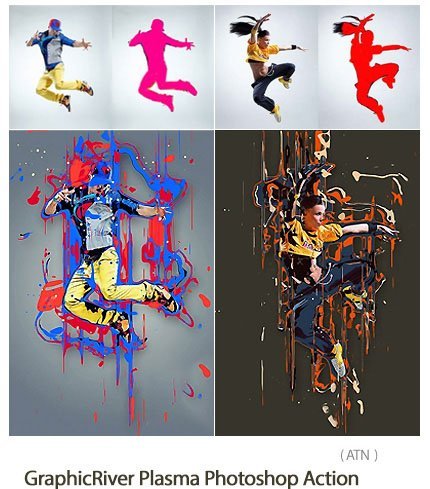
plasma photoshop action Create color effects cast on images | 0.29 MB | ATN format
In this collection, you can see another example of the effect of images in the form of action and titled creating the effect of colors cast on images
plasma photoshop action

Watch the above video for a demonstration of the action and tutorial on how to customize the result!!
Plasma Photoshop Action
Give your photo a modern creative edge with this action! You open a photo, brush where you want to apply the effect and click play. Does it get any easier?
The action has been tested and working on Photoshop CS3,CS4,CS5,CS6,CC,CC 2015.5+
Important to know
- Make sure you are using the English version of Photoshop to run the Action on. All Sevenstyles Actions will only work in the English version of Photoshop.
- Check you are using a version of Photoshop that the Action supports.
- Watch the video tutorial to ensure you have your Photoshop file setup correctly. A link to the tutorial is also included in the ‘Readme.txt’ file in the download. You can view all of my Action tutorials here.
- Use high-resolution photos with the Action for the best results and to avoid errors. An optimal photo resolution is between 2000px – 4500px.
- With Adobe Creative Cloud, you can install multiple versions of Photoshop. If you like this Action but is not supported on your version of Photoshop, you can always install an additional version of Photoshop to run the Action on. Once an Action has been tested and working on a version of Photoshop, it will work forever.
- Use Jpeg images to run the Action on. Other file types such as TIFF, BMP, PNG, PSD can cause issues with Actions, as Photoshop disables various features for different file types.
- If a Sevenstyles Action includes a brush (.abr), pattern (.pat) or shapes (.csh) file in the download, then it must be loaded into Photoshop before playing the Action.
- Avoid using the Action on logos or clip art style images as the lack of detail and color contrast can lead to errors.
Having troubles with the Action?
- Double check you have your file setup correctly as shown at the beginning of the video tutorial.
- Check the resolution of your photo. If its a low-resolution photo (<1000px), take the shortest length of your photo and increase it to around 2500px or more. This will help avoid errors and also create far better results.
Create custom effects
Photo effect Actions can be combined to create new effects. Follow these steps below:
- Run the first Action on your photo.
- Once you are happy with the result, save your design as a Jpeg image.
- Close your Photoshop file and re-open the image you just saved.
- Now run another Action over your photo! This will then stack the second effect on top of the first.
A Photoshop action is an incredible feature tool that allows you to record a series of steps
To achieve remarkable effects, and then play the sequence back to apply those effects on any image.
Because these actions are reusable you can improve your workflow by chopping countless hours off your design process.
you can transform your images into polished works of art while saving a lot of time and money.
Designed to save you time in the editing process for actions that you do repeatedly and create lots more elements that can be edited manually.
Exclusively designed for graphic designers & photographers .
we’ve cut out the hard work for you by putting the best collection of excellent Premium Photoshop actions!
Photoshop actions are perfect for both beginners and advanced Photoshop users
➡️ ➡️ For More Actions Photoshop 😀 😀


Reviews
There are no reviews yet.