
AE 3DRIG for After Effects
ae3drig script
Download AE3DRIG v1.0 for After Effects on Windows and Mac, a powerful rigging script that automates the setup of complex 3D layer hierarchies for advanced animation workflows. Create sophisticated 3D rigs with parent-child relationships, controllers, and null structures in seconds—saving hours of manual setup time.
Key Features of AE3DRIG v1.0:
- Automated 3D Rigging: Instantly create professional 3D rigs with proper parent-child hierarchies and controller layers
- Controller Generation: Automatically generates intuitive controller nulls with clear visual feedback for easy animation
- Multi-Layer Support: Rig multiple layers simultaneously with consistent structures and naming conventions
- Customizable Rig Structures: Choose from various rig types for different animation needs—character limbs, mechanical assemblies, or camera systems
- Parent-Child Automation: Automatically establishes proper parenting relationships between layers for clean, logical hierarchies
- Time-Saving Workflow: Eliminate hours of manual null creation and layer linking for complex 3D setups
- Cross-Platform Support: Works on both Windows and Mac systems
- Broad Compatibility: Supports After Effects 2025, 2024, 2023, 2022
Perfect For:
- Character animators rigging 3D puppets and figures
- Motion graphics artists creating complex 3D scenes with multiple elements
- VFX designers building mechanical rigs and camera systems
- Anyone tired of manually creating nulls and parenting layers for 3D animation
- Studios wanting to standardize and speed up 3D rigging workflows
System Requirements:
- Adobe After Effects 2025, 2024, 2023, 2022
- Windows 10/11 (64-bit) or macOS
- 4GB RAM minimum (8GB+ recommended)
- 10MB available disk space
- Enable “Allow Scripts to Write Files and Access Network” in Preferences > Scripting & Expressions
Installation:
Copy the script file to your After Effects ScriptUI Panels folder:
- Windows:
C:\Program Files\Adobe\Adobe After Effects [version]\Support Files\Scripts\ScriptUI Panels\ - Mac:
/Applications/Adobe After Effects [version]/Scripts/ScriptUI Panels/
Access via Window menu > AE3DRIG
Note: Version 1.0 is the initial release of this 3D rigging automation tool . The script’s ability to instantly generate professional 3D rigs makes it invaluable for complex animation projects .
AE3Drig is a set of six scripts that make working with 3D in After Effects less painful and more direct.
AE3Drig is a set of six scripts that make working with 3D in After Effects less painful and more direct.
Tools:
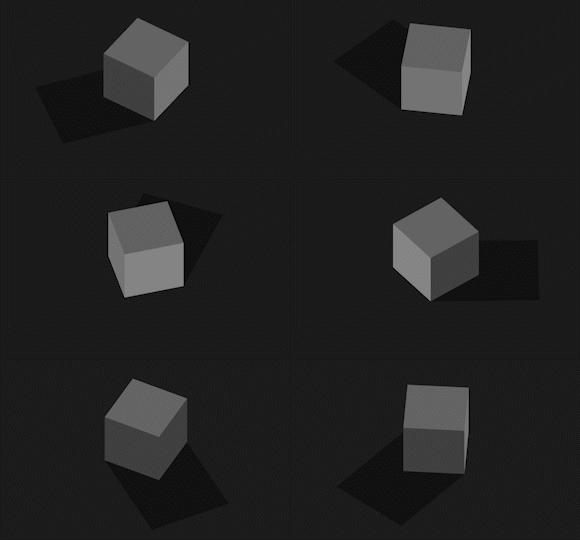
Camera Rig
Centralized control for 3D cameras in After Effects. Adjust position, rotation, zoom, and focal length from one place. Includes built-in motion and camera shake, plus one-click switch to orthographic view for cleaner 3D work.
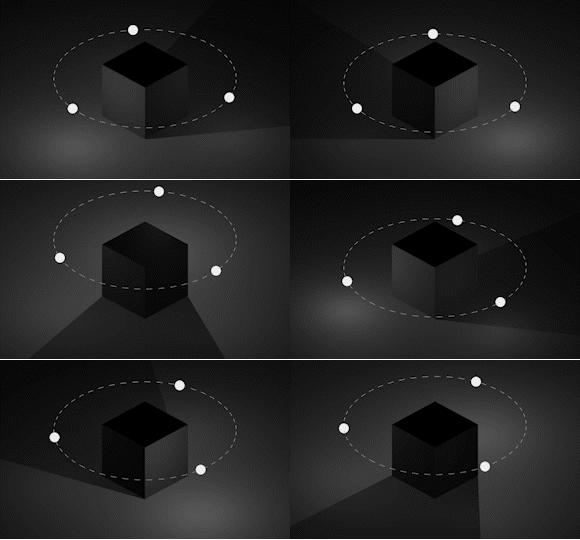
Light Rig
Three-light orbit rig (key, fill, back) for fast and simple lighting setups. Move all lights together or one by one. Change color, direction, and intensity without diving through layers. Works in both Classic and C4D renderers.
Element 3D Boilerplate
Automatically prepares layers for Element 3D by generating all required solids and assignments.
If nothing is selected, it creates a solid with Element 3D. If an image is selected, it’s assigned as the Texture.
If a text or mask layer is selected, it’s assigned to Custom Text or Custom Mask.

Background
Quick 3D background generator. One click to drop a clean background into your scene with optional color and other controls.

Z Stacker
Stacks selected layers along the Z-axis. Control spacing, alignment (from center or top), and padding multipliers for clean 3D layer layouts.
Shape to Mask
Converts shape layers into masks for use in Element 3D or other effects. Ctrl + Click (Windows) or ⌘ + Click (Mac) to create separate layers for each shape group.
Elevate your motion graphics workflow with premium collection of After Effects plugins. Whether you are a seasoned professional or just starting your VFX journey, powerful tools designed to streamline complex tasks, unlock creative possibilities, and save you hours of rendering time. From stunning glitch effects and seamless transitions to advanced 3D extrusion and text animation tools, each plugin in our library is rigorously tested for compatibility with the latest versions of Adobe after Effects. Enhance your video production value today and download industry-leading plugins that help you create breathtaking visuals without the technical headaches. Browse our full range and find the perfect extension to supercharge your editing suite now.
➡️ ➡️ For more after effects Plugins 😀 😀
➡️ ➡️ System requirements AE
Reviews
There are no reviews yet.