
Agile Render Addon for Blender
agile render addon
Agile Render Addon for Blender – Intelligent Render Queue & Batch Processing Tool
Download Agile Render Addon for Blender on Windows, Mac, and Linux, a powerful render management tool that revolutionizes how you handle complex rendering workflows. This essential add-on provides intelligent batch processing, automated render queuing, and real-time progress monitoring—perfect for artists and studios who need to render multiple scenes, cameras, or animation sequences without manual intervention .
Key Features of Agile Render Addon:
- Smart Render Queue: Add multiple scenes, cameras, or animation ranges to a queue and let Agile Render process them automatically in sequence
- Batch Scene Rendering: Render multiple Blender scenes in one go—ideal for projects with separate shot files or scene variations
- Multi-Camera Support: Queue up different camera angles from the same scene and render them all without manual reconfiguration
- Custom Frame Ranges: Set specific frame ranges for each render job—perfect for rendering only the sections of animation you need
- Real-Time Progress Monitoring: Track render progress for all queued jobs with detailed status updates and estimated completion times
- Output Management: Automatically organizes rendered files into designated folders with customizable naming conventions
- Render Presets: Save and load render settings presets for consistent output across multiple jobs
- Background Processing: Queue jobs and continue working on your scene while rendering happens in the background
- Error Handling: Intelligent error detection and job recovery to prevent rendering failures from stopping your entire queue
Perfect For:
- 3D artists rendering multiple scenes or animation sequences
- Studios managing complex rendering pipelines
- Freelancers batch rendering client deliverables
- Animators rendering multiple camera angles for editing
- Anyone needing to automate repetitive rendering tasks
System Requirements:
- Blender 3.0, 3.1, 3.2, 3.3, 3.4, 3.5, 3.6, 4.0, 4.1, 4.2, 4.3
- Windows 10/11 (64-bit), macOS, or Linux
- 4GB RAM minimum (8GB+ recommended)
- 10MB available disk space
Installation:
- Download the add-on zip file
- In Blender, go to Edit > Preferences > Add-ons
- Click “Install” and select the downloaded zip file
- Enable the add-on by checking the box next to “Agile Render”
Note: Agile Render transforms Blender’s rendering workflow by adding professional batch processing capabilities that rival dedicated render management software . Whether you’re rendering a single scene with multiple cameras or an entire animation sequence, Agile Render handles the complexity so you can focus on creative work . Perfect for studios and individual artists alike .
AGILE RENDER:
This add-on contains only presets that enable you to render faster with minimal (if any) difference in image quality, to the extent that blender python allows, it is not an external render engine either; this means you don’t need to use an experimental or custom build of Blender to get the benefits of Agile Render.
There are 2 main presets, Agile and Turbo:
Agile does minimal optimisations in order to preserve image quality, this preset won’t touch samples & won’t enable denoising.
Turbo is a speed optimised preset that makes use of denoising and other optimisations.
Check the images above to compare noise levels! You’ll find the images are practically identical with the only difference being the render time. The video demo should also help remove any and all that doubt that the results are too good to be true!.
Customers also get the nebula .blend file and the kitchen .blend file you see being used as a benchmark.
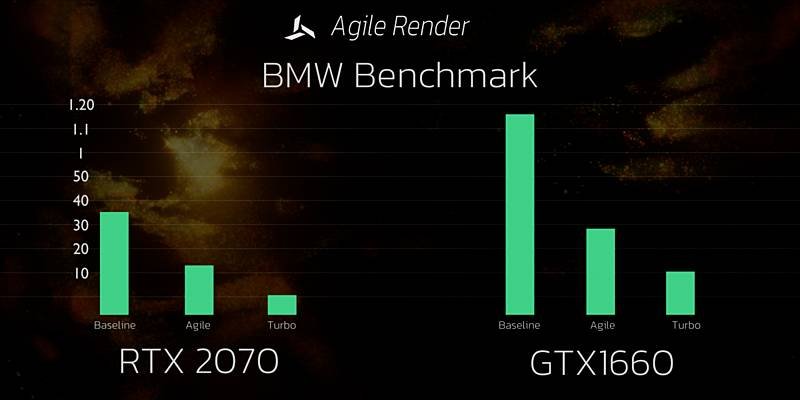
STATS:
Ryzen 7 3700x / RTX2070 / 32GB RAM
BMW Baseline – 00:32.28
BMW Agile – 00:18.68
BMW Turbo – 00:05.17
Intel Core i5 9400f / 1660s / 32GB RAM
BMW Baseline – 01:16.93
BMW Agile – 00:28.19
BMW Turbo – 00:10.27
Notice that with the Agile preset applied a GTX1660s it is capable of rendering 4.09 seconds faster than an RTX 2070 can render its baseline benchmark.
Just take that in for a moment. A GTX1660s rendering FASTER than an RTX2070
SHOWOFF:
Remember to show off anything you render with agile on social media using the #agilerender hash tag!
Supercharge your 3D creation workflow with premium selection of Blender Add-ons. Whether you are modeling intricate characters, sculpting realistic environments, or animating cinematic sequences, the right add-on can transform how you work inside Blender. Our curated collection includes powerful tools for UV unwrapping, procedural texture generation, rigging automation, rendering optimization, and more—each rigorously tested for compatibility with the latest Blender versions. Eliminate tedious manual processes and unlock advanced functionality that lets you focus on what matters most: bringing your creative vision to life. Explore our full range of professional Blender plugins today and take your 3D projects to the next level.
➡️ ➡️ For more Blender Plugins 😀 😀
Reviews
There are no reviews yet.