

Align To Path 1.7 Script For After Effect
Align To Path v1.7 script for After Effects software
How to use:
- Select the layer(s) you want to attach to a motion path
- Add to your selection any masks you want to use as a motion path (IMPORANT – Select the Mask NAME, not the Mask PATH)
- Run the script.
Interface Options:
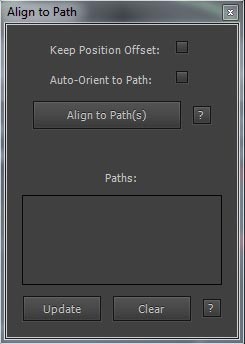
- Keep Position Offset
Keep the layer at it’s current position - Auto-Orient to Path
Should the layer by automatically oriented while following the path
(Note: Auto-Orient only works after an initial keyframe is created on the Motion Path Complete slider) - Updating Paths
Every path you add will show up in this listTo update them do the following:
- Edit the original Mask Path (The path can not be animated)
- Select the Mask(s) you want to update in the GUI
- Click Update
All your connected layers should jump to their new positions
Any existing keyframes will stay in placeUse the “Clear” button to empty the list
(This is necessary if you undo the adding of a motion path)
Control:
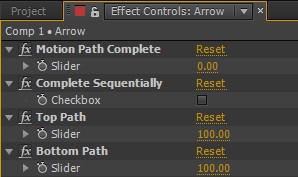
- Motion Path Completion
Animate through all of your paths sequentially
When this is activated, the sliders for individual paths have no effect - Complete Sequentially
How far along on the motion path(s) the layer is. Range 0→100 - One slider per motion path
You can animate what % you want each motion path to contribute
If all sliders are set to 0, then you can set a keyframe like normal on your layer
Things to keep in mind:
- The sliders are only valid in the range of 0 100. If the slider is moved outside this range, it will get calculated as 0 or 100
(All sliders are normalized to 100% — The values are added together, and divided by the # of sliders.) - The script makes a null per each of your motion paths. However, they are put as the last layers in your comp, locked, hidden, and set to shy mode
- If the Mask Layer is rotated or scaled, motion paths will not reflect this (the same as when copying a mask in the interface)
- Even with Orient Along Path selected, you can still animate the rotation of the layer like normal
- When using Complete Sequentially, the masks will complete in alphabetical order
After effects templates
Amazing clips to use and help you create your own unique projects from AE templates or to improve the design of your existing broadcasts.
We have a wide range of templates for you to choose from. You can find PowerPoint Video Templates, Motion Graphics Templates, and After Effects Logo Templates, Scripts, Promos, news, fashion, sports, social media, titles…
After Effects Templates, Wedding Templates as well, After Effects Intro Templates, Transitions, Products Promos, Instagram stories, Scripts, Call Titles, Elements 3D, Corporate , and many more.
With After Effects project files, or templates, your work with motion graphics and visual effects will get a lot easier. In short, they are customizable After Effect files, neatly organized and labelled. You can easily change colors, text and other design elements without having to spend time on creating timelines and effects. It’s all there-you just need to customize it to fit your project.
What you waiting for? Hurry up and download the best after effects templates
➡️ ➡️ For more Ready Project Files Templates 😀 😀



Reviews
There are no reviews yet.