
AutoCircularMotion V1.07
Download AutoCircularMotion V1.07, a powerful After Effects script developed by ada scripts that enables you to create complex circular motions with ease. This intuitive tool allows you to link multiple layers, arrange their movements, and extend beyond basic circles to create pendulum swings, bouncing effects, and Z-axis depth for truly dimensional animations .
Easily create circular motions
Key Features of AutoCircularMotion V1.07:
- Versatile Motion Control: Create circular motions, pendulum swings, bouncing effects, and more—far beyond simple rotation
- Z-Axis Depth Control: Express shallowness or depth of movements with full Z-axis control for dimensional, layered animations
- Multiple Layer Linking: Link and coordinate movements across several layers simultaneously for complex, synchronized animations
- Shape Group Support: Apply ACM to shape groups by selecting a single shape layer containing a shape group—the group will be decomposed into separate layers for individual control
- Trapcode Particular Integration: Apply circular motion directly to Trapcode Particular particles—select a single layer with Particular applied, click Apply, and ACM controls the particle system (note: ACM-applied light or null layers cannot be used as emitters)
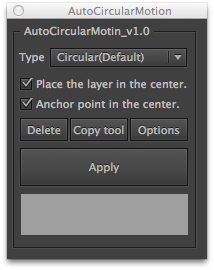
- Simple Setup: Select one or multiple layers, click [Apply], and an “ACM Control” layer is automatically created for easy adjustment
- Updated License Framework: V1.07 (March 28, 2025) updates the license framework to v4.3.2 for improved stability and activation reliability
- Broad Compatibility: Works with After Effects 2025 down through CS6 on both Windows and Mac systems
Perfect For:
- Motion graphics artists creating orbiting objects and planetary animations
- Title sequence designers needing elegant circular text reveals
- VFX artists adding dimensional movement to particle systems
- Character animators creating natural swinging and bouncing motions
- Anyone wanting to simplify complex circular motion setups
System Requirements:
- Adobe After Effects 2025, 2024, 2023, 2022, 2021, 2020, CC 2019, CC 2018, CC 2017, CC 2015.3, CC 2015, CC 2014, CC, CS6
- Windows or macOS
- 4GB RAM minimum (8GB+ recommended)
- 50MB available disk space
- Trapcode Particular (optional, for particle integration)
AutoCircularMotion allows you to easily express circular motions.
Not to mention linking multiple layers and arranging their movements, you can also set up other motions, such as swinging and bouncing.
Having control over Z axis allows you to express the shallowness or depth of movements as well.
 |  |  |
How to set up
1. Select one or multiple layers. Click [ Apply ].
2. Adjust using ”ACM control”, which will be automatically created.
Applying to a shape group
Select a single shape layer which includes a shape group.
Then click [Apply] to use this shape group to different layers.
Applying to [ Trapcode Particular ]
Click [ Apply ] after selecting a single layer which [ Trapcode Particular ] has been applied to.
This allows you to apply ACM to [ Trapcode Particular ].
You cannot use light or null layers, which ※ACM has been applied to, as an emitter.
Please follow the instruction above to use them.。
AutoCircularMotionとは
AutoCircularMotion(以下ACM)は円運動を簡単に表現することができるスクリプトです。
複数のレイヤーをリンクさせて動きを付けられるのはもちろんのこと、
振り子運動や、バウンド等の円運動以外の動きも設定することができます。
また、Z軸も制御できるため、奥行きのある動きが表現可能です。
| | |
セットアップ方法
1.単一レイヤーもしくは複数のレイヤーを選択して「Apply」ボタンを押す。
2.自動で生成される「ACM制御」で調整を行う。
シェイプグループに適用する場合
シェイプグループを含む、単一のシェイプレイヤーを選択して「Apply」ボタンを押すと、
シェイプグループをレイヤーに分解して適用することができます。
「Trapcode Particular」に適用する場合
「Trapcode Particular」を適用した単一のレイヤーを選択して「Apply」ボタンを押すと、
「Trapcode Particular」にACMを適用することができます。
※ACMを適用したライトレイヤーや、ヌルレイヤーをエミッターとして使用することはできません。

Elevate your motion graphics workflow with premium collection of After Effects plugins. Whether you are a seasoned professional or just starting your VFX journey, powerful tools designed to streamline complex tasks, unlock creative possibilities, and save you hours of rendering time. From stunning glitch effects and seamless transitions to advanced 3D extrusion and text animation tools, each plugin in our library is rigorously tested for compatibility with the latest versions of Adobe after Effects. Enhance your video production value today and download industry-leading plugins that help you create breathtaking visuals without the technical headaches. Browse our full range and find the perfect extension to supercharge your editing suite now.
➡️ ➡️ For more after effects Plugins 😀 😀
➡️ ➡️ System requirements AE
Reviews
There are no reviews yet.