
Autokroma bundle 2025
Here is the SEO-optimized description for Autokroma Bundle 2025.7 CE for Windows.
Download Autokroma Bundle 2025.7 CE for Windows, a professional collection of 4 essential Adobe plugins designed to streamline your video production workflow. This all-in-one bundle solves common format compatibility issues, accelerates rendering, and helps you manage project media efficiently across After Effects, Premiere Pro, and Media Encoder .
This package includes:
- AfterCodecs v1.12.0: A powerful encoding plugin that supports H.264, H.265, and ProRes codecs. It delivers faster rendering speeds, smaller file sizes, and better image quality compared to Adobe’s native exporters, with extensive customizable parameters .
- BRAW Studio v3.3.8: Import, decode, and edit native Blackmagic RAW (.braw) footage directly in Adobe software without transcoding. Includes advanced tools like a Desktop Application, White Balance Picker, and a Premiere Pro Metadata Organizer .
- PlumePack v2.4.6: A project management tool to trim, collect, and archive media. It helps you clean up project files by removing unused media, making your projects lightweight and easier to archive or share .
- Influx Premium v1.5.7: Import a wide range of unsupported video and audio formats directly. Supports containers like .MKV, .WebM, .FLV, and codecs such as .FLAC, .OPUS, VP8/VP9, eliminating the need for external transcoding software .
Perfect For:
- Video editors needing to import MKV, FLAC, and other non-native formats directly into Adobe software .
- Motion graphics artists looking for faster and higher-quality H.264/5 and ProRes exports .
- Professionals working with Blackmagic RAW footage who need native integration in After Effects and Premiere Pro .
- Post-production houses aiming to optimize project file sizes and streamline media archiving .
System Requirements:
- Adobe After Effects 2020-2025
- Adobe Premiere Pro 2020-2025
- Adobe Media Encoder 2020-2025
- Adobe Audition 2020-2025
- Windows 10/11 (64-bit)
- 4GB RAM minimum (8GB+ recommended)
- 100MB available disk space
Version 2025.7 CE includes: AfterCodecs v1.12.0 | BRAW Studio v3.3.8 | PlumePack v2.4.6 | Influx Premium v1.5.7
AfterCodecs
AfterCodecs Fast Exporter for Adobe CC (After Effects, Premiere Pro and Media Encoder)
Main Features
Filling the codec gap
AfterCodecs brings you with consistency all the codecs & features you need, without Quicktime and in .MP4 and .MOV:
- ProRes 422 / 4444 / XQ : yes even on Windows and older versions of Adobe. Included a new ProRes 4444 Light unofficial profile to get both Alpha channel and lower file size
- All 4 HAP codecs from Vidvox but with faster algorithms and without resolution restrictions
- Special Premiere Pro & Media Encoder features : MultiRenders Markers, Export all Audio tracks separately, Quick sub resolutions buttons, Custom Framerate etc.
H264 / H265 : the best and fastest compression
- Choose the efficiency you need: fast encoding for your previews or low file size for final delivery. Low bitrate videos are of better quality than before and you can render in 8K!
- A fast, easy-to-use (one param to select), YouTube Upload profile that respects YouTube upload recommendation
- Save time directly in After Effects render queue without having to use the command line and without using Adobe Media Encoder
- Advanced features : FileSize targeting, 10 bpc, Full Range, YUV 4:2:2 / 4:4:4, Tuning profiles etc.
Optimize your workflow !
AfterCodecs is regularly updated with new codecs, features or speed improvements, see our Changelog. Our latest feature are MultiRender Markers to batch export in Premiere Pro and displaying a progress bar in your taskbar icon in After Effects when rendering !
More information about each license and features :
Technical specifications
Requirements :
- One license is for the same user on up to two computers not used at the same time
- macOS Apple Silicon (M1 etc.) and Intel : 12 (Monterey) to 26 (Tahoe)
- Microsoft Windows 10 and 11
- Adobe 2017 to 2026 included
Codecs and containers :
- [MOV] ProRes: 6 official profiles (422 LT / Proxy / Normal / HQ / 4444 / XQ) and 2 unofficial profiles (422 Ultra / 4444 Light). ProRes 4444 Light / 4444 / XQ supports the Alpha Channel. If you need GPU encoding for this codec, contact us !
- [MOV] HAP optimized codecs: 4 codecs (Hap, Hap Alpha, Hap Q and Hap Q Alpha), you can choose disable Snappy compression and change the number of CPU chunks, and for Hap and Hap Alpha you can choose your compression algorithm (each have their own tradeoff between speed and quality). If you need GPU encoding for this codec, contact us !
- [MOV] [MP4] x264: best H264 / AVC implementation, outperforming both Adobe Media Encoder and QuickTime H264. A special Youtube Upload profile is provided, very easy to use!
- [MOV] [MP4] x265: files are ~25% lighter than x264 for the same quality, but slower encoding
- [MOV] [MP4] x264 RGB: same as x264 but avoids YUV colorspace, best for storing separate channels in one video like UV maps, alpha, 3D passes etc. (for power users!)
Known limitations :
- Dark Mode bug on macOS with wrong colors displayed, this will be fixed in AfterCodecs V2
- Don’t use the ProRes for broadcast. Always test your hardware and software. It’s not an official version of ProRes; for example ProRes 4444’s Alpha channel doesn’t seem to be accepted by Blackmagic Hyperdeck Studio Mini.
- For H264 and H265, dimensions of the video must be even (=> odd resolutions will fail), except if you choose YUV 4:4:4 for H264
- Interlacing: lower field first in H264 recognized as top field first by Adobe, you can safely use the top field first
Screenshots

BRAW Studio
BRAW Studio Blackmagic RAW Importer for Adobe CC (After Effects, Premiere Pro and Media Encoder)
Main Features
The missing piece in your workflow
- Premiere Pro and Media Encoder : import, edit, re-encode, create proxies for your
.BRAWfootages directly and natively with BRAW Studio !
Source Settings Panel, Batch changes, Trimming, Toolbox tab etc. - After Effects : import your
.BRAWand modify / experience the color grading in real time with our BRAW Studio Layer Settings filter, directly within AEfx interface - Access the same RAW color parameters than in DaVinci Resolve, using the official BMD Color Science and BMD BRAW SDK
A brand new Desktop App
- Play and Color Grade your
.BRAWdirectly with our new Desktop Player App by opening it from your Finder/Explorer - Save your settings on sidecar: it will be automatically applied inside any NLE (DVR, PPro, AEfx, AME)
- Find the same tools than in our plugins: White Balance Color Picker, Custom A/B, Presets, Custom LUT etc.
- Remove unused frames and keep the BRAW Codec with the same quality by using the Trim Tool
- Get easily all Metadata from your
.BRAW
Fully featured
- White Balance Color Picker to automatically make your footages neutral in a few clicks !
- Custom A/B to quickly compare your different RAW Parameters set
- 20 Global Presets to store your RAW Params across Projects and Premiere Pro / After Effects / Desktop Player
- Custom LUT with our new feature “Add LUT To Sidecar”
- Note : BRAW Studio doesn’t import
.dngfiles
Technical specifications
BRAW Studio is a stand-alone desktop software to play and grade BRAW files, and it also includes a suite of Adobe plugins (+ Premiere Pro Panel) adding a new .braw format to be imported into Adobe Premiere Pro, Media Encoder, After Effects, Audition.
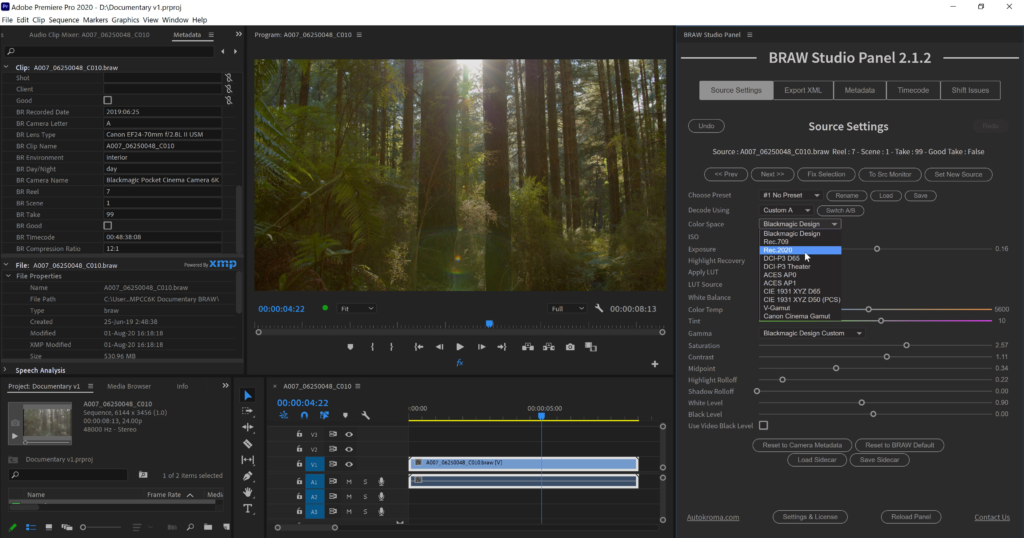
In Premiere Pro, you can access the Blackmagic RAW Params in our BRAW Studio Source Settings Panel (available in top menu : Window -> Extensions). This Panel also provides useful utilities and workflow features, for example batch applying parameters changes to many clips at once, extracting Embedded LUT, importing your footages metadata, a Toolbox tab etc. On After Effects you will be able to use the BRAW Studio Layer Settings effect to color grade your .BRAW which is impossible without BRAW Studio.
You also have access to our new Desktop Player and Color Grader application, letting you do everything you need with your .BRAW files without launching a video editing application such as DaVinci Resolve and Premiere Pro.
Requirements:
- One license is for the same user on up to two computers not used at the same time
- Adobe Premiere Pro and Media Encoder from 13.0 (CC 2019) to 26 (2026) included
- Adobe After Effects from 16.1 (CC 2019) to 25 (2025) included
- macOS Apple Silicon (M1 etc.) and Intel : 12 (Monterey) to 26.2 (Tahoe)
- Microsoft Windows 10 and 11. CPU : at least SSE4.1 instructions set. Most CPUs before 2008 are not compatible (e.g. AMD Phenom II. AMD Phenom II X6 is not compatible !). Compatibility with Intel starts with Core 2 Penryn architecture in 2008. This is a limitation of the BRAW API
Screenshots
PlumePack
The Best Project Manager for Premiere Pro !
Main Features
Improve your Workflow
Accelerate your production pipeline and collaborate more efficiently
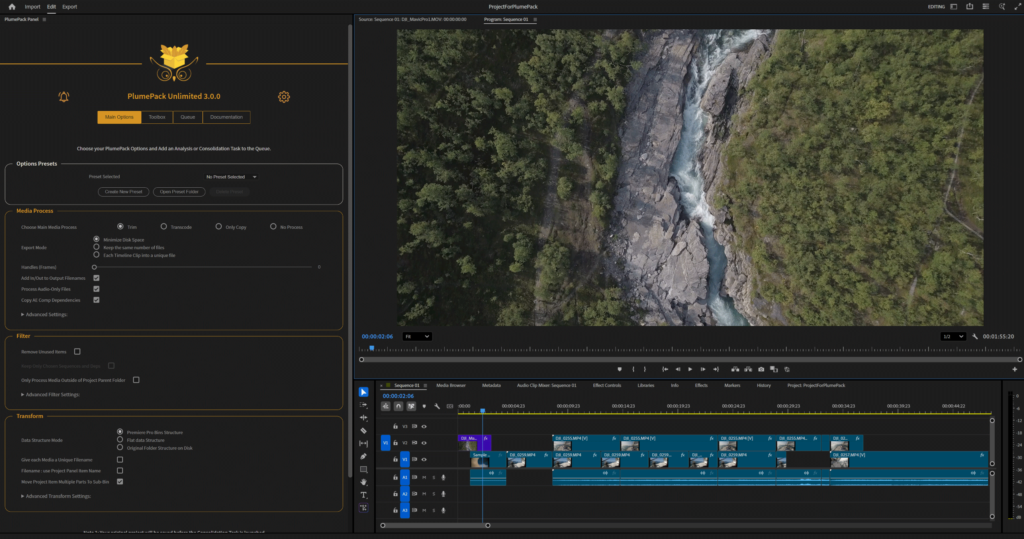
- Get Smaller, Cleaner and Easier to Share Consolidated Projects
- Save HUGE amounts of disk space for editing, backups, delivery, and archiving
- Access Toolbox tools: Trim/Transcode Selected Clips, UnMerge merged clips, Reorder Timeline Tracks, and more
- FREE mode for Projects < 60GB, see below for other licenses
- Save and reuse configurations with Presets, Batch Consolidate multiple Projects in the Queue, Run PlumePack in background
Trim, Transcode or Copy
Choose the best Media Process mode for your needs
- Trim your files to remove unused frames losslessly: preserve original pixels, metadata and codecs. Supported for: ProRes, .BRAW, .R3D, H.264/H.265, DNxHD, Image Sequences and more
- Transcode the used part of your media to a prefered codec / format
- Copy your files and all dependent files (Proxy, After Effects assets, sidecar, XML, ..)
- Smart Replace all Trim/Transcoded/Copied media in the new PlumePacked Project
- Choose between 3 Optimization Modes: Optimize, Minimize File Number or Each Timeline Clip Into a Unique File
Clean, Filter and Organize
Simplify and clean your project before archiving or sharing
- Clean unused items in your new consolidated project
- Filter your project by selecting a list of sequences – Nested sequences included recursively
- Export every used media to a new location, with a unique filename relinked in the Project
- Organize your new folder based on your Premiere Pro bins structure or from your Original Disk Structure
- Fix known Premiere Pro Project Manager bugs for a reliable consolidation
What our clients say about PlumePack
Had a lot of trouble with the project manager in AdobePremierePro. I had to consolidate my project for a client but it didn’t work. Spend 3h in forums & chats but found no solution. Finally I installed #plumepack for free and it just did what it should do. @Adobe @AdobeCare
Philipp Sulser
Plume Pack is an excellent tool to archive and organize your Premiere Pro projects! Archiving my projects is now less stressful because this extension saves a lot of time by looking for assets and organizing all your files for you. You also have the ability to trim your final files which frees up a ton of space in your drive. I recommend editors to add PlumePack in their workflow, especially if you have to archive your projects: It will make a huge difference !
Rodlyne J.
Role: Video editor
While AutoKroma has some fantastic tools (AfterCodecs/Influx for non-standard codec, Braw studio for better BRAW handling), the tool that’s made the biggest difference for my clients? The strangely named PlumePack. It’s the Media Managmeent tool that Adobe should have built into Adobe Premiere Pro. The Free version is super capable – ever have a project that you couldn’t copy/media manage? PlumePack saves the day. Want serious Media Management? A necessity for working with audio post/colorists)? It’s the best $79 that you can spend to provide sanity. Creating a trimmed copy with handles, of your final timeline? Easy. PlumePack is one of the tools that belongs in every editors toolkit.
Jeff I. Greenberg
Role: Master Trainer, Author, NAB/Max Speaker, Post Production Consultant “Helping make smart people become smarter”
Technical specifications
Requirements:
- One license is valid for the same user on up to two computers not used simultaneously.
- Adobe Premiere Pro from 23.0 (2023) to 26.x (2026) included.
- Microsoft Windows 10 and 11.
- macOS Apple Silicon (M1 and later) and Intel: macOS 12 (Monterey) to 26 (Tahoe).
Supported Codecs for Lossless Trimming:
- [.MOV, .MXF] Apple ProRes (XQ, 4444, HQ, Normal, LT, Proxy), ProRes RAW
- [.BRAW] Blackmagic RAW
- [.R3D] REDCODE R3D
- [.MOV, .MP4, .MXF] H.264 / AVC
- [.MOV, .MP4, .MXF] H.265 / HEVC
- [.MXF] Sony X-AVC
- [.ARI] ARRIRAW Image Sequence (Not MXF)
- [.PNG, .JPG, .DNG, .DPX, .TIFF, .PSD etc.] Image Sequence
- [.MOV, .AVI] Cineform
- [.MOV, .MXF] DNxHD / DNxHR
- [.MOV, .AVI] Vidvox HAP
- [.MOV] Apple QuickTime Animation RLE (in Beta)
- [.MOV, .MXF, .AVI] MPEG-2 (XDCAM) (in Beta)
- [.MOV, .AVI] Motion JPEG (in Beta)
- [.MOV] NDI HX (in Beta)
- [.AVI] vMix (in Beta)
Want more supported codecs? Contact us!
Available Output Formats for Transcoding:
- H264 Low / Medium / High BitRate – Stereo
- H264 Adaptive Low / Medium / High BitRate – Stereo
- Apple ProRes 422, 422 LT, 422 HQ, 4444 – Match Source Audio channels
- GoPro Cineform YUV 10-bits – Stereo
- GoPro Cineform RGB 12-bits with Alpha – Stereo
Want more output codecs? Contact us!
Features and Limitations:
- Creates a new Project and new Folder containing all project media.
- Automatically replaces all media paths in the new Premiere Pro Project with copied, trimmed, or transcoded files.
- Includes automatic integrity checks for all trimmed/transcoded files and the resulting project.
- Generates a detailed report at the end of the process.
- Various elements supported for copy: Merged Clips, After Effects compositions, Generative Clips, …
- Presets (Pro & Unlimited only) allow you to save and recall configuration sets for faster workflows.
- The Queue feature (Unlimited only) lets you batch process multiple consolidation.
- Run PlumePack in the background and continue editing while consolidating.
Screenshots
Influx
All-in-one Importer for Adobe CC !
Main Features
Native import directly inside Adobe CC Video
- No need to go through an external transcoding software anymore ! Saves you time, disk space and hassle
- Import and edit in Premiere Pro
- Process your footage directly in After Effects
- Export your PrPro and AEfx projects in Media Encoder, as well as transcode your files directly from AME
- Edit your audio directly in Adobe Audition in new containers, audio and video codecs, without re encoding or remuxing
Wide range of new formats and codecs supported :
- Formats : Matroska .MKV (eg files recorded through OBS Studio) / .WebM, Microsoft .AVI, Quicktime .MOV, .360 GoPro, Windows Media .WMV (also works on macOS), Flash .FLV, Bink .BIK, DVD-Video .VOB, Motion-JPEG .MJPG, .OGV .3GP .Y4M
- Video codecs : AV1, Vidvox Hap / Hap Q with Alpha or not, FFV1 for Archiving, VP9, VP8, Canopus HQ, all commons codecs such as H264 / H265 / HEVC and image formats such as .QOI .JPG .PNG .TIFF
- Audio codecs : .FLAC, .OPUS, .OGG Vorbis, .DTS DTS-HD Master Audio, .AC3 Dolby AC-3, .AIFF, .MKA, .WMA Windows Media, .SPX Speex
Constantly updated !
Enjoy the exact same set of features and results on both macOS and Windows and all Adobe versions supported (2019 to 2024), easy switch your projects between multiple OS and avoid worrying about compatibility and Adobe updates breaking your projects.
We’re here to fix your issues and update Influx.
Contact us for any feedback and feature request !
If you’re interested in supporting MLV Magic Lantern RAW please read this article and this article for Blackmagic CinemaDNG and let us know by contacting us if those new codecs are important for you.
Technical specifications
Requirements :
- macOS Apple Silicon (M1 to M4) and Intel : 11 (Big Sur) to 26 (Tahoe)
- Microsoft Windows 10 and 11
- Adobe 2019 to 2026 included (Premiere Pro, Media Encoder, After Effects, Audition)
- One license is for the same user on up to two computers not used at the same time
Notes :
- Since a recent update 2025 v25.2, PrPro and AME now import H264 .MKV files : sometimes Adobe will fail to give the files to Influx and will produce errors or audio tracks missing instead, Influx won’t be called ! To work around this Adobe bug, either enable override the .mkv extension in the Settings popup to act on all files, or do the following below :
- Suffix your video files with .influx to import them with Influx instead of natively by Adobe, this way you will know for sure it’s not Adobe decoding the files. Could be useful for troubleshooting Adobe and working around its bugs. You can also select in the Settings what formats to override or let Influx decide on its own which files to let Adobe import.
Screenshots

Vizual
FREE PixelPerfect pixel art filter
Main Features
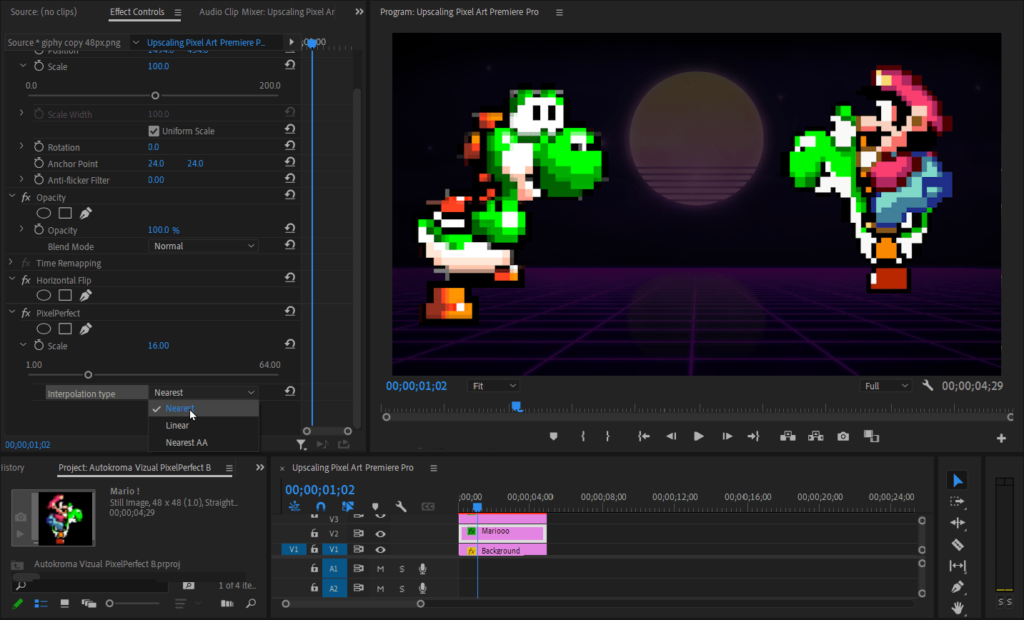
3 Upscaling algorithms
- Nearest Neighbor algorithm (gives the square look, well suited for Pixel Art)
- Linear interpolation algo
- Nearest algo with Antialiasing controllable with the Edge Blur slider
Free Pixel Art Upscaler !
- For both After Effects and Premiere Pro where nearest neighbor upscaling isn’t natively available
- Includes GPU acceleration in After Effects
- Upscales from the center of the original image on Premiere Pro, and on After Effects upscales from your layer anchor point (don’t forget it is expressed in the original resolution)
More effects are coming !
Need more effects that don’t exist yet ? Contact us !
Technical specifications
Requirements :
- macOS Apple Silicon (M1 etc.) and Intel : 11 (Big Sur) to 15 (Sequoia)
- Microsoft Windows 10 and 11
- Adobe 2020 to 2025 included
Screenshots
Elevate your motion graphics workflow with premium collection of After Effects plugins. Whether you are a seasoned professional or just starting your VFX journey, powerful tools designed to streamline complex tasks, unlock creative possibilities, and save you hours of rendering time. From stunning glitch effects and seamless transitions to advanced 3D extrusion and text animation tools, each plugin in our library is rigorously tested for compatibility with the latest versions of Adobe after Effects. Enhance your video production value today and download industry-leading plugins that help you create breathtaking visuals without the technical headaches. Browse our full range and find the perfect extension to supercharge your editing suite now.
➡️ ➡️ For more after effects Plugins 😀 😀
➡️ ➡️ System requirements AE
Reviews
There are no reviews yet.