
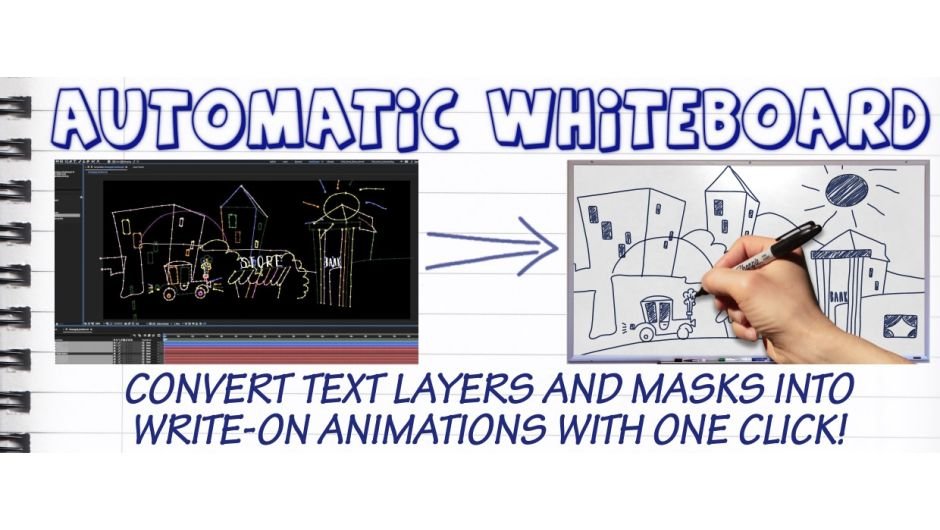
Automatic Whiteboard for After Effects
Download Automatic Whiteboard v1.0, a powerful After Effects script that instantly converts text layers and masks into professional write-on animations . Just type your text or draw masks, click a button, and watch as the script automatically creates stunning whiteboard-style reveals—saving you hours of tedious manual work copying and sequencing mask paths .
Automatic Whiteboard converts After Effects text layers and masks into write-on animations, automatically! Just type in some text, or draw some masks, and then click a button. Instant whiteboard-style animation, with or without a hand to draw it on.
Key Features of Automatic Whiteboard v1.0:
- One-Click Animation: Automatically transforms text layers and masks into complete write-on animations with a single button click
- 8 Rendering Styles: Choose from clean paper, dirty paper, old parchment, blackboard, and other preset looks—or use basic outlines for custom compositing
- Optional Drawing Hand: Include a hand that draws the elements on screen, with 20 different hands to choose from
- Animation Controls: Adjust overall duration, add organic wiggle effects (like in Juno or Red Bull ads), and control left-to-right or right-to-left direction
- Resolution Independent: Works up to 4K—creates animations at the same resolution as your composition
- Illustrator Integration: Bonus scripts help separate and sort mask paths from complex Illustrator artwork for dramatically improved results
- No Plugins Required: Pure script functionality tested with After Effects versions CS6 through 2025
- Comprehensive Learning Resources: Includes extensive help documents and video tutorials, including instructions for using your own hand素材
Perfect For:
- Explainer video creators needing quick whiteboard animations
- Motion graphics artists producing hand-drawn style content
- Educators and trainers creating instructional videos
- Anyone wanting to automate tedious write-on animation workflows
System Requirements:
- Adobe After Effects CS6 through 2025 (all versions supported)
- Windows or macOS
- 4GB RAM minimum (8GB+ recommended)
- 50MB available disk space
Note: For best results with Illustrator artwork, watch the tutorial videos and use the included bonus scripts to prepare complex masks before animation . A free demo is available for testing before purchase .
Automatic Whiteboard creates write-on animations from text layers and masks. Automatically!
You can create amazing “whiteboard style” reveals with one click, saving hours of tedious work copying, pasting and sequencing mask paths and position keyframes.
Automatic Whiteboard even sets up your compositions to look great, with 8 different rendering styles available. If you just want basic outlines so you can do your own compositing then sure – that’s fine. But you can also choose from 7 other preset styles including clean paper, dirty paper, old parchment and a blackboard.
Using Automatic Whiteboard is easy. Just type in some text using ordinary After Effects text layers, or draw some artwork using masks. Automatic Whiteboard converts your text layers and masks into an animation with one click of a button. You can choose whether or not to include a hand that draws the text and masks on, although you don’t have to.
There are many controls over the animations, including:
- Overall duration
- Add a hand to draw on the elements
- Wiggle the animation, like in Juno or the Red Bull ads
- 8 different rendering settings
- 20 different hands to choose from!
- Left-to-right and right-to-left direction
Automatic Whiteboard is resolution independent, up to 4K. You create a composition at the resolution you want, and then the script converts your text layers and any selected masks into animations at the same resolution as your composition.
It’s been tested with all versions of After Effects back to CS6, and it does not require any plugins.
It comes with extensive help documents and several video tutorials, including instructions for using your own hand to draw on the animations.
Please note!
If you are interested in Automatic Whiteboard, especially for use with Illustrator artwork & masks, please check the videos for tutorials on how to get the best results. You can also download the trial version to see how it works, and if it will work for you.
Automatic Whiteboard includes two bonus scripts that help seperate and sort mask paths to improve the end result. It’s not uncommon for complex Illustrator artwork to give poor results if just copied & pasted directly into After Effects, however with a little preparation the results can be dramatically improved. Check out the videos above for more information on these bonus scripts, when and how to use them.


Compatibility
After Effects
2025, 2024, 2023, 2022, 2021, 2020, CC 2019, CC 2018, CC 2017, CC 2015.3, CC 2015, CC 2014, CC, CS6
Elevate your motion graphics workflow with premium collection of After Effects plugins. Whether you are a seasoned professional or just starting your VFX journey, powerful tools designed to streamline complex tasks, unlock creative possibilities, and save you hours of rendering time. From stunning glitch effects and seamless transitions to advanced 3D extrusion and text animation tools, each plugin in our library is rigorously tested for compatibility with the latest versions of Adobe after Effects. Enhance your video production value today and download industry-leading plugins that help you create breathtaking visuals without the technical headaches. Browse our full range and find the perfect extension to supercharge your editing suite now.
➡️ ➡️ For more after effects Plugins 😀 😀
➡️ ➡️ System requirements AE
Reviews
There are no reviews yet.