
baya for Blender
Baya v1.0 for Blender – The Ultimate Asset Browser & Library Manager
Version: V1.0
File Size: 5 MB
Download Baya v1.0 for Blender on Windows and Mac, a powerful addon that streamlines how you browse, preview, and import assets directly within your 3D workspace. With instant thumbnail generation, drag-and-drop functionality, and smart categorization, Baya v1.0 transforms how you manage your personal library of models, materials, HDRIs, and node groups, eliminating the need to switch between file explorers and Blender.
Key Features of Baya v1.0:
Instant Visual Browser: Browse your entire asset library with high-quality, auto-generated thumbnails without leaving the Blender interface
Drag-and-Drop Import: Simply drag models, materials, or HDRI maps from the Baya panel directly into your scene or onto specific objects
Smart Categorization: Automatically organizes assets by type (Mesh, Material, World, Node Group) and allows for custom folder tagging and filtering
Material Preview Modes: Switch between solid, material preview, and rendered modes instantly to see exactly how assets will look in your scene
Favorite & Recent System: Mark frequently used assets as favorites or access your recently imported items for rapid workflow iteration
Metadata Support: Displays resolution, poly count, and file size for selected assets to help you make informed decisions before importing
Custom Library Paths: Add unlimited local or network drive folders to your library, keeping all your studio resources in one centralized place
Fast Search & Filter: Quickly locate specific assets by name, tag, or type using the integrated search bar with real-time results
Cross-Platform Support: Works flawlessly on both Windows and Mac systems including Apple Silicon M1/M2/M3 chips
Perfect For:
Environment artists building large scenes from kits of parts quickly
Material artists managing extensive PBR libraries and node setups
Architectural visualization studios needing fast access to furniture and decor assets
Freelancers who want to organize their growing collection of free and paid assets
Anyone tired of navigating complex folder structures via Blender’s default file browser
System Requirements:
Blender 3.6, 4.0, 4.1, 4.2, 4.3+ (Latest LTS recommended)
Windows 10/11 (64-bit) or macOS 10.15+
8GB RAM minimum (16GB+ recommended for large libraries with many thumbnails)
SSD storage recommended for faster thumbnail loading and asset importing
Installation:
Open Blender and go to Edit > Preferences > Add-ons:
Click “Install…” and select the downloaded .zip file for Baya
Enable the checkbox next to “Interface: Baya Asset Browser”
Access via the 3D Viewport Sidebar (N-panel) > Baya Tab or the Asset Editor region
Note: Version 1.0 features a lightweight database engine that indexes your folders on first launch, ensuring smooth performance even with libraries containing thousands of assets.
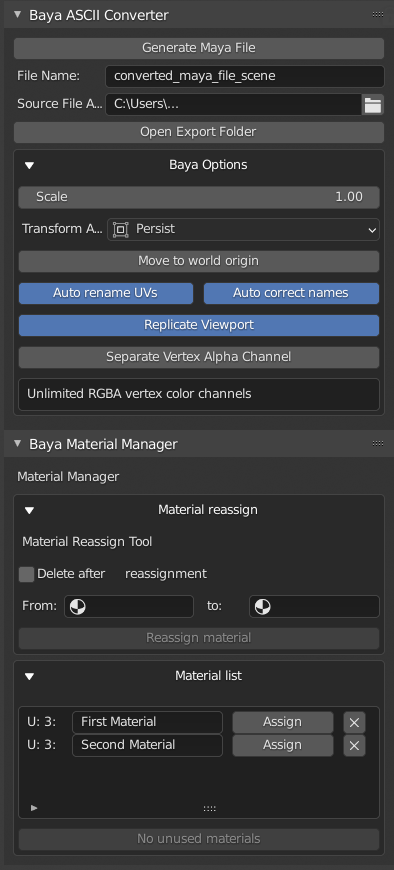
Baya is a Blender tool that generate Maya source file (.ma) inside Blender.
Note: Baya is compatible only with Blender 4.0+ and orientation isssue is fixed.
How is it useful
- Baya is a quick way to exchange data with other artists who might use Maya
- You can iterate quickly when you work with Maya oriented game engine exporters by quickly generating Maya source and exporting using Maya
How does it work
Supercharge your 3D creation workflow with premium selection of Blender Add-ons. Whether you are modeling intricate characters, sculpting realistic environments, or animating cinematic sequences, the right add-on can transform how you work inside Blender. Our curated collection includes powerful tools for UV unwrapping, procedural texture generation, rigging automation, rendering optimization, and more—each rigorously tested for compatibility with the latest Blender versions. Eliminate tedious manual processes and unlock advanced functionality that lets you focus on what matters most: bringing your creative vision to life. Explore our full range of professional Blender plugins today and take your 3D projects to the next level.
➡️ ➡️ For more Blender Plugins 😀 😀
Reviews
There are no reviews yet.