
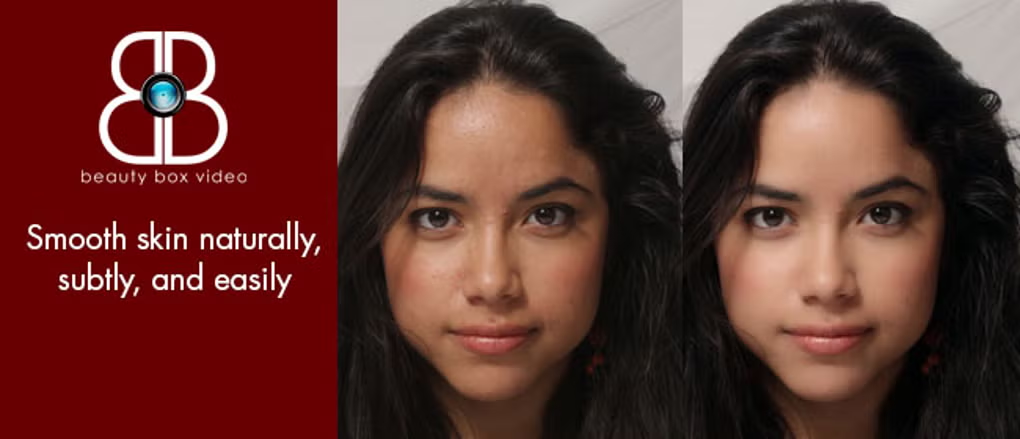
Beauty Box Video for After Effects
beauty box video plugin
Beauty Box Video v6.0.3 for After Effects & Premiere Pro – Professional AI-Powered Skin Retouching & Digital Makeup
Download Beauty Box Video v6.0.3 for Windows, the industry-standard skin retouching and digital makeup plugin from Digital Anarchy for Adobe After Effects and Premiere Pro . This powerful tool automatically identifies skin tones, creates precise masks, and smooths wrinkles and blemishes in real-time—giving your talent a flawless, professional look without frame-by-frame manual work .
Key Features of Beauty Box Video v6.0.3:
- AI-Powered Automatic Masking: Click “Analyze Frame” and Beauty Box instantly detects skin tones, creating an accurate, traveling mask that adapts to movement and expressions throughout your footage
- Real-Time GPU Acceleration: Supports NVIDIA CUDA, AMD OpenCL, and Apple Metal for real-time or near-real-time playback and rendering—works beautifully with Apple M-series chips for incredibly fast performance
- NEW AI Shine Removal (v6.0.3): Advanced AI-powered de-oiling function automatically reduces unwanted shine from oily skin or bright lighting conditions for a more natural, matte finish
- Three Main Controls: Simple, intuitive interface with Skin Smoothing (adjustable from subtle to airbrushed), Skin Color Correction, and Shine Removal—that’s all you need for professional results
- Preset Styles Library: Dozens of pre-built visual effects and color correction combinations for everything from classic Hollywood glow to dramatic stylized looks—speed up your workflow with one-click application
- Built-in Color Correction: Precise tools for fine-tuning skin tones and reducing shine, giving you complete control over your talent’s appearance
- Preserves Facial Details: Advanced algorithms keep important features like eyes, eyebrows, teeth, and hair razor-sharp while smoothing surrounding skin—no over-processed, airbrushed look
- Broad Compatibility: Works with After Effects CC 2015-2026, Premiere Pro CC 2015-2026, DaVinci Resolve, Avid, Nuke, Vegas Pro, and other OpenFX applications
- Used Worldwide: Trusted by major studios including Park Road Post Production, NBC, and Universal Music for feature films, music videos, and commercials
Perfect For:
- Video editors and colorists needing fast, professional skin retouching
- Beauty and fashion content creators requiring flawless skin tones
- Corporate and interview video producers wanting polished talent appearances
- Music video editors seeking consistent, natural-looking skin across multiple shots
- Anyone who wants to save hours of manual rotoscoping and frame-by-frame retouching
System Requirements:
- Adobe After Effects CC 2015-2026 or higher
- Adobe Premiere Pro CC 2015-2026 or higher
- Windows 10/11 (64-bit)
- GPU with CUDA, OpenCL, or Metal support recommended for real-time performance
- 4GB RAM minimum (8GB+ recommended)
- 289-500MB available disk space
Installation:
Run the installer and select your Adobe applications. After installation, Beauty Box appears in your Effects panel under Digital Anarchy. A fully functional watermarked demo is available for testing before purchase .
Note: Version 6.0.3 adds the new AI-powered Shine Removal feature, enhanced performance, and expanded compatibility with the latest Adobe applications .
User Stories for Beauty Box Video Plugin
Beauty Box Video smooths out unwanted skin wrinkles so your client appears to have never had them. It’s difficult to show you the ‘before’ and ‘after’ images — since the ‘before’ images never *really* happened. Instead of an image gallery, we have listed the compliments and accolades that Beauty Box Video has gathered.
Music Videos: Applying Digital Makeup to improve image quality.
With over 20 years of experience as a multimedia producer and musician, Neil Cabana has led a long, incredibly diverse creative life. He taught himself to play guitar at 4, wrote his first song at 12, and started playing in rock bands at 17. Later on in NYC, he learned photography and lighting from well-known fashion photographer Tom Concordia, teaching himself how to use Photoshop and Lightroom to create better images soon after that. As his skills improved, he started designing websites and promotional materials and created an independent label called Pink Lady Records, writing and producing albums for its artists and landing a plethora of music placements on several MTV programs. However, it was after moving to Toronto that Neil started working for global multimedia creative agencies.
Retouching Music Videos made easy with Beauty Box
Skin retouching has always been a challenge in Neil Cabana’s work. “Retouching on fashion models for major publications with Tom Concordia in NYC was challenging, but applying digital makeup in the video was a whole new level”, he explains. In the past Cabana and his team would have to literally retouch the footage frame by frame with image exports: a tedious, time-consuming, and expensive process he was able to avoid by applying Beauty Box video to his entire edited sequence, all at once. “After playing with the demo and seeing the results of what it could do I decided to give it a spin and not only did it reduce the time-consuming process, it looked natural and flawless. It’s so powerful that right away I learned the rule of thumb was to keep it as subtle! You can actually push it far enough to make your footage look like an 80’s soap with characters named Thorn and Ridge!”, Cabana says.
Of course, applying skin smoothing that matches Neil’s celebrity-client’s expectations is still a challenge. “My clients are very sensitive to how they appear in all of their videos. For many of them, their face, their look, their vibe is a big part of their brand”, he explains. Because of that, after dragging and dropping Beauty Box into his timeline, Cabana makes sure the plugin’s auto analysis is carefully adjusted for a more natural look. “For the ‘Sparrow’ video clip, for example, one of the things I found most useful was tracking parts of Lauren’s face so it wasn’t a blur. With the way the plugin is set up you can set thresholds and create multiple masks that can be tracked independently”, says Neil. Tracking independent masks allows for a more precise retouch.
In addition to mask tracking, Beauty Box Video offers a range of presets to make skin smoothing in post-production even easier. Video editors can quickly apply the presets with the option to leave the retouch as is or adjust the settings for a more polished look. For Neil, it’s helpful to go in and adjust the masks where necessary to not give the effect away. He explains that “you don’t necessarily need to take that approach, but if it isn’t great, don’t present it. Measure twice and cut once. And with a Beauty Box you can easily do that”.
Elevate your motion graphics workflow with premium collection of After Effects plugins. Whether you are a seasoned professional or just starting your VFX journey, powerful tools designed to streamline complex tasks, unlock creative possibilities, and save you hours of rendering time. From stunning glitch effects and seamless transitions to advanced 3D extrusion and text animation tools, each plugin in our library is rigorously tested for compatibility with the latest versions of Adobe after Effects. Enhance your video production value today and download industry-leading plugins that help you create breathtaking visuals without the technical headaches. Browse our full range and find the perfect extension to supercharge your editing suite now.
➡️ ➡️ For more after effects Plugins 😀 😀
➡️ ➡️ System requirements AE
Reviews
There are no reviews yet.