

Blender OSM premium for Blender
Blender OSM Premium for Blender – The Ultimate Real-World Map & Terrain Generator
Version: V4.1
File Size: 100 MB
Download Blender OSM Premium for Blender on Windows and Mac, a professional-grade addon that instantly imports real-world geographic data from OpenStreetMap directly into your 3D scene. With automated building extrusion, high-resolution satellite texture mapping, and accurate terrain elevation data, Blender OSM Premium transforms how you create cityscapes, architectural contexts, and game environments, eliminating the need for manual modeling of entire cities or complex GIS software workflows.
Key Features of Blender OSM Premium:
Real-World Data Import: Search any location on Earth by address or coordinates and instantly generate the surrounding map with streets, water bodies, and green spaces
Automated Building Generation: Automatically extrudes building footprints into 3D structures with accurate heights, roof shapes, and window placements based on OSM data
High-Res Satellite Textures: Fetches and projects high-quality satellite imagery (up to 4K) directly onto the terrain and building facades for photorealistic results
Accurate Terrain Elevation: Imports real topographic height data to create realistic hills, valleys, and slopes matching the actual geography of the selected area
Smart Road & Path Systems: Generates detailed road networks with proper lane markings, sidewalks, and curvature, ready for traffic simulation or driving scenes
Vegetation & Land Cover: Automatically places trees, grass, and water planes based on land-use tags (parks, forests, lakes) for immediate scene richness
Unlimited Area Coverage: Premium version removes size restrictions, allowing you to import entire city districts or large rural areas without clipping or data loss
Optimized Geometry: Intelligent mesh decimation and instancing ensure that massive maps remain performant in the viewport and render quickly
Cross-Platform Support: Works flawlessly on both Windows and Mac systems including Apple Silicon M1/M2/M3 chips
Perfect For:
Architectural visualization artists needing accurate context for building proposals
Game developers creating open-world environments based on real-life locations
Urban planners and researchers visualizing city data and infrastructure
VFX studios requiring realistic background plates for film and television
Anyone tired of manually modeling cities or struggling with complex GIS imports
System Requirements:
Blender 3.6, 4.0, 4.1, 4.2, 4.3+ (Latest LTS recommended)
Windows 10/11 (64-bit) or macOS 10.15+
8GB RAM minimum (16GB+ recommended for large city imports)
Active Internet connection required for fetching map and satellite data
Installation:
Open Blender and go to Edit > Preferences > Add-ons:
Click “Install…” and select the downloaded .zip file for Blender OSM Premium
Enable the checkbox next to “Add Mesh: Blender OSM Premium”
Access via the Add Menu > Mesh > Blender OSM or the 3D Viewport Sidebar (N-panel) > OSM Tab
Note: The Premium version includes access to higher-resolution satellite layers, faster server priority for data fetching, and the ability to export generated maps directly to game engine formats like FBX and USD.
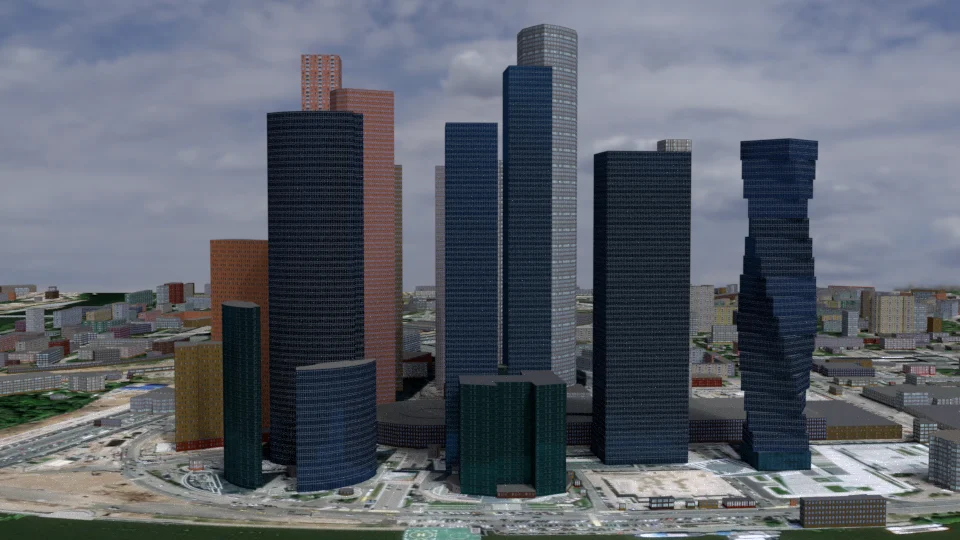


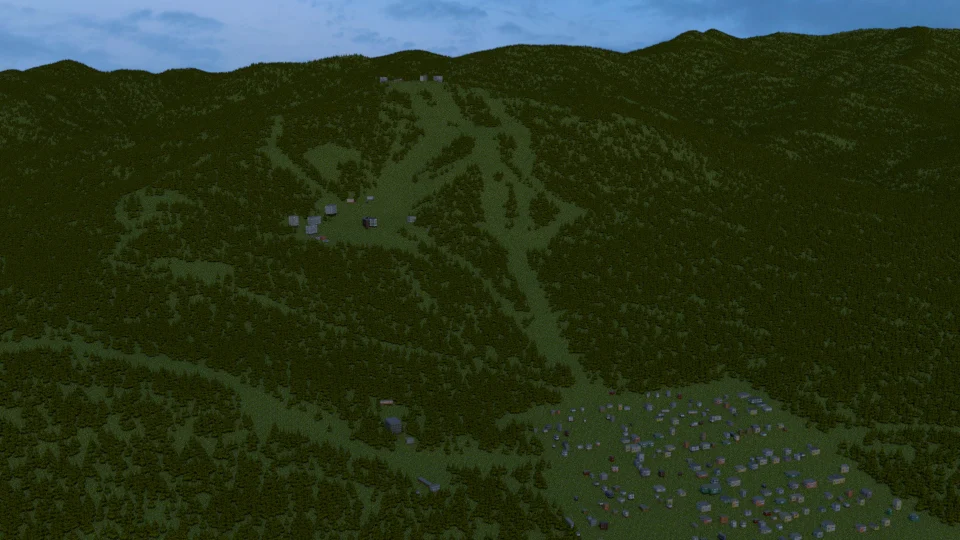


One click import of OpenStreetMap with textured buildings, forests, satellite imagery, terrain for Blender
In addition to all the features of the base version, the Pro version offers:
- One-click baking of multiple textures into a single texture for 3D Tiles
- Import of buildings from OpenStreetMap with default materials, tileable building textures and UV-mapping applied
- Default materials and textures to mimic lit windows for a late evening setting
- Import of forests and single trees as 3D objects
- An option to apply geometry nodes to OSM footprints to get realistic 3D buildings (more information)
- Options to use custom tileable building textures, for example from textures.com (a tutorial)
- Satellite imagery and web maps projected on a terrain
Subsequent releases will include more details and variability for imported buildings and other features depending on user feedback.
Important notice: the addon does not provide real textures for each imported building!
Important notice: export of textures is available as an experimental feature.
At the moment only one low-polygon model of a tree is provided with the addon. It’s possible to use custom tree models for imported forests and single trees.
Supercharge your 3D creation workflow with premium selection of Blender Add-ons. Whether you are modeling intricate characters, sculpting realistic environments, or animating cinematic sequences, the right add-on can transform how you work inside Blender. Our curated collection includes powerful tools for UV unwrapping, procedural texture generation, rigging automation, rendering optimization, and more—each rigorously tested for compatibility with the latest Blender versions. Eliminate tedious manual processes and unlock advanced functionality that lets you focus on what matters most: bringing your creative vision to life. Explore our full range of professional Blender plugins today and take your 3D projects to the next level.
➡️ ➡️ For more Blender Plugins 😀 😀
Reviews
There are no reviews yet.