
BlenderAe2 for After Effects
blenderae 2 plugin
BlenderAe2 v2.1.1 for After Effects – Seamless Blender to After Effects 3D Data Transfer
Download BlenderAe2 v2.1.1 for After Effects on Windows and Mac, a powerful Blender add-on that enables seamless bidirectional transfer of 3D data and objects between Blender and Adobe After Effects. Streamline your 3D/VFX workflow by effortlessly integrating your Blender creations, including complex physics simulations, directly into After Effects without intermediate file exports .
Key Features of BlenderAe2 v2.1.1:
- Bidirectional Data Transfer: Export objects, cameras, lights, vertices, and faces from Blender to After Effects. Import solids, nulls, cameras, and 3D layer transforms from After Effects back into Blender for a true round-trip workflow
- glb (glTF) Quick Exporter: Fast export for After Effects 23.0 and above, ensuring compatibility with modern AE versions
- Layer Synchronization: Sync objects, lights, and cameras without needing to create new layers in After Effects—maintains existing relationships
- Physics Simulation Support: Transfer vertex data from Blender simulations (cloth, ocean, soft & rigid bodies) to nulls in After Effects for advanced visual effects
- Vertex Normal Rotation Support: Maintain advanced 3D data fidelity during transfer for accurate lighting and shading
- Auto-Connect Feature: Simplified connection setup between Blender and After Effects saves time on complex scenes
- Blender Camera Shift X,Y Support: Accurate transfer of camera data including shift values for perfect match moving
- New UI & Extended Compatibility: Updated interface with support as an extension in Blender 4.2 and above
- v2.1.1 Fixes: Resolves slow MacOS imports from After Effects, fixes camera sensor matching issues, and separates world origin alignment functions for clarity
- v2.1.1 Additions: Adds warnings for resolution/framerate mismatches and an “Include Anchor Point Offset” option for accurate layer positioning
- Cross-Platform Support: Works on both Windows and Mac systems
Perfect For:
- Motion graphics artists integrating 3D Blender elements into After Effects compositions
- VFX professionals creating complex scenes requiring both Blender’s power and After Effects’ compositing tools
- 3D artists needing to round-trip cameras and null data for motion tracking and layout
- Anyone who wants to streamline their 3D-to-2D workflow without manual file conversions
System Requirements:
- Adobe After Effects 2025, 2024, 2023, 2022, 2021, 2020
- Blender 4.4, 4.3, 4.2, 4.1, 4.0, 3.6 LTS to 3.0
- Windows 10/11 (64-bit) or MacOS 10.15 to 15
- 4GB RAM minimum (8GB+ recommended)
- 50MB available disk space
Installation:
Copy the add-on files to your Blender add-ons directory and enable through Blender preferences. The After Effects script installs to your AE ScriptUI Panels folder for easy access.
Seamlessly transfer 3D data and objects between Blender and After Effects in both directions. Save time and streamline your workflow by effortlessly integrating your Blender creations into After Effects!
Ready to combine the power of Blender and After Effects?
Key Features
BlenderAe2 is a bridge between Blender and After Effects! Transfer data, objects, layers, 3D physics and simulations! The possibilities are endless!
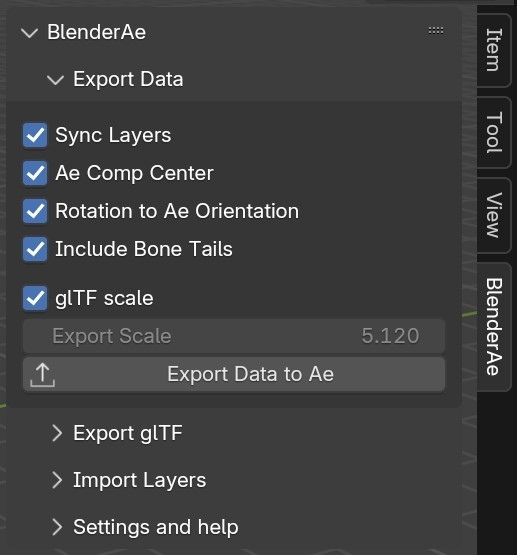
Export from Blender to After Effects:
- Cameras
- Lights
- Objects
- Vertices
- Faces
- Bones
Import from After Effects to Blender:
- Solids
- Nulls
- Cameras
- 3D layer transforms
New features in BlenderAe2
- glb (glTF) quick exporter (After Effects 23.0 and above)
- Layer synchronization
- Vertex support for physics simulations (eg. Cloth, ocean, soft & rigid bodies)
- Vertex normal rotations
- Auto-connect
- Blender camera shift x,y support
- New UI
- Extension compatible (in Blender 4.2 and above)
- Fixed bugs and code enhancements
How It Works
- Install BlenderAe (as an extension in Blender 4.2 and above, or an addon in Blender 3.6 LTS to 4.2 versions)
- Export objects and data from Blender to After Effects
- Import layers and data from After Effects to Blender
System Requirements
- Blender 3.6 LTS or later
- Adobe After Effects 23 or higher
- Supported operating systems:
- MacOS 10.15 to 15
- Windows 10 and 11
Note for MacOS users: Add and enable After Effects in ‘Privacy & Security > Full Disk Access’
Watch the complete YouTube tutorial playlist! – Click Here!
Tutorials
Notes and Known Issues
- Some modifiers can affect exporting of data.
- Non-planar Faces (in Edit Mode) and non-planar Planes (in Object Mode) are not currently supported.
- If the ‘Ae Path’ field contains a correct path but After Effects is not open, After Effects will open and close without saving.
- A large number of selections, or long frame duration can take a long time to process (particularly for face selections); you can press ‘esc’ to abort the import process.
Elevate your motion graphics workflow with premium collection of After Effects plugins. Whether you are a seasoned professional or just starting your VFX journey, powerful tools designed to streamline complex tasks, unlock creative possibilities, and save you hours of rendering time. From stunning glitch effects and seamless transitions to advanced 3D extrusion and text animation tools, each plugin in our library is rigorously tested for compatibility with the latest versions of Adobe after Effects. Enhance your video production value today and download industry-leading plugins that help you create breathtaking visuals without the technical headaches. Browse our full range and find the perfect extension to supercharge your editing suite now.
➡️ ➡️ For more after effects Plugins 😀 😀
➡️ ➡️ System requirements AE
Reviews
There are no reviews yet.