
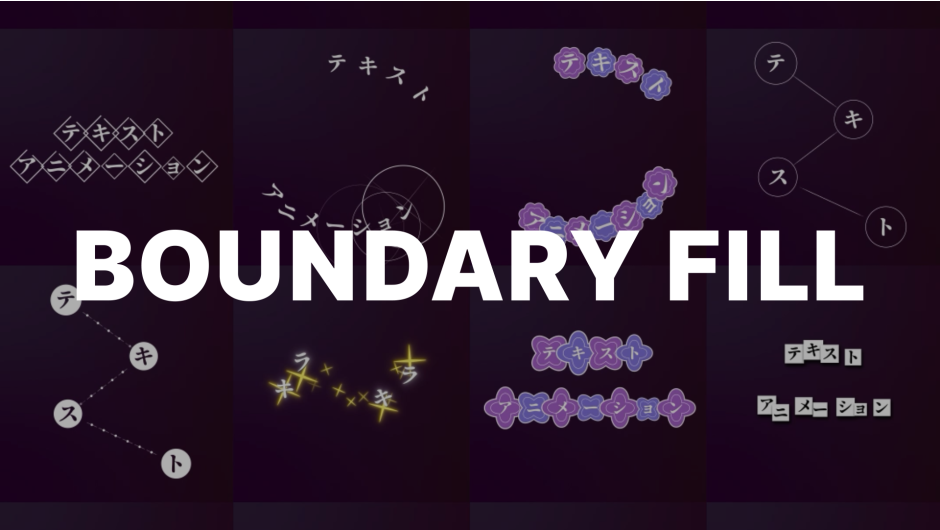
Boundary Fill for After Effects
Primary Keyphrase: text boundary fill plugin
Description:
Download Boundary Fill V2.2.0 for Windows, a powerful After Effects plugin that allows you to attach any texture or graphic to the boundaries of your text layers with precision and ease . This innovative tool goes beyond simple parenting by enabling textures to follow each individual glyph while remaining fully compatible with text animators for dynamic, flexible motion graphics .
A new way to decorate text layer boundaries! Apply effects directly to text layers! Compatible with text animators for easy control!
Key Features of Boundary Fill V2.2.0:
- Texture Attachment: Attach any layer (textures, graphics, shapes) to text layer boundaries—perfect for decorating each letter individually
- Text Animator Compatible: Works seamlessly with text animators, allowing textures to respond to character-level animation properties
- Merge Controls: Adjust Merge X and Merge Y parameters to control how boundaries merge based on font and size for clean results
- Dynamic Properties: Enable Dynamic Rotation (texture rotates with text), Dynamic Opacity (proportional to boundary pixels), and Dynamic Size (proportional to boundary size)
- Split Text Function: Split text into boundary units, allowing controlled overlap when characters are close together
- Text Save Feature: Save the current appearance of text as a reference to improve accuracy and ensure clean texture application
- Alignment Controls: Reverse the order of boundary arrangement and control line filling between boundaries with Overlap Distance and Smoothness
- Shape Only Mode: Display only the texture without the original text for creative compositing options
- Initial Release: V2.2.0 (June 19, 2025) is the initial version of this powerful new tool
How It Works:
Prepare your texture layer, apply Boundary Fill to your text layer, select the texture, and press “Text Save” to set a reference. Adjust Merge X and Merge Y based on your font and size, and watch as your texture perfectly follows each character—even with text animators applied . The plugin intelligently infers character-level property data to support text animator compatibility .
Important Note:
After Effects doesn’t provide native individual property data for each character. Boundary Fill infers this information as accurately as possible. In special cases where characters overlap, results may not be perfect—these situations can often be resolved by separating text into multiple layers .
Perfect For:
- Motion graphics artists creating decorated text with unique textures per character
- Title sequence designers wanting intricate text boundary effects
- Anyone needing textures to follow individual glyphs with text animator support
- Designers looking to streamline complex text decoration workflows
System Requirements:
- Adobe After Effects 2023, 2024, 2025
- Windows 10/11 (64-bit)
- 4GB RAM minimum (8GB+ recommended)
- 50MB available disk space
Introducing Boundary Fill, Attach Any Texture to Your Text Layer, and Apply Text Animation!

If you just want a single texture to follow an entire text layer, you could easily use parenting or similar techniques.
But what if you want the texture to follow each individual glyph and still use text animators?
Boundary Fill drastically streamlines this otherwise repetitive and time-consuming workflow.

Prepare the texture, apply Boundary Fill to the text layer, select the texture layer, press ‘Text Save’ ensuring no overlap or rotation, and adjust Merge X and Merge Y based on font and size, saving you countless hours.
NEW : Use the Moglyph FX plugin to break the limits of text layers manipulate them in ways you’ve never imagined, including procedural animation and advanced effects all within a single text layer!
Supercharge your workflow with this awesome bundle
Feature Description
Texture – Specifies the layer to fill the boundary.
Merge – Defines the distance at which boundaries merge.
Enable
- Dynamic Rotation – Adjusts the rotation origin based on Text Save, so the texture rotates along with the text. (Horizontal & Vertical aspect ratio fixed limitation)
- Dynamic Opacity -Makes the fill opacity proportional to the opacity of pixels within the boundary.
- Dynamic Size – Makes the fill size proportional to the boundary size.
- Scale By Saved Ratio – Scales the texture to 100% size based on the saved size from Text Save. (Horizontal & Vertical aspect ratio fixed limitation)
Alignment Reverse – Reverses the order of boundary arrangement.
Split Text – Splits the text layer into boundary units, allowing overlap to be expressed when close enough not to merge.
influenced – Submenu of Split Text.
- Position – Changes the text position according to the texture’s position.
- Opacity – Adjusts the text opacity according to the texture’s opacity.
Line – Fills the lines between boundaries.
- Overlap Distance – Prevents lines from being generated around the boundary.
- Overlap Smoothness – Softens the Overlap Distance by adjusting the opacity.
Shape Only – Displays only the texture.
Text Save – Saves the current appearance of the text to set a reference and improve accuracy.
When the Merge feature is enabled, it works based on the saved Text Save appearance, ensuring that textures are applied cleanly even when perfectly overlapping.
*If the text or font changes, you need to reset it.
Tip
If the text size becomes 0, the text will not be recognized. To maintain the random option cleanly, avoid setting the size to 0. Instead, set it to a small value like 0.001.
For all textures, it is recommended to use the Collapse Transformations / Continuously Rasterize (sun icon) layer to preserve color precision.
Elevate your motion graphics workflow with premium collection of After Effects plugins. Whether you are a seasoned professional or just starting your VFX journey, powerful tools designed to streamline complex tasks, unlock creative possibilities, and save you hours of rendering time. From stunning glitch effects and seamless transitions to advanced 3D extrusion and text animation tools, each plugin in our library is rigorously tested for compatibility with the latest versions of Adobe after Effects. Enhance your video production value today and download industry-leading plugins that help you create breathtaking visuals without the technical headaches. Browse our full range and find the perfect extension to supercharge your editing suite now.
➡️ ➡️ For more after effects Plugins 😀 😀
➡️ ➡️ System requirements AE
Reviews
There are no reviews yet.