
BRAW Studio v3.4.0
Primary Keyphrase: braw studio blackmagic raw importer
Description:
Download BRAW Studio v3.4.0 for Windows, a powerful suite of Adobe plugins developed by Autokroma that enables native Blackmagic RAW (.braw) import and color grading directly within After Effects, Premiere Pro, Media Encoder, and Audition . This essential tool bridges the gap in your Blackmagic workflow by providing direct access to the same RAW color parameters as DaVinci Resolve, allowing you to import, edit, and grade your .braw footage without transcoding .
Brand new Desktop Application, White Balance Picker, Premiere Pro Metadata Organizer Tool. Available in FREE and Premium Versions. After Effects, Premiere Pro and Media Encoder native Blackmagic RAW (.braw) importer, with advanced Premiere Pro features in our BRAW Studio Panel as well as customizable RAW Settings with our Layer Settings After Effects filter.
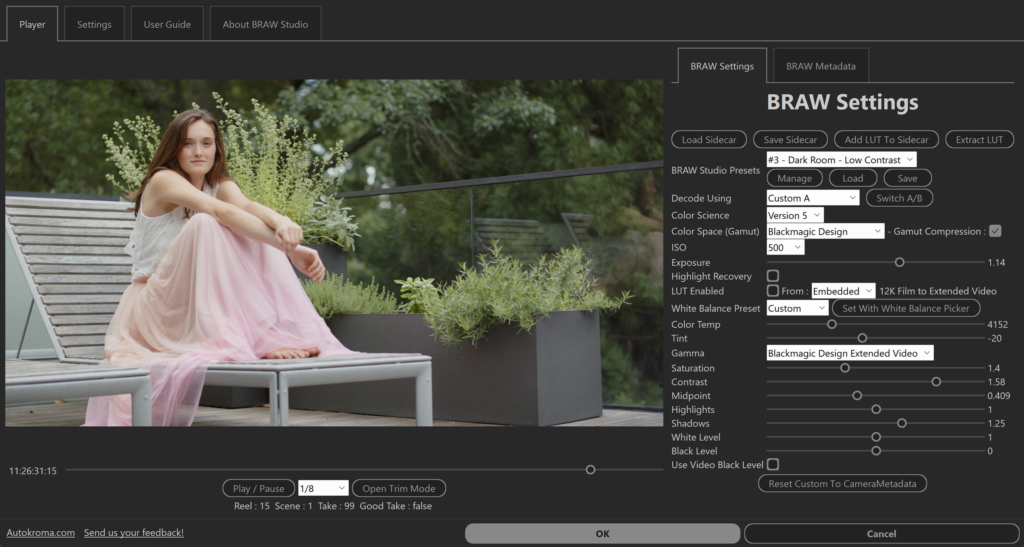
BRAW Studio v3.4.0 features a brand new Desktop Application for playing and color grading .braw files directly from Windows Explorer, complete with a White Balance Picker tool, lossless trimming, and custom LUT support . The plugin suite seamlessly integrates into Adobe applications, offering advanced Premiere Pro panel features and real-time RAW parameter adjustments in After Effects .
Version 3.4.0 Key Updates (November 9, 2025) :
- BRAW 5.0 and 5.1 Support: Adds support for Blackmagic PYXIS 12K camera, Blackmagic URSA Cine Immersive camera, and Leica SL3-S, Sony FX3, Sony FX30 Blackmagic RAW clips
- Immersive Workflow: New “Immersive Track” parameter for selecting Left or Right tracks, plus beta option for immersive workflow in Premiere Pro
- Bug Fixes: Resolved crashes in Premiere Pro and After Effects Layer Settings, fixed issues with RAW Settings modifications in Media Encoder and After Effects
Key Features of BRAW Studio V3 :
- Native Adobe Integration: Import .braw footage directly into Premiere Pro, After Effects, Media Encoder, and Audition without transcoding
- Desktop Application: Standalone player and color grader for .braw files with metadata viewer and trim tool
- White Balance Picker: Eyedropper tool to automatically set neutral white balance with a single click
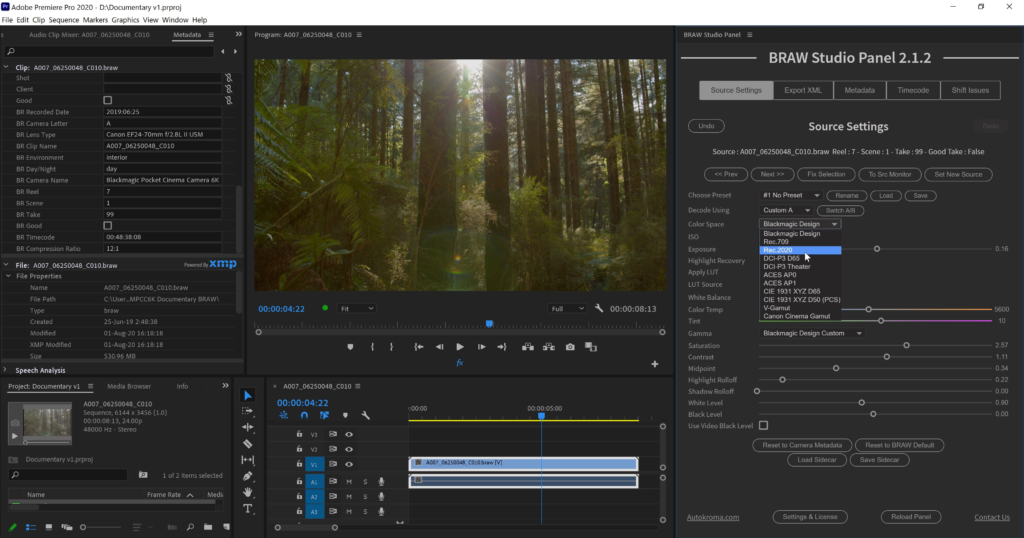
- Premiere Pro Panel: Advanced panel for batch changes, metadata organization, and source settings with keyboard shortcuts
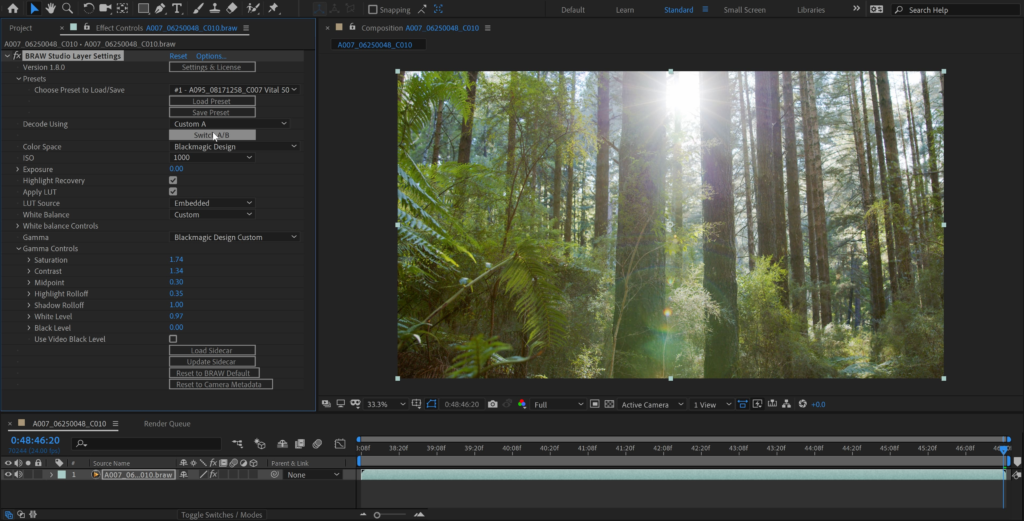
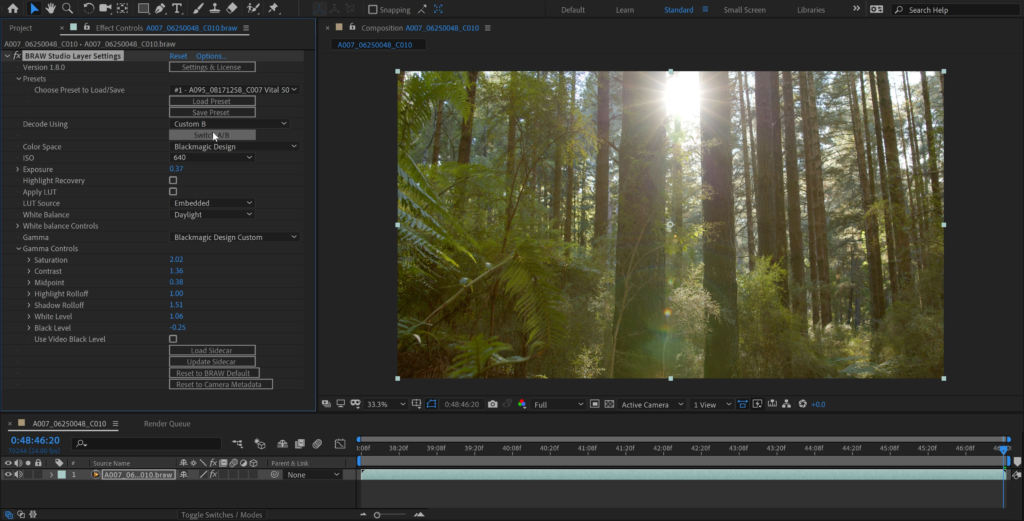
- After Effects Layer Settings: Real-time RAW parameter adjustments directly within the AE interface
- Sidecar Support: Save and load RAW parameters to .sidecar files for consistent grading across applications
- Global Presets: Store and reuse 20 different RAW parameter configurations across projects
- Lossless Trimming: Remove unused frames while maintaining BRAW codec quality
Perfect For:
- Filmmakers and video editors working with Blackmagic RAW footage
- Colorists needing access to DaVinci Resolve-grade RAW controls within Adobe applications
- Post-production houses integrating Blackmagic cameras into Adobe workflows
- Content creators shooting on Blackmagic Pocket Cinema Camera, URSA, or PYXIS cameras
- Anyone wanting to streamline their BRAW to Adobe workflow without transcoding
System Requirements :
- Adobe After Effects 2019-2026
- Adobe Premiere Pro 2019-2026
- Adobe Media Encoder 2019-2026
- Adobe Audition 2019-2026
- Windows 10/11 (64-bit) with SSE4.1 compatible CPU (Intel Core 2 Penryn 2008+ or AMD equivalent)
- 4GB RAM minimum (16GB+ recommended)
- 50MB available disk space
License Options :
- FREE version: Unlimited import of Blackmagic RAW files
- Premium version ($79.00): Full access to advanced features including the Desktop App, White Balance Picker, Premiere Pro Metadata Organizer, batch changes, and more
BRAW Studio V3 FREE and Premium are out!
Brand new Desktop Application, White Balance Picker, Premiere Pro Metadata Organizer Tool
Main Features
The missing piece in your workflow
- Premiere Pro and Media Encoder : import, edit, re-encode, create proxies for your
.BRAWfootages directly and natively with BRAW Studio !
Our BRAW Studio Panel will also help your daily workflow with awesome features such as : Source Settings Panel, Batch changes, Trimming, Toolbox tab etc. - After Effects : import your
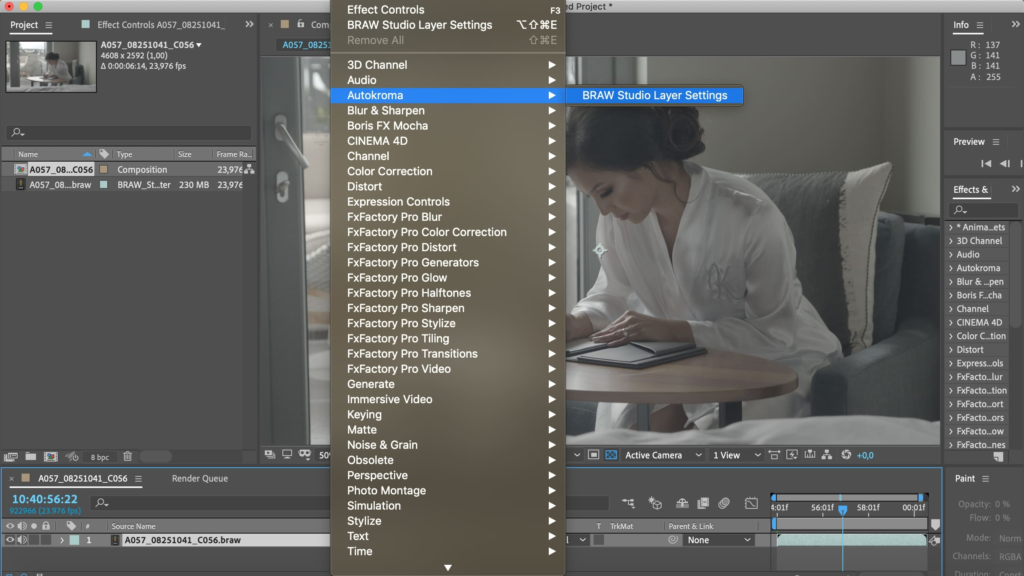
.BRAWand modify / experience the color grading in real time with our BRAW Studio Layer Settings filter, directly within AEfx interface - Access the same RAW color parameters than in DaVinci Resolve, using the official BMD Color Science and BMD BRAW SDK
A brand new Desktop App
- Play and Color Grade your
.BRAWdirectly with our new Desktop Player App by opening it from your Finder/Explorer - Save your settings on sidecar: it will be automatically applied inside any NLE (DVR, PPro, AEfx, AME)
- Find the same tools than in our plugins: White Balance Color Picker, Custom A/B, Presets, Custom LUT etc.
- Remove unused frames and keep the BRAW Codec with the same quality by using the Trim Tool
- Get easily all Metadata from your
.BRAW
Fully featured
- White Balance Color Picker to automatically make your footages neutral in a few clicks !
- Custom A/B to quickly compare your different RAW Parameters set
- 20 Global Presets to store your RAW Params across Projects and Premiere Pro / After Effects / Desktop Player
- Custom LUT with our new feature “Add LUT To Sidecar”
- Note : BRAW Studio doesn’t import
.dngfiles
Technical specifications
BRAW Studio is a stand-alone desktop software to play and grade BRAW files, and it also includes a suite of Adobe plugins (+ Premiere Pro Panel) adding a new .braw format to be imported into Adobe Premiere Pro, Media Encoder, After Effects, Audition. Its basic features are FREE (importer + Source Settings effect), but you have access to much more with a Premium license !
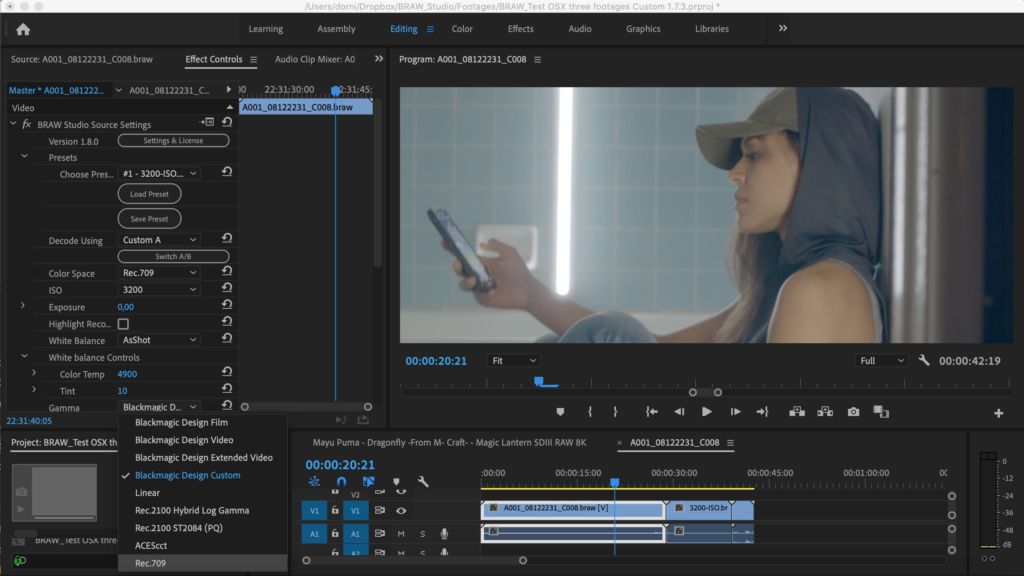
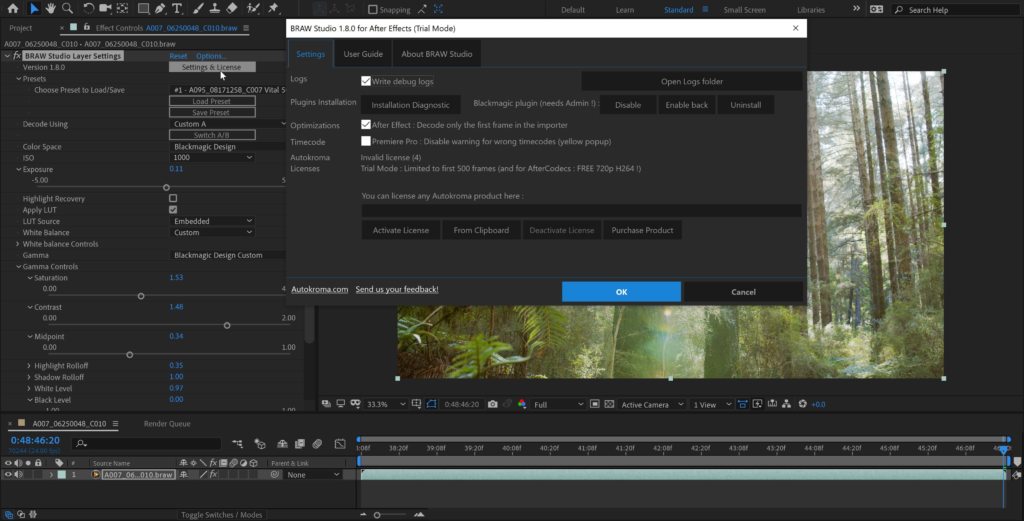
In Premiere Pro, you can access the Blackmagic RAW Params in our BRAW Studio Source Settings Panel (available in top menu : Window -> Extensions). This Panel also provides useful utilities and workflow features, for example batch applying parameters changes to many clips at once, extracting Embedded LUT, importing your footages metadata, a Toolbox tab etc. On After Effects you will be able to use the BRAW Studio Layer Settings effect to color grade your .BRAW which is impossible without BRAW Studio.
You also have access to our new Desktop Player and Color Grader application, letting you do everything you need with your .BRAW files without launching a video editing application such as DaVinci Resolve and Premiere Pro.
Requirements:
- One license is for the same user on up to two computers not used at the same time
- Adobe Premiere Pro and Media Encoder from 13.0 (CC 2019) to 25 (2025) included
- Adobe After Effects from 16.1 (CC 2019) to 25 (2025) included
- macOS Apple Silicon (M1 etc.) and Intel : 12 (Monterey) to 15 (Sequoia)
- Microsoft Windows 10 and 11. CPU : at least SSE4.1 instructions set. Most CPUs before 2008 are not compatible (e.g. AMD Phenom II. AMD Phenom II X6 is not compatible !). Compatibility with Intel starts with Core 2 Penryn architecture in 2008. This is a limitation of the BRAW API


Compatibility
After Effects
2026, 2025, 2024, 2023, 2022, 2021, 2020, CC 2019
Audition
2025, 2024, 2023, 2022, 2021, 2020, CC 2019
Media Encoder
2026, 2025, 2024, 2023, 2022, 2021, 2020, CC 2019
Premiere Pro
2026, 2025, 2024, 2023, 2022, 2021, 2020, CC 2019
Elevate your motion graphics workflow with premium collection of After Effects plugins. Whether you are a seasoned professional or just starting your VFX journey, powerful tools designed to streamline complex tasks, unlock creative possibilities, and save you hours of rendering time. From stunning glitch effects and seamless transitions to advanced 3D extrusion and text animation tools, each plugin in our library is rigorously tested for compatibility with the latest versions of Adobe after Effects. Enhance your video production value today and download industry-leading plugins that help you create breathtaking visuals without the technical headaches. Browse our full range and find the perfect extension to supercharge your editing suite now.
➡️ ➡️ For more after effects Plugins 😀 😀
➡️ ➡️ System requirements AE
Reviews
There are no reviews yet.