

Canvaso Photoshop Action
Photoshop Action: Making Art Painting on Canvas with Video Tutorial | 195 MB | Comes with Preview | ATN & ABR & PAT & MP4 & JPG Format
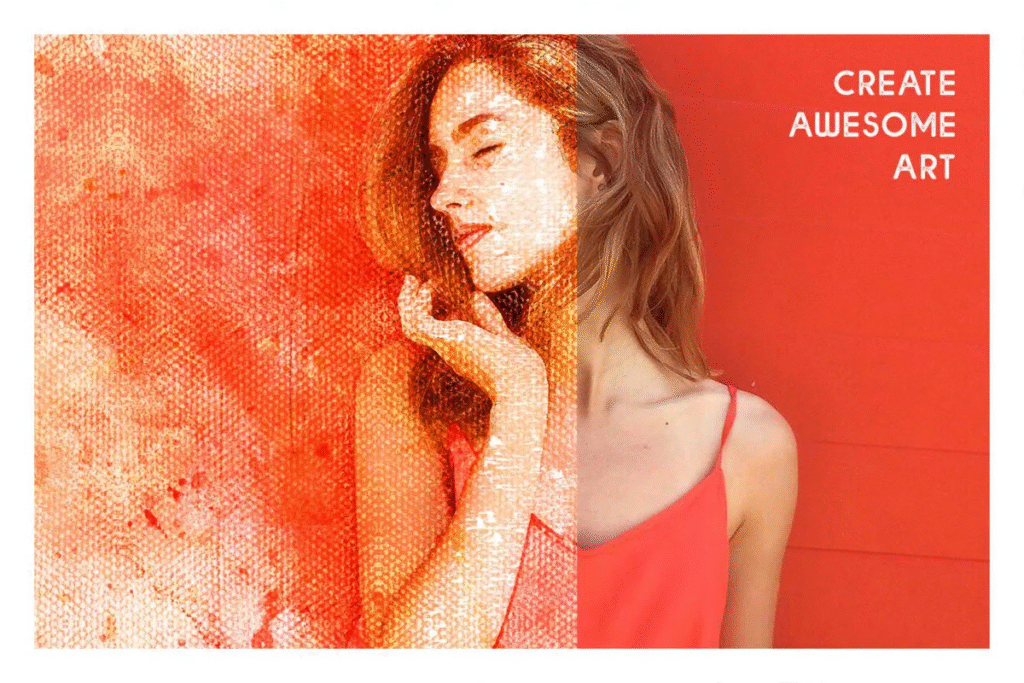
In this series, you will see another example of the effect of images in the form of action and entitled Converting Images to Painting on Canvas along with a video tutorial that has been placed on the site for download in ATN, ABR, PAT, MP4 and JPG formats.
Transform your photos into stunning works of art with our Canvaso Photoshop Action! This easy-to-use action allows you to create beautiful paintings in just minutes. Simply apply the action to your photo and watch as it transforms into a gorgeous digital oil painting with a unique texture. Perfect for adding a unique touch to your home decor, social media posts, or creative projects. Elevate your photos with our Canvaso Photoshop Action and impress your audience with your artistic skills!


WATCH VIDEO TUTORIAL
Canvaso photoshop action convert your image to premium artwork. Highly detailed unique painting effect just one click away. This action is very suitable for photos of portraits, animals, food, fruits, birds, architecture, products, vehicles, furniture, family photos etc. Save hours of work with this action. Action delivers you a well-organized and structured file with the many layers, folders and settings to improve the final result. Action perfectly work on Mac and PC. Super easy to use.
SUCCESSFULLY TESTED AND OPTIMIZED
Tested and working for Adobe Photoshop CS3 and newer till Photoshop CC 2023 versions, Windows or Mac.
WHAT YOU GET
1, ANT File – action file
2, PAT File – patterns file
3, ABR File – brushes file
4, PDF – Help file with instructions
After you run the action, you have the option to customize the various elements generated and create a masterpiece out of it! You can tweak different art elements generated.
FOR THE BEST RESULT, IT IS RECOMMENDED TO USE
1, photo sizes between 2000 – 5000px
2, photo resolution 72 – 300 dpi
HOW TO USE ACTION
Highly recommended to see video tutorial before using the action!
https://youtube.com/c/WalllowCreatives
1. Install the Action, Brushes and Patterns (help file included)
2. Open your photo.
3. Create a new layer and you can give any name.
4. With this new layer layer selected, brush (use any color) onto the area of photo to choose the object.
5. Click play button on action panel. That’s all!
6. You can also customize and improve the result. Turn on/off or duplicate folders and layers.
A Photoshop action is an incredible feature tool that allows you to record a series of steps
To achieve remarkable effects, and then play the sequence back to apply those effects on any image.
Because these actions are reusable you can improve your workflow by chopping countless hours off your design process.
you can transform your images into polished works of art while saving a lot of time and money.
Designed to save you time in the editing process for actions that you do repeatedly and create lots more elements that can be edited manually.
Exclusively designed for graphic designers & photographers .
we’ve cut out the hard work for you by putting the best collection of excellent Premium Photoshop actions!
Photoshop actions are perfect for both beginners and advanced Photoshop users
➡️ ➡️ For More Acions Photoshop 😀 😀
Reviews
There are no reviews yet.