
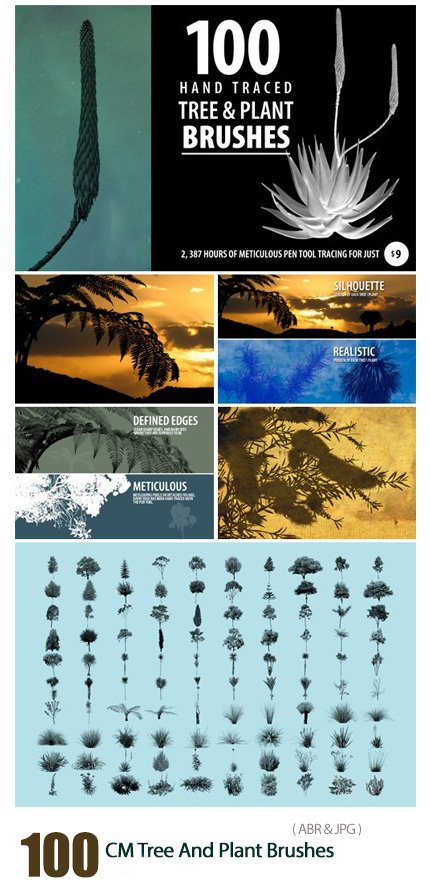
CM 100 Tree And Plant Brushes
100 Tree and Plant Photoshop Brushes 133 MB | With preview | ABR & JPG format
In this collection, you can see 100 Photoshop brushes entitled Tree and Plant, which are available for download in ABR and JPG formats on the site.
CM 100 Tree And Plant Brushes
100 hand traced tree and plant brushes with very sharp and clean edges. This is a very diverse collection of species from both hemispheres, so there is something for everyone. All plants have been hand traced with the pen tool (no magic wand) – perfect for silhouette compositions or use the realistic brushes for creative design.
Two .abr files are included – so you have a choice of realistic or silhouette brushes. The minimum brush height is 1646, but most are between 2000 and 2500 pixels high-wide.
Includes: 100 unique tree and plant Brushes (100 x realistic, 100 x silhouette). Resolution: up to 2500 px .2 ABR Files + Help file


The Brush tool allows you to paint on any layer, much like a real paintbrush.
It’s easy to use the Brush tool to paint in your document. Simply Import The Brushes, locate and select the Brush tool from the Tools panel, then click and drag in the document window to paint. You can also press the B key on your keyboard to select the Brush tool at any time.
Brush Size: If you want to make the brush larger or smaller, click the Brush Picker drop-down arrow in the Control panel, then adjust the Size slider. You can also press the bracket keys [ ] to quickly increase or decrease the brush size at any time.
Hardness: If you want to make the edges of the brush harder or softer, you can adjust the hardness from the same drop-down menu. A harder brush will have clear, defined edges, whereas a softer brush will have blurry, less-defined edges. For most situations, we recommend setting the hardness to 50% or less because it will help to make individual brush strokes less obvious.
Brush Tip: If you want to create a unique effect, there are different brush tips to choose from in the same drop-down menu. Some of these are designed to mimic real-life drawing tools like pens and markers, while others are simpler.
Opacity: By default, the opacity of your brush is set to 100%, meaning the brush will use the highest intensity. However, you can reduce the opacity of your brush to make it less intense.
➡️ ➡️ For More Brushes Products 😀 😀
System Requirement For Photoshop CC


Reviews
There are no reviews yet.