
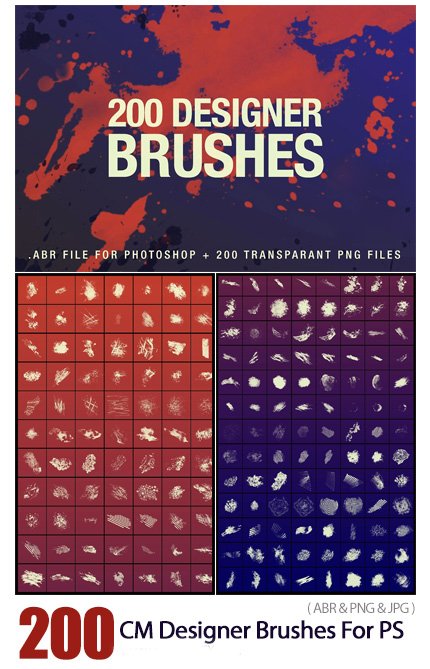
CM 200 Designer Brushes For Photoshop
- Compatible with: Adobe Photoshop
- File Size: 50.1 MB
- Dimensions: 1000 x 1000 px
200 Extraordinary Brushes for Photoshop
Refine your designs with this brush set of 200 creative brushes and be surprised by the unexpected results. Your digital artworks will instantly get that artistic touch.
Double-click on the .abr file to automatically add the brushes to the Brush Presets panel in Photoshop. Or permanently install the brushes by copying the .abr file inside the “Brushes” folder of Photoshop. All brushes are saved as PNG files for preview purpose. The PNG files can also be used as design elements if you don’t want to load the ABR file into Photoshop.
What’s included
- .abr file for Photoshop
- 200 PNG files
- Documentation
CM 200 Designer Brushes For Photoshop


The Brush tool allows you to paint on any layer, much like a real paintbrush.
It’s easy to use the Brush tool to paint in your document. Simply Import The Brushes, locate and select the Brush tool from the Tools panel, then click and drag in the document window to paint. You can also press the B key on your keyboard to select the Brush tool at any time.
Brush Size: If you want to make the brush larger or smaller, click the Brush Picker drop-down arrow in the Control panel, then adjust the Size slider. You can also press the bracket keys [ ] to quickly increase or decrease the brush size at any time.
Hardness: If you want to make the edges of the brush harder or softer, you can adjust the hardness from the same drop-down menu. A harder brush will have clear, defined edges, whereas a softer brush will have blurry, less-defined edges. For most situations, we recommend setting the hardness to 50% or less because it will help to make individual brush strokes less obvious.
Brush Tip: If you want to create a unique effect, there are different brush tips to choose from in the same drop-down menu. Some of these are designed to mimic real-life drawing tools like pens and markers, while others are simpler.
Opacity: By default, the opacity of your brush is set to 100%, meaning the brush will use the highest intensity. However, you can reduce the opacity of your brush to make it less intense.
➡️ ➡️ For More Brushes Products 😀 😀
System Requirement For Photoshop CC


Reviews
There are no reviews yet.