
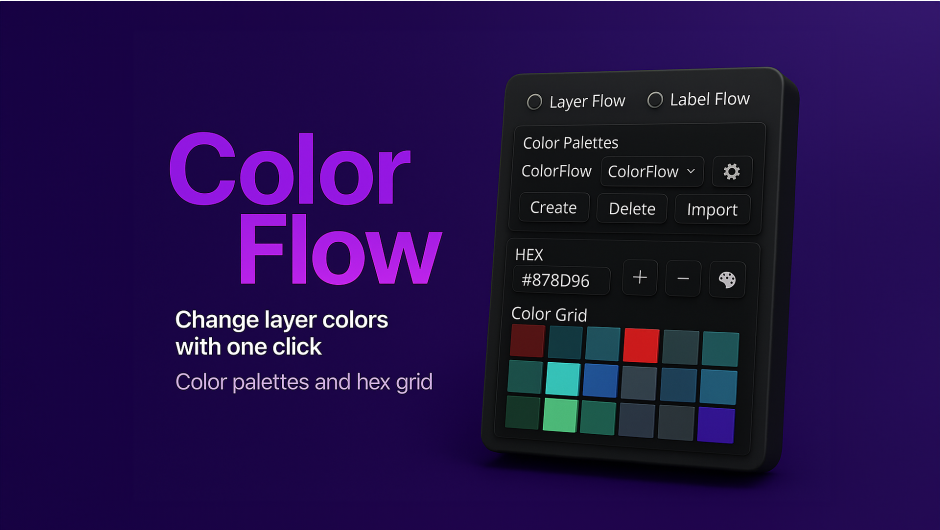
ColorFlow for After Effects
colorflow script
ColorFlow v1.5.3 for After Effects – Professional Color Palette Manager & Label Organizer
Download ColorFlow v1.5.3 for After Effects on Windows and Mac, a powerful color management script that streamlines how you create, save, and apply color palettes across your projects. Featuring a custom color wheel, multiple palette generation tools, and an advanced label management system, ColorFlow eliminates the repetitive task of manually recreating brand colors or design palettes for every new composition .
Key Features of ColorFlow v1.5.3:
- Instant Color Application: Apply source colors or add fill effects to any layer with a single click—works with solids, shape layers, text layers, footage, and more
- Advanced Label Management: Dedicated tag panel for organizing layers efficiently with intuitive visual controls
- Smart Keyboard Shortcuts:
- Ctrl + Click a color: Select all layers using that color
- Shift + Click a color: Change stroke color
- Right-click a color: Add fill effect with that color
- Ctrl + Click a label: Select all layers with that label
- Shift + Click a label: Toggle shy mode on selected layers
- Seamless Palette Import: Easily import, edit, and apply custom color palettes from external sources
- Advanced Color Harmony: Automatically generate triadic, analogous, complementary, and tonal variations from any base color
- Custom Color Wheel: Create and save unlimited color palettes as reusable .aepal files for instant recall across any project
- Universal Language Support: v1.5.3 makes color property access language-independent, ensuring full functionality in any After Effects language environment (Japanese, French, German, etc.)
- Cross-Platform Support: Works on both Windows and Mac systems with After Effects 2026, 2025, 2024, 2023, 2022, 2021, 2020, and CC 2019
Perfect For:
- Motion graphics artists managing multiple projects with consistent brand colors
- Designers needing quick access to professional color schemes and harmonies
- Studios wanting to maintain color standards across team projects
- Anyone tired of manually recreating color palettes for every new composition
- UI/UX designers working with Material Design color specifications
System Requirements:
- Adobe After Effects 2026, 2025, 2024, 2023, 2022, 2021, 2020, CC 2019
- Windows 10/11 (64-bit) or macOS
- 4GB RAM minimum (8GB+ recommended)
- 25MB available disk space
- Enable “Allow Scripts to Write Files and Access Network” in Preferences > Scripting & Expressions
Installation:
Copy the script file to your After Effects ScriptUI Panels folder:
- Windows:
C:\Program Files\Adobe\Adobe After Effects [version]\Support Files\Scripts\ScriptUI Panels\ - Mac:
/Applications/Adobe After Effects [version]/Scripts/ScriptUI Panels/
Access via Window menu > ColorFlow
Note: Version 1.5.3 introduces universal language support, ensuring the script works perfectly in any After Effects language environment. The included tutorial helps you master the complete workflow .
Easily manage colors and labels in After Effects
With ColorFlow, you can create custom palettes, quickly apply colors to any layer type, organize labels efficiently, and streamline your workflow with intuitive shortcuts.
Stop Wasting Time Managing Colors in After Effects.
If you’ve ever copied hex codes, applied Fill effects manually, or fought messy comps—ColorFlow was built for you. Create palettes, apply colors in one click, generate harmonies, and control labels fast. Trusted by more than 300 motion designers worldwide.

One-Click Color Apply (No Manual Fill Work)
Apply colors instantly to text, shapes, solids, footage, comps—and even the comp background.

Build Your Own Palettes
Create, edit, reorder and name palettes so every project starts organized.

Extract Colors (Even from Images and Videos)
Turn comps, images, or footage into clean palettes in seconds—no guessing, no hunting.

Import From Anywhere
Paste from Adobe Color, Coolors, CSS/JSON, or any text—ColorFlow extracts, cleans, and removes duplicates.

Label Control for Large Comps
Select, solo, invert, and organize layers by label—fast navigation when timelines get heavy.

Color Harmonies (Make It Look Right, Faster)
Generate complementary, triadic, analogous, tetradic schemes—and instant light/dark shades.
Try ColorFlow Right Here
Test the base functions with the live ColorFlow demo.
Watch It In Action
Elevate your motion graphics workflow with premium collection of After Effects plugins. Whether you are a seasoned professional or just starting your VFX journey, powerful tools designed to streamline complex tasks, unlock creative possibilities, and save you hours of rendering time. From stunning glitch effects and seamless transitions to advanced 3D extrusion and text animation tools, each plugin in our library is rigorously tested for compatibility with the latest versions of Adobe after Effects. Enhance your video production value today and download industry-leading plugins that help you create breathtaking visuals without the technical headaches. Browse our full range and find the perfect extension to supercharge your editing suite now.
➡️ ➡️ For more after effects Plugins 😀 😀
➡️ ➡️ System requirements AE
Reviews
There are no reviews yet.