

Crazy Shapes for After Effects
Primary Keyphrase: path animation tools
Description:
Download Crazy Shapes 1.1.7, a powerful After Effects extension that expands the possibilities of path-based animation with intuitive rigging tools and dynamic effects . Create squash and stretch, wavy animations, secondary motions, and complex character rigs in just a few clicks—without the limitations of traditional tools .
With Crazy Shapes, you can expand the possibilities of Path work in After Effects. Make rigs, add cool animations in a few clicks, and use extra tools to make your work easy and fun.
Crazy Shapes uses two types of animation: looped animations work without keyframes directly inside the path, controllable with simple sliders, while half-automated animations add secondary actions to your prepared illustrations . The result is faster workflows and creative possibilities that standard After Effects tools cannot achieve .
Key Features of Crazy Shapes 1.1.7:
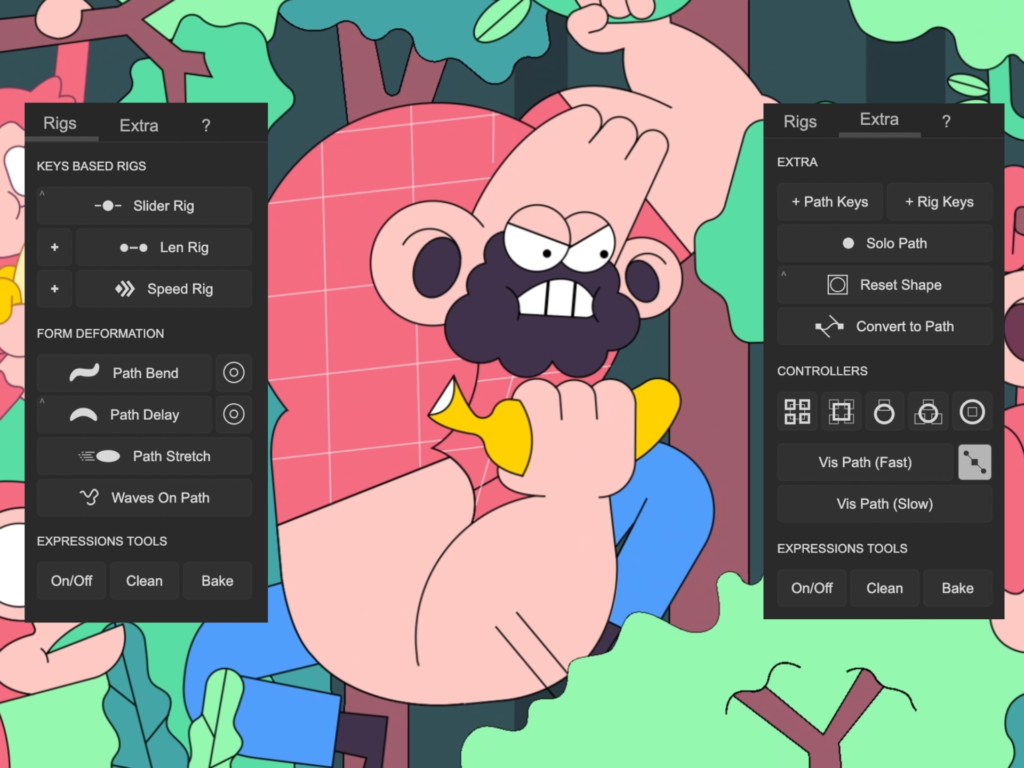
- Path Bend & Delay: Create looped rotation animations on path points with Length Delay, Bend Amplitude, and Speed controls—adds organic secondary motion based on existing animations
- Path Stretch: Dynamically stretch shapes in response to movement with adjustable deformation styles, smoothing controls, and elastic animation options
- Waves on Paths: Generate complex, looped wave animations combining multiple waves with controls for amplitude, frequency, time offset, and noise
- Slider Rig (Slideric): Link selected properties to a single slider for instant control over complex animations—perfect for time-based rigs
- Lenric Limb Rigging: Advanced tool for creating arms, legs, and squash/stretch structures with three-keyframe method (squash, relaxed, stretch)
- Support Tools: Reset shape positions/rotations, link nulls to path points (5 ways), convert parametric shapes to paths, and disable unnecessary inner shape groups
- Bake Function: Convert all expressions to keyframes with one button for optimized performance and web/app animation export
- Clean & On/Off: Remove all expressions or only Crazy Shapes expressions from selected layers
- Visualize Paths: See path points and tangents with fast or accurate visualization modes
- Range Group Control: Reduce deformation for points closer to anchor point for smoother, more natural animations
Version 1.1.7 Update (Nov 20, 2024) :
- Updated license framework
- Based on v1.1.6 fixes for Slider Rig with 3D layers and Time Remap property
Perfect For:
- Motion graphics artists creating organic character animations with squash and stretch
- VFX designers needing dynamic path deformations and wave effects
- Character animators rigging limbs, tails, and tentacles
- Anyone wanting to add secondary motion and complex path animations without manual keyframing
System Requirements :
- Adobe After Effects 2025, 2024, 2023, 2022, 2021, 2020
- Windows 10/11 (64-bit) or macOS
- 4GB RAM minimum (8GB+ recommended)
- 100MB available disk space
- Enable “Allow Scripts to Write Files and Access Network” in Preferences

We prepared a set of tools to process Path. They help to make squash and stretch, wavy animation, secondary actions, and more. Rig tools help to connect prepared illustrations, which cannot be achieved with other classic tools.
The scripts use two types of animation. Looped animations work without any keys and are created directly inside the path. So with a few sliders, you can change full animation. Half-automated animations add secondary actions to your prepared illustrations.
These features will speed up your workflow and extend possibilities.
To the basic tools, there are some supporting tools:
- Reset position, rotation, and scale inside the shape layer, including the path space coordinates.
- Link Nulls with Path points in 5 ways.
- Convert all parametric shapes to the path or all expressions to keyframes with one button.
- Disable the visibility of unnecessary inner groups of shapes.

Custom rigs
Don’t limit your illustrations. Expressions will adjust to your tasks.

Add extra details
Our tools add animation to illustration that is hardly achieved with standard tools. Without any effects and extra layers.

Secondary Actions
Add more details faster, just in one click, depending on the prepared main motion.

Path Stretch
Stretch your path like never before. You can use any shape illustration and control the stretch style with additional controllers.

Export
All animations in our scripts work on expressions, so you can easily convert them to keys and use them as web or app animations.

Support Tools
The extension also includes rich tools to support work with path, like reset path, link path to nulls, visualize points, cleaning expressions, and more.
How does it work?
We prepared two options. Take a look at the video tutorial and get familiar with the possibilities and features it can provide. Also, we provide widely described docs in Notion. All information is organized and illustrated with videos and gifs. Get Fun!

Tutorials
Elevate your motion graphics workflow with premium collection of After Effects plugins. Whether you are a seasoned professional or just starting your VFX journey, powerful tools designed to streamline complex tasks, unlock creative possibilities, and save you hours of rendering time. From stunning glitch effects and seamless transitions to advanced 3D extrusion and text animation tools, each plugin in our library is rigorously tested for compatibility with the latest versions of Adobe after Effects. Enhance your video production value today and download industry-leading plugins that help you create breathtaking visuals without the technical headaches. Browse our full range and find the perfect extension to supercharge your editing suite now.
➡️ ➡️ For more after effects Plugins 😀 😀
➡️ ➡️ System requirements AE
Reviews
There are no reviews yet.