
Explode Shape Layers v3.5
Primary Keyphrase: shape layer management script
Description:
Download Explode Shape Layers v3.5 for After Effects, a powerful script that revolutionizes how you work with shape layers by letting you explode and merge layers for complete control . Perfect for designers dealing with complex Illustrator imports, this essential tool splits each shape into its own individual layer, removes annoying artboard artifacts, converts Illustrator layers into editable shape layers, and provides one-click selection for fills and strokes .
Take control of your shape layers! Explode & merge for greater precision.
Whether you’re cleaning up imported artwork or organizing complex compositions, Explode Shape Layers streamlines your workflow with intuitive controls. The script includes a convenient headless version that can be executed directly without opening the panel—perfect for toolbar integration—with modifier keys for different functions .
Version 3.5.x Key Features:
- Explode Shape Layers: Split any shape layer into individual layers for finer control and easier access—no more digging through nested groups
- Merge Multiple Layers: Combine several shape layers together into a new, consolidated layer
- Convert Illustrator Layers: One-click conversion of .ai, .pdf, and .eps files into editable shape layers—now also supports AE text layers to shape layers (v3.5.0+)
- Remove Artboard Artifacts: Eliminate empty artboard elements that appear when converting Illustrator files with non-100% opacity or elements outside the frame
- Select Fills & Strokes: One-click buttons to select all fills or strokes in your comp—hold shift to find elements with the same color as selected
- Headless Version: Run the script directly without UI panel using modifier keys (Alt/Option to merge, Shift to delete source, Ctrl/Cmd to use selected shape groups)
- Center Anchor Point: Automatically center anchor points on converted or exploded layers
- Broad Compatibility: Works with After Effects 2025 down through CS5.5 on both Windows and Mac
Version 3.5.4b Update (Dec 2024): Added manifest for better installation using aescripts manager app
Version 3.5.4 Update (Feb 2024): Added MacOS Monterey and newer support, changed options hotkey modifier from “ctrl/meta” to “ctrl/meta AND alt”, updated licensing framework, fixed CONVERT layers not respecting solo switch and EXPLODE path shape errors
Version 3.5.3 Update (Jul 2021): Added error messages, EXPLODE now works with nested shape groups
Perfect For:
- Motion graphics artists importing complex Illustrator artwork
- Designers needing to organize and manage multiple shape layers
- Anyone tired of manually separating shapes or dealing with artboard artifacts
- Studios wanting efficient shape layer workflows for animation and compositing
System Requirements:
- Adobe After Effects 2025, 2024, 2023, 2022, 2021, 2020, CC 2019, CC 2018, CC 2017, CC 2015.3, CC 2015, CC 2014, CC, CS6, CS5.5, CS5
- Windows 10/11 (64-bit) or macOS (Monterey and newer supported)
- 4GB RAM minimum (8GB+ recommended)
- 50MB available disk space
Note: Standard users should install the main file to their ScriptUI folder for a dockable panel. The headless version is ideal for toolbar integration with ft-toolbar2 or The Commander .
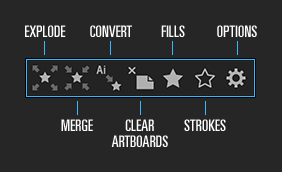
Do you deal with a lot of shape layers, or shape layers from Adobe Illustrator? Explode will take a shape layer and split each shape out into its own individual layer, for finer control & easier access. Alternatively, you can Merge multiple shape layers together into a new layer!
Tired of having to right-click your .ai layer to make it into a shape layer? Use Convert!
If any of your Illustrator layers have non-100% opacity or go outside of the frame, you’ve probably noticed that converting brings in an empty artboard artifact that gets in the way. No more! Remove it with Remove Artboard.
Now, your new shape layers probably have a ton of strokes and fills that need adjusting– that’s what Select Fills and Select Strokes are for. One-click buttons to select all fills or all strokes in your comp, or hold shift to find any fills or strokes with the same colour as the selected.


(Tap to view)
ESL 3 Tutorial
Elevate your motion graphics workflow with premium collection of After Effects plugins. Whether you are a seasoned professional or just starting your VFX journey, powerful tools designed to streamline complex tasks, unlock creative possibilities, and save you hours of rendering time. From stunning glitch effects and seamless transitions to advanced 3D extrusion and text animation tools, each plugin in our library is rigorously tested for compatibility with the latest versions of Adobe after Effects. Enhance your video production value today and download industry-leading plugins that help you create breathtaking visuals without the technical headaches. Browse our full range and find the perfect extension to supercharge your editing suite now.
➡️ ➡️ For more after effects Plugins 😀 😀
➡️ ➡️ System requirements AE
Reviews
There are no reviews yet.