
FacePro for After Effects
facepro script
FacePro v1.0.0 for After Effects – AI-Powered Facial Animation & Tracking Toolkit
Download FacePro v1.0.0 for After Effects on Windows and Mac and Facepro v1.1.0 windows, a powerful AI-driven toolkit that revolutionizes facial animation and tracking. Automatically detect, track, and animate facial features with unprecedented accuracy—perfect for character animation, VFX, and motion graphics projects requiring realistic facial movements.
Key Features of FacePro v1.0.0:
- AI-Powered Face Detection: Automatically identifies and tracks facial features including eyes, eyebrows, nose, mouth, and facial contours with high precision
- Real-Time Tracking: Continuous facial tracking that adapts to movement, rotation, and expression changes throughout your footage
- Expression Mapping: Map detected facial expressions to animated characters or graphics—smiles, frowns, eyebrow raises, and more trigger corresponding animations
- Landmark Data Output: Export detailed facial landmark data for use in other applications or for custom animation workflows
- Null Layer Generation: Automatically creates null layers for each tracked facial feature, enabling precise control and parenting
- Multi-Face Support: Track and animate multiple faces within the same composition simultaneously
- Compositing Ready: All tracking data integrates seamlessly with After Effects’ native tools and third-party plugins
- Real-Time Preview: See facial tracking and animation results instantly as you work
- Performance Optimized: Efficient processing for smooth previews even with complex facial tracking
- v1.0.0 Release: Initial stable version with core facial tracking and animation features
Perfect For:
- Character animators creating realistic facial animations for dialogue
- VFX artists replacing or enhancing faces in live-action footage
- Motion graphics designers creating reactive facial graphics
- Content producers building personalized, face-driven animations
- Anyone needing professional facial tracking without complex manual setup
System Requirements:
- Adobe After Effects 2025, 2024, 2023, 2022
- Windows 10/11 (64-bit) or macOS
- GPU recommended for optimal AI performance
- 4GB RAM minimum (8GB+ recommended)
- 200MB available disk space
- Enable “Allow Scripts to Write Files and Access Network” in Preferences > Scripting & Expressions
Installation:
Copy the script file to your After Effects ScriptUI Panels folder:
- Windows:
C:\Program Files\Adobe\Adobe After Effects [version]\Support Files\Scripts\ScriptUI Panels\ - Mac:
/Applications/Adobe After Effects [version]/Scripts/ScriptUI Panels/
Access via Window menu > FacePro
Note: Version 1.0.0 is the initial release of this facial animation toolkit . The script’s AI-powered tracking makes complex facial animation accessible to creators at all skill levels .
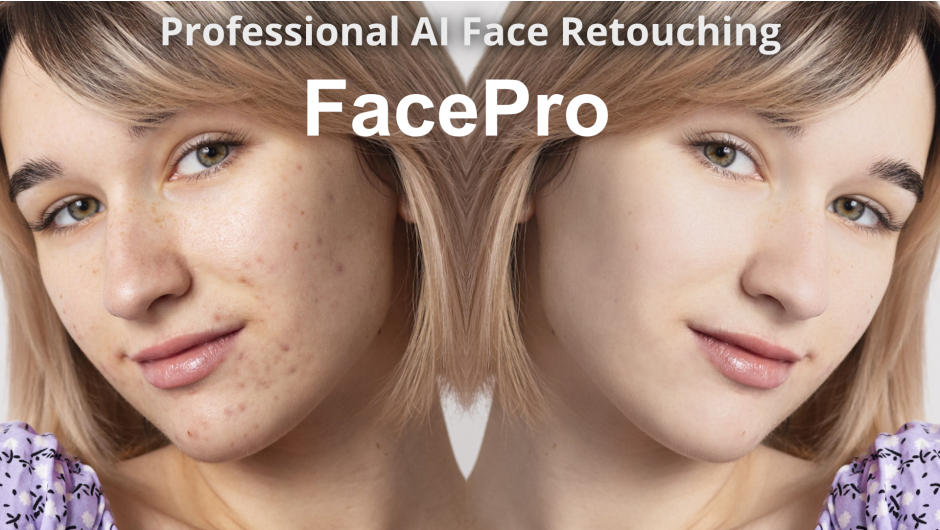
Effortlessly create stunning portraits with AI-powered face masking and retouching, including blemish removal, smoothing, and more.
FacePro, an advanced AI-powered face retouching tool, is designed to bring professional-grade portrait enhancement through the power of modern AI technology. It transforms complex edits into a seamless and intuitive process, hence achieves stunning and beautiful face looking quickly.
Built around a comprehensive facial analysis engine, this tool automatically detects faces with remarkable accuracy and consistency. The AI meticulously studies the facial landscape, intelligently generating a perfect, pixel-level skin mask by automatically isolating the skin from hair, eyes, eyebrows, lips, and background. In addition to the primary AI facial skin masking, FacePro provides alternative skin color-based masking. For ultimate adaptability, it also supports the integration of externally created masks.
FacePro employs a well-designed AI model specifically trained for blemish removal. It understands the context of the surrounding skin, seamlessly sampling and blending to remove spots, acne, and minor scars without affecting the surrounding skin structure.
Another key retouching engine focuses on smoothing skin while preserving the natural fine details. The advanced algorithm gently smoothens uneven skin texture while intelligently preserving the crucial details, and then delivers natural retouching results that looks natural healthy, and visually appealing.
FacePro empowers you with a full suite of supplementary tools for complete creative freedom, including whiten, shine removal and color correction tools.
Moreover, FacePro plugin is GPU accelerated for Adobe After Effects and Adobe Premiere Pro, and available for Mac and Windows.
Simple and user friendly controls.
Integrated with well-trained algorithms for AI face masing and skin retouching. Obtain professional and natrual retouching with ease.

Blemish removal with ease
Accurately and seamlessly remove blemishes, acne, pimples, and minor scars with just one slider. Well-designed AI model specifically trained for blemish removal. It understands the context of the surrounding skin, seamlessly sampling and blending to remove spots, acne, and minor scars without affecting the surrounding skin structure.

Smooth Face and Look Gorgeous
Smoothing skin while preserving the natural fine details. The advanced algorithm gently smoothens uneven skin texture while intelligently preserving the crucial details, and then delivers natural retouching results that looks natural healthy, and visually appealing.

Whitening
FacePro empowers you with a full suite of supplementary tools for complete creative freedom. The face whitening provides a quick way to brighten, lightens, and evens out facial skin tones to create a cleaner, more luminous, and polished complexion.

Shine Removal
Shine Removal intelligently analyzes and eliminates undesirable specular highlights by leveraging localized exposure and texture correction to deliver a refined and natural result.

Color Correction
The Color Correction controls provide granular control over hue, saturation, lightness, density and contrast for the skin, enabling you to craft a specific mood and style that enhances the entire portrait. While designed for natural correction, extreme values can be used for creative or stylized effects.

AI Face Mask
With the powerful AI technology, FacePro instantly detects and analyzes faces and generates pixel-level skin mask by automatically isolating the skin from hair, eyes, eyebrows, lips, and background. The face mask controls allow you to further view, refine and adjust the skin mask. Moveover, you can retouch the portrait with multiple faces.

Workflow
Once the FacePro is applied, it automatically detects faces and generates skin mask. And all the retouching adjustments are applied on the skin mask area. Therefore, the workflow is extremely simple:
1. Apply Blemish Removal, if desired.
2. Adjust the Smoothing and Details. And the other controls such as whitening, shine removal and color correction.
3. Review the fask mask, edit and refine it if necessary.

Elevate your motion graphics workflow with premium collection of After Effects plugins. Whether you are a seasoned professional or just starting your VFX journey, powerful tools designed to streamline complex tasks, unlock creative possibilities, and save you hours of rendering time. From stunning glitch effects and seamless transitions to advanced 3D extrusion and text animation tools, each plugin in our library is rigorously tested for compatibility with the latest versions of Adobe after Effects. Enhance your video production value today and download industry-leading plugins that help you create breathtaking visuals without the technical headaches. Browse our full range and find the perfect extension to supercharge your editing suite now.
➡️ ➡️ For more after effects Plugins 😀 😀
➡️ ➡️ System requirements AE
Reviews
There are no reviews yet.