
Flow V1.5.2
Primary Keyphrase: keyframe easing script
Description:
Download Flow v1.5.2 for After Effects, a powerful and intuitive curve editor that revolutionizes how you adjust keyframe easing. Created by Zack Lovatt and renderTom, Flow replaces After Effects’ aging, confusing graph editor with a modern, snappy, and normalized environment—no more fighting with speed and influence or wrestling with complex expressions .
Flow gives you complete control over animation curves through two main components. The Graph Editor lets you click and drag handles to define curve shapes that translate directly into your animation, with the ability to read values from existing AE keyframes . The Library system lets you save your custom curves as presets, build personal easing libraries, and share them with others—or import preset packs from top animators .
Flow provides a simple, clean, and intuitive curve editor to adjust your keyframe easing.
Now with multi-library support, responsive overshoot & undershoot, kbar export, and more!
Version 1.5.2 Key Features:
- Multi-Library Support: Create and manage multiple easing libraries for different projects or styles
- Responsive Overshoot Control: Fine-tune graph values with responsive overshoot and undershoot behavior
- Dynamic Controls Location: Adaptable interface that responds to your workspace
- KBar Export: Export your entire library directly to KBar for streamlined toolbar access
- Expression Application: Apply curves as expressions instead of keyframes when needed
- 25 Built-in Presets: Includes commonly-used animation curves based on Robert Penner’s easing functions
- Curve Copy/Paste: Quickly copy or paste curves as cubic-bezier values—familiar to anyone using CSS animations
- Shareable Libraries: Export your custom easing libraries to share with team members or the community
- Import Additional Packs: Download and import preset packs from renowned animators including @Oddernod, @aembury, @FoughtTheLaw, and more
- Keyboard Shortcuts: Full shortcut support with Shift/Alt/Ctrl modifiers for quick easing type selection
- Responsive Layout: Interface adapts from wide to narrow, vertical to horizontal—hide the graph and use only the library when needed
Perfect For:
- Motion graphics artists wanting professional easing without AE’s complex graph editor
- Animators building reusable easing libraries for consistent animation styles
- Teams needing to share standardized easing curves across projects
- Anyone tired of fighting with speed and influence controls
- CSS developers familiar with cubic-bezier transitions who want the same control in After Effects
System Requirements:
- Adobe After Effects 2024, 2023, 2022, 2021, 2020
- Windows 10/11 (64-bit) or macOS
- 4GB RAM minimum (8GB+ recommended)
- 50MB available disk space
- Enable “Allow Scripts to Write Files and Access Network” in Preferences
What’s Flow?
Flow gives After Effects an intuitive curve editor to adjust keyframe easing.
Gone are the days of fighting with speed & influence (what do those even mean?!), or navigating through some bloated 8000-features-in-one garbage pile to find their easing system – just make a curve, hit Apply and you’re gold!
Flow Features
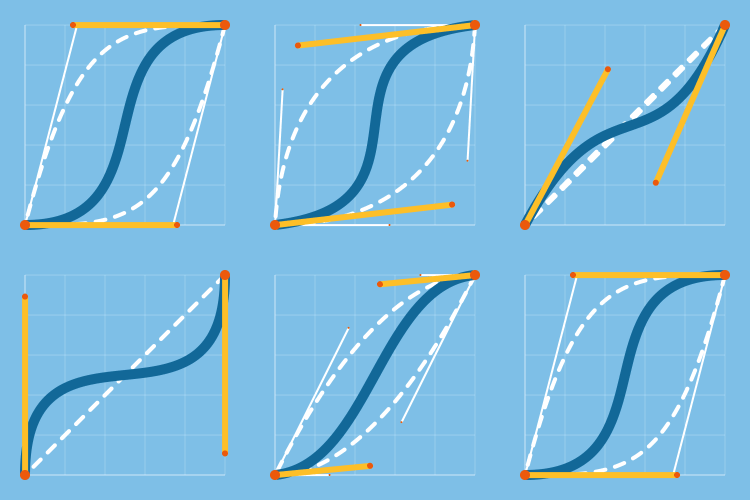
Flow consists of two main components: the Graph Editor and the Library.
The graph editor is all about easing – lose AE’s internal graph editor in favour of a modern, snappier, normalized environment.
The library is all about presets – have you come up with some on-brand, snappy easing curves? Have a go-to animation style and want to bring it everywhere you go? Save your curve as a preset, and build out your own custom easing libraries.
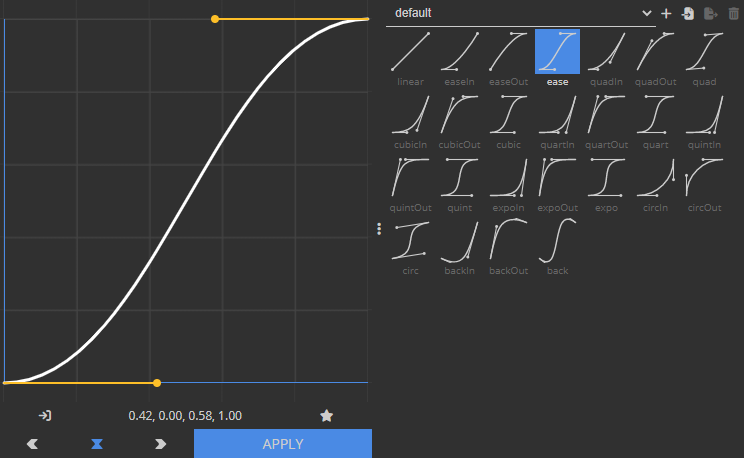
Looking to kickstart your presets library?
Flow ships with 25 commonly-used animation curves, or you can download some additional preset packs below.
| Flow’s built-in default presets | |
                        | |


@FoughtTheLaw | Matthew Law’s time-saving Animation Presets | Download |
|---|---|---|
          | ||
@JustinLawes | Justin’s animation Presets for Flow | Download |
|---|---|---|
          | ||
@Workbench_tv | Workbench Flow’s library | Download |
|---|---|---|
          | ||
| Google’s Material Design Easing Curves | Download | |
    | ||
Elevate your motion graphics workflow with premium collection of After Effects plugins. Whether you are a seasoned professional or just starting your VFX journey, powerful tools designed to streamline complex tasks, unlock creative possibilities, and save you hours of rendering time. From stunning glitch effects and seamless transitions to advanced 3D extrusion and text animation tools, each plugin in our library is rigorously tested for compatibility with the latest versions of Adobe after Effects. Enhance your video production value today and download industry-leading plugins that help you create breathtaking visuals without the technical headaches. Browse our full range and find the perfect extension to supercharge your editing suite now.
➡️ ➡️ For more after effects Plugins 😀 😀
➡️ ➡️ System requirements AE
Reviews
There are no reviews yet.