
Hextractor for After Effects
hextractor script
Hextractor V1.2.4 for After Effects – Smart Color Palette Extractor & Manager
Download Hextractor V1.2.4 for After Effects on Windows and Mac, a powerful script that instantly extracts hex color codes from text, layers, or images and generates color controls and swatches in dedicated compositions. Save and load palettes to easily switch between projects—perfect for maintaining brand consistency across multiple clients or campaigns .
Key Features of Hextractor V1.2.4:
- Instant Color Extraction: Extract hex codes from text, selected layers, or images with one click—no manual entry required
- Dedicated Color Controls: Automatically generates color controls and visual swatches in their own composition for easy management
- Save/Load Palettes: Store and recall color palettes to quickly switch between projects or client brand guides
- Team Sharing: Export saved palettes to share with colleagues for consistent color workflows
- Multi-Language Support: v1.2.4 adds improved handling for non-English After Effects versions
- Smart Layer Detection: Intelligently extracts colors from linked multilayer Illustrator and Photoshop files, sampling only the layers actually used in your composition
- Cross-Platform Support: Works on both Windows and Mac systems
Perfect For:
- Motion graphics artists managing multiple brand color palettes
- Designers who frequently work with client brand guides containing hex codes
- Anyone needing to quickly build color schemes from reference images or text
- Teams wanting consistent color workflows across multiple projects
- Studios maintaining brand standards across diverse client work
System Requirements:
- Adobe After Effects 2025, 2024, 2023, 2022, 2021, 2020, CC 2019
- Windows 10/11 (64-bit) or macOS
- 4GB RAM minimum (8GB+ recommended)
- 25MB available disk space
- Enable “Allow Scripts to Write Files and Access Network” in Preferences > Scripting & Expressions
Installation:
Copy the script file to your After Effects ScriptUI Panels folder:
- Windows:
C:\Program Files\Adobe\Adobe After Effects [version]\Support Files\Scripts\ScriptUI Panels\ - Mac:
/Applications/Adobe After Effects [version]/Scripts/ScriptUI Panels/
Access via Window menu > Hextractor
Note: Version 1.2.4 includes improved handling for non-English After Effects versions and enhanced stability . The script’s ability to extract colors from text, images, and layered artwork makes it an essential tool for maintaining brand consistency across projects .
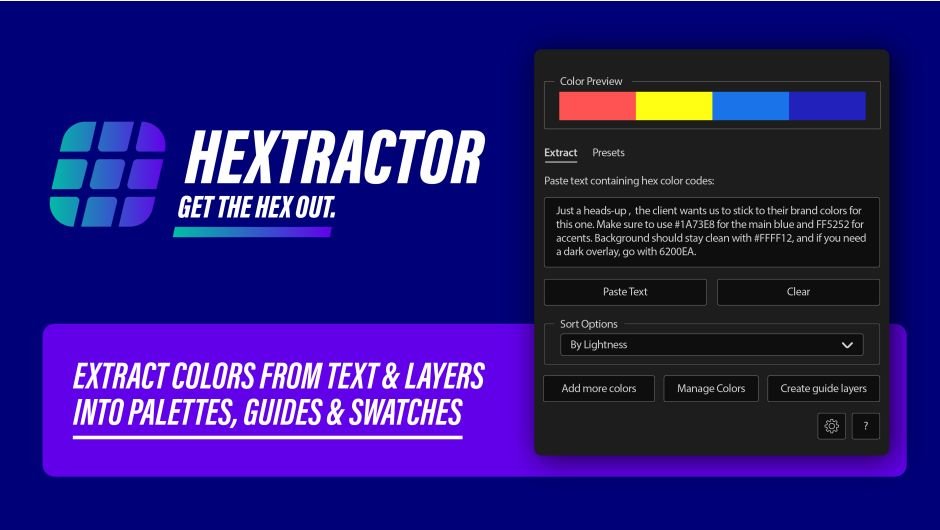
Extract colors from text and layers into palettes, guides and swatches.
HEXTRACTOR
Instantly extract hex color codes from text, layers, or images and generate color controls and color swatches in dedicated comps. Hextractor also allows you to save/load palettes so you can switch projects easily.

Extract Everything
Grab hex codes from pasted text, AE layers, or images. Then generate color controls automatically. No more manual typing or eyedropping. Perfect for pasting brand guides or email text.


Build Swatch Guides
Create color controls on a layer or build a comp with color swatches that have adjustable size and optional hex labels. Sort them by hue or lightness for clean, organized visuals. Perfect for reusing colors consistently across your project.
Save & Share Palettes
Save palettes for each client and load them back instantly. Share them with your team and stay consistent. No more “which red was that again?” moments.

Use Cases
- ✓Paste a full brand guide or client email containing hex codes and grab all the colors instantly
- ✓Build a color palette from selected layers or even images
- ✓Quickly switch between color schemes (perfect for juggling multiple clients or projects)
- ✓Share saved color palettes with your team
Elevate your motion graphics workflow with premium collection of After Effects plugins. Whether you are a seasoned professional or just starting your VFX journey, powerful tools designed to streamline complex tasks, unlock creative possibilities, and save you hours of rendering time. From stunning glitch effects and seamless transitions to advanced 3D extrusion and text animation tools, each plugin in our library is rigorously tested for compatibility with the latest versions of Adobe after Effects. Enhance your video production value today and download industry-leading plugins that help you create breathtaking visuals without the technical headaches. Browse our full range and find the perfect extension to supercharge your editing suite now.
➡️ ➡️ For more after effects Plugins 😀 😀
➡️ ➡️ System requirements AE
Reviews
There are no reviews yet.