
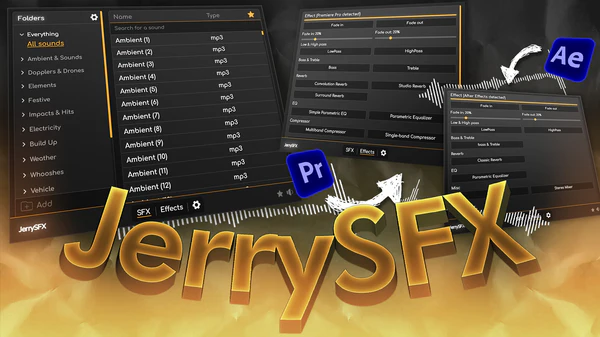
JryMedia JerrySFX for After Effects
jerrysfx script
JryMedia JerrySFX v1.0.1 for After Effects – Professional Sound Effects & Audio Integration Toolkit
Download JryMedia JerrySFX v1.0.1 for After Effects on Windows and Mac, a comprehensive sound effects library and audio integration tool designed specifically for motion graphics artists. Browse, preview, and apply hundreds of professional sound effects directly inside After Effects—perfect for syncing audio to your animations without switching between applications .
Key Features of JerrySFX v1.0.1:
- Built-in Sound Effects Library: Extensive collection of professionally recorded sound effects including whooshes, impacts, transitions, swishes, beeps, and more—all royalty-free for use in your projects
- One-Click Application: Select any audio effect and apply it directly to your composition with a single click—no file importing or timeline placement required
- Real-Time Preview: Preview sound effects instantly before adding them to your project, ensuring perfect match for your animation
- Smart Layer Placement: Audio layers automatically placed at the current time indicator, perfectly synced with your animation
- Customizable Volume Control: Adjust volume levels directly within the interface before adding audio to your composition
- Favorites System: Build your personal library of most-used sound effects for quick access across projects
- Search & Filter: Quickly find the perfect sound effect with keyword search and category filtering
- Works with Any Project: All sound effects are royalty-free and cleared for use in commercial and personal projects
- Cross-Platform Support: Works on both Windows and Mac systems
Perfect For:
- Motion graphics artists adding professional sound effects to animations
- Video editors needing quick access to royalty-free audio libraries
- Animators who want to sync audio without leaving After Effects
- Content creators producing engaging, audio-driven motion graphics
- Studios looking to streamline sound design workflows
System Requirements:
- Adobe After Effects 2025, 2024, 2023, 2022
- Windows 10/11 (64-bit) or macOS
- 4GB RAM minimum (8GB+ recommended)
- 200MB available disk space (for sound library)
- Enable “Allow Scripts to Write Files and Access Network” in Preferences > Scripting & Expressions
Installation:
Copy the script file to your After Effects ScriptUI Panels folder:
- Windows:
C:\Program Files\Adobe\Adobe After Effects [version]\Support Files\Scripts\ScriptUI Panels\ - Mac:
/Applications/Adobe After Effects [version]/Scripts/ScriptUI Panels/
Access via Window menu > JerrySFX
Note: Version 1.0.1 includes performance improvements and expanded sound library . The script’s integration of professional sound effects directly into After Effects makes it an essential tool for motion designers who want to add audio to their animations without breaking creative flow .
Feature list
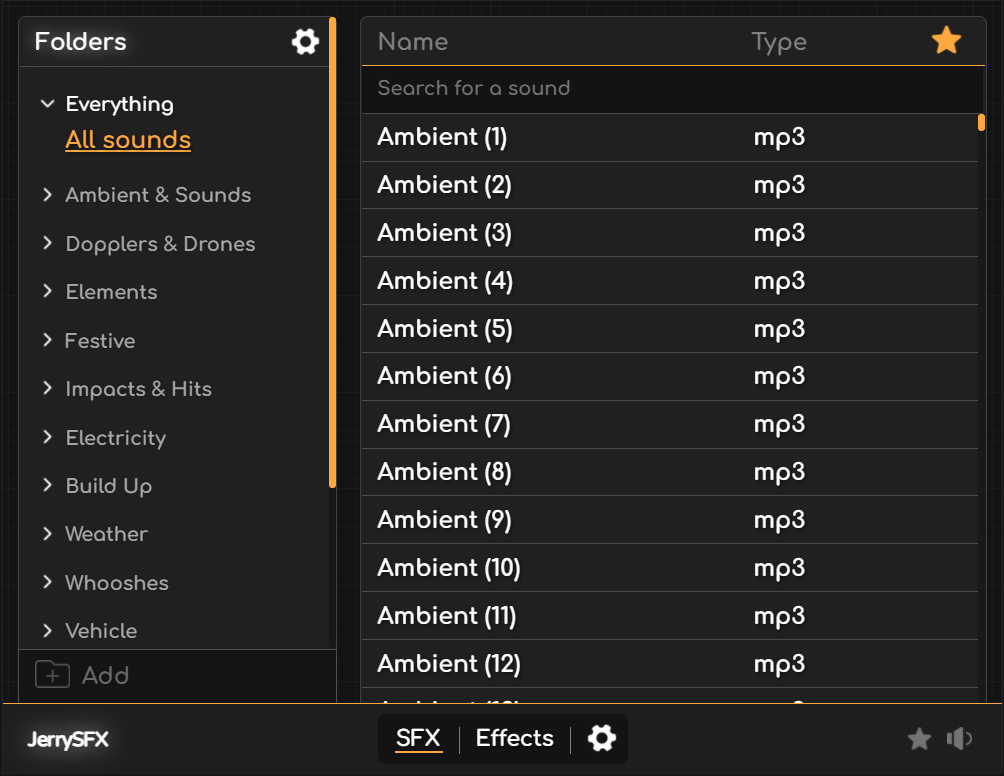
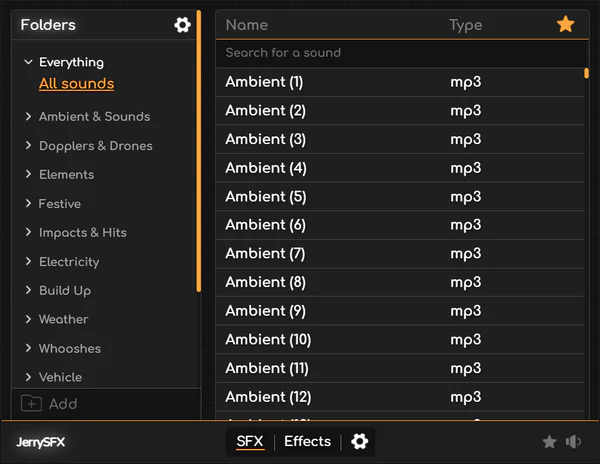
Sonic Control Hub: The Main Tab
JerrySFX offers a robust, pre-installed sound library that includes over 1,250 high-quality sound files. Each file is original, ensuring no overlap with other sound design providers, and they are all delivered in the highest available quality (256kbit). The files are carefully categorized to make navigation intuitive, with sections such as Ambient & Sounds, Dopplers & Drones, Elements, Festive, and more.
Personal Sound Library: Add your own custom sound effects to JerrySFX and organize them into personalized folders, allowing you to expand the library to fit your unique needs.
Instant Sound Previews: Hover over any sound file to hear a real-time preview. This feature provides immediate feedback, allowing you to quickly find the perfect sound for your project.
Interactive Audio Visualizer: As you hover over sounds, watch them come to life with a dynamic audio visualizer that syncs to the preview, enhancing the browsing experience.
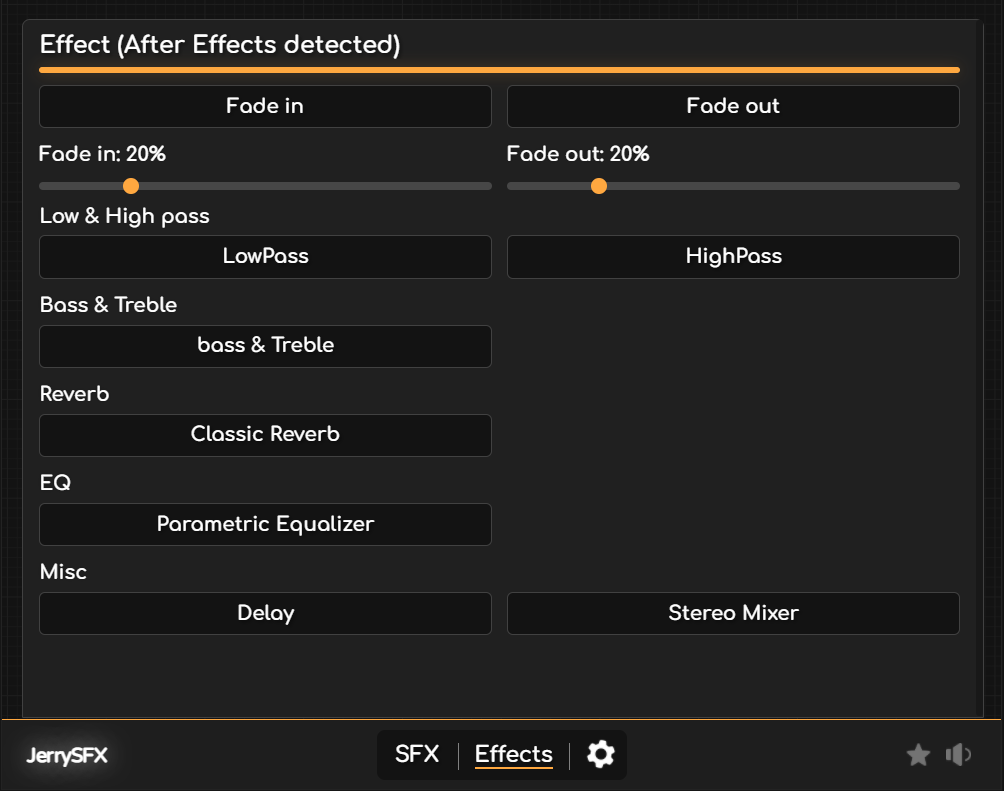
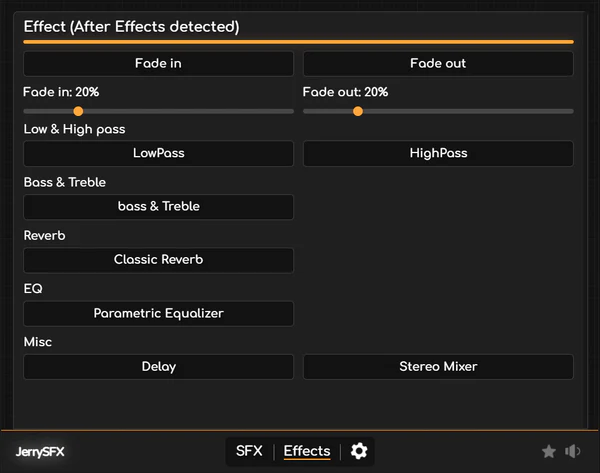
Seamless Audio Integration: Effects Tab for Adobe After Effects
In the Effects Tab for After Effects, JerrySFX allows you to instantly apply Adobe’s built-in sound effects to your selected audio with just a click. This streamlines the audio editing process by giving you direct access to essential sound adjustments without leaving the JerrySFX interface.
One-Click Audio Effects: Easily apply After Effects’ default sound effects—like High-Pass, Low-Pass, Bass, and Treble adjustments—by selecting your audio and hitting a button. No need for manual tweaking or complex setups.
Sound Enhancements on Demand: Whether you need quick frequency adjustments or subtle sound shaping, the integrated effects make your After Effects sound design workflow smoother and faster.
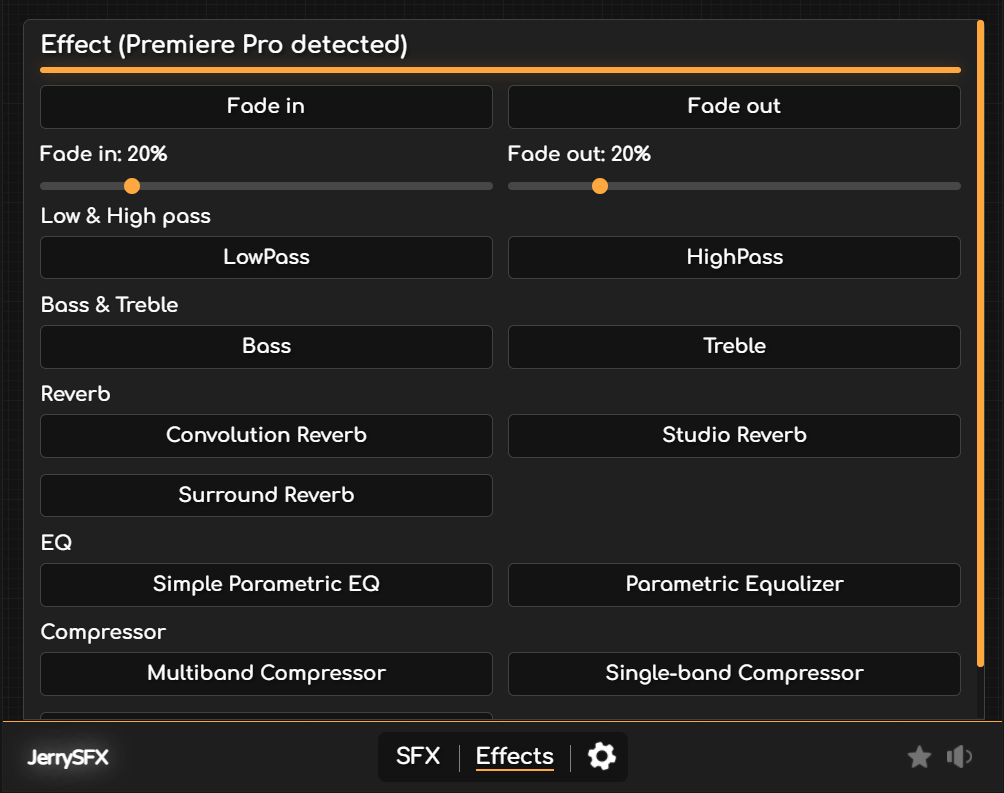
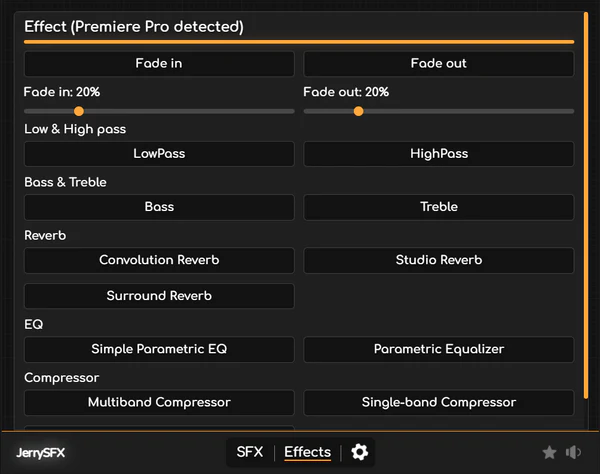
Effortless Sound Processing: Effects Tab for Adobe Premiere Pro
In the Effects Tab for Premiere Pro, JerrySFX enhances your workflow by making it faster and easier to apply the built-in audio effects that come with Premiere Pro.
Quick Application of Built-In Effects: Apply Premiere Pro’s pre-installed audio effects, such as Compressors, EQs, and Reverbs, with just a single click on your selected sound file. This streamlined approach saves time, allowing you to focus on the creative aspects of your project.
Efficient Sound Editing: Without adding new effects, JerrySFX simplifies the process of using Premiere Pro’s powerful sound design tools by making them more accessible and easier to apply within your timeline.
One-Click Workflow Enhancement: Select an audio clip and instantly add any of Premiere Pro’s default effects through JerrySFX’s intuitive interface, speeding up the audio editing process significantly.
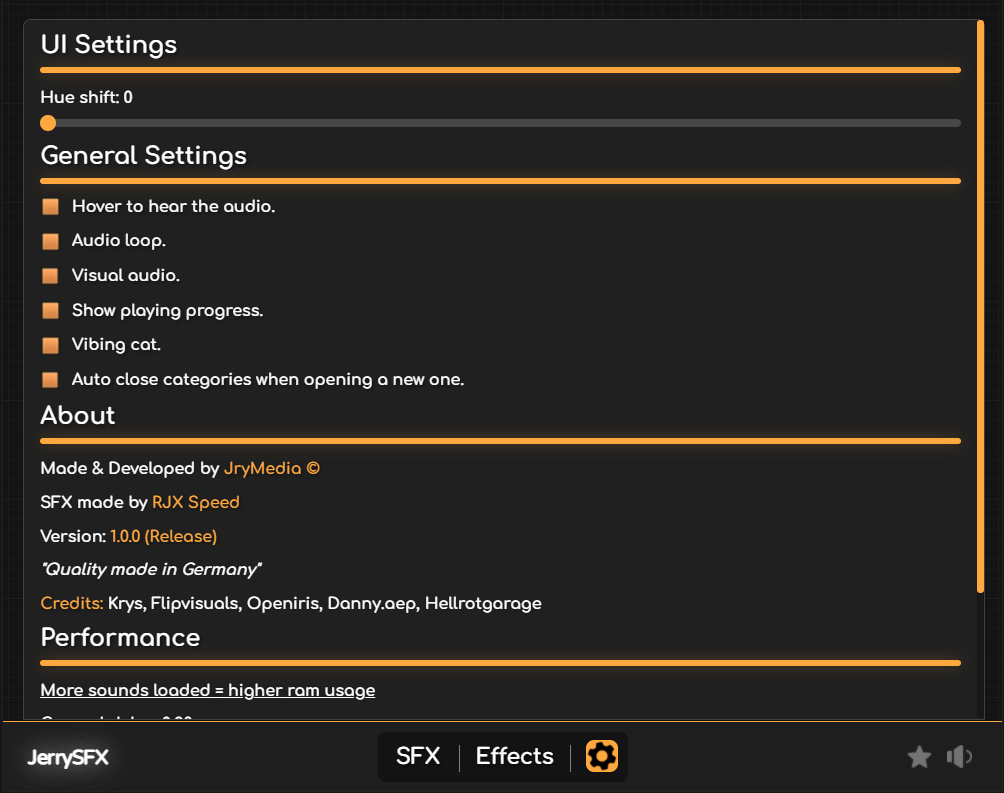
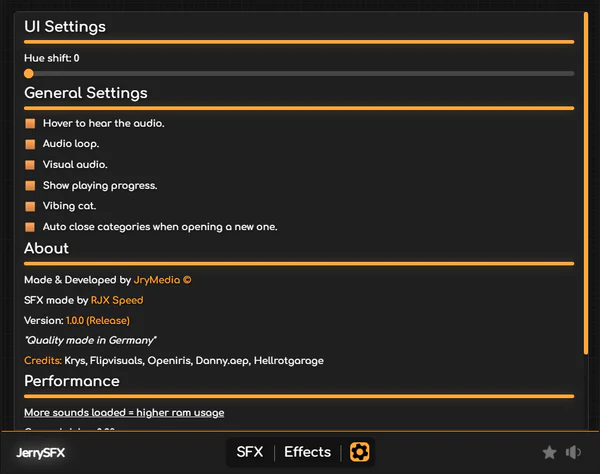
Ultimate Customization: The Settings Tab
The Settings Tab in JerrySFX is designed to offer a fully customizable user experience, letting you tailor the extension to match your workflow and creative needs. Key features include:
Sound Preview Toggle: Turn sound previews on or off when hovering over sound files.
Audio Looping: Enable the option for sound files to loop as you hover over them for continuous playback.
Playback Progress Bar: View the sound’s progress with a small, intuitive playback bar that displays how far along the preview has played.
Vibing Cat: Activate a fun “Vibing Cat” feature, where a dancing cat animates to the rhythm of your selected sounds, adding a playful touch to your editing sessions.
In addition, you’ll find a Performance Tab, where you can monitor the system’s performance as you work, ensuring that JerrySFX runs smoothly. Classic features from JerryFlow V2, such as color scheme personalization, are also available, letting you adapt the interface to your aesthetic preferences — and much more!
Ready to craft stunning soundscapes?
JerrySFX is more than just a sound design tool; it’s a versatile toolkit crafted to streamline your audio workflow and elevate your creative output. Take your projects to the next level with JerrySFX and transform how you design sound in Adobe After Effects and Premiere Pro.
Elevate your motion graphics workflow with premium collection of After Effects plugins. Whether you are a seasoned professional or just starting your VFX journey, powerful tools designed to streamline complex tasks, unlock creative possibilities, and save you hours of rendering time. From stunning glitch effects and seamless transitions to advanced 3D extrusion and text animation tools, each plugin in our library is rigorously tested for compatibility with the latest versions of Adobe after Effects. Enhance your video production value today and download industry-leading plugins that help you create breathtaking visuals without the technical headaches. Browse our full range and find the perfect extension to supercharge your editing suite now.
➡️ ➡️ For more after effects Plugins 😀 😀
➡️ ➡️ System requirements AE
Reviews
There are no reviews yet.