

Kease for After Effects
Primary Keyphrase: keyframe easing script
Description:
Download Kease v2.1.4 for After Effects on Windows and Mac, a powerful and intuitive keyframe easing script that transforms the tedious process of curve manipulation into a smooth, efficient workflow. With its minimal, discreet interface, Kease packs smart features that help you work faster—from simple easing presets to advanced curve copying and value transfer .
Kease is an Easing Tool for After Effects that aims to simplify and speed up your work.
You can instantly apply, save and edit basic and advanced easing curves like bounce, overshoot, or elastic effects.
Kease streamlines keyframe animation with multiple powerful tools. Simple Easing Presets offer one-click solutions for changing time interpolation, with modifier keys allowing you to apply easing to specific incoming, middle, or outgoing sections of your keyframe selection . Create your own presets by selecting keyframes, copying their data, and saving them to your personal library .
Version 2.1.4 Key Features:
- Simple Easing Presets: One-click application of smooth easing curves with modifier key support for targeting specific keyframe sections (Shift for incoming, Ctrl/Cmd for middle, Alt/Opt for outgoing)
- Extended Easing Presets: Apply complex easing with anticipation and overshoot effects that create additional intermediate keyframes for advanced motion
- Copy & Paste Easing Curves: Transfer easing curves between keyframes without altering values—copy with (C), paste easing with (E)
- Copy & Paste Values: Transfer keyframe values independently of timing—copy with (C), paste values with (V)
- Linearize Spatial Interpolation: Convert spatial properties (Position, Anchor Point) to linear with one click (L) with modifier key support
- Multi-Keyframe Operations: Copy or mirror multiple keyframes across layers and properties with current time indicator positioning
- Custom Keyboard Shortcuts: Full support for personalized shortcut mapping to speed workflow
- v2.1.4 Updates: Fixed UI bugs from previous updates; adjustable preset sizes in Settings panel; responsive preset library that adapts to panel size; more free presets available; various small adjustments and bug fixes
- Broad Compatibility: Works with After Effects CC 2019 through 2025 and higher on both Windows and Mac
Perfect For:
- Motion graphics artists seeking faster, more intuitive keyframe easing
- Animators wanting to copy and paste easing curves between properties
- Anyone tired of manual graph editor adjustments for complex animations
- Designers building personal easing libraries for consistent motion styles
- Users who need precise control over keyframe timing and values
System Requirements:
- Adobe After Effects CC 2019 through 2025 or higher
- Windows 10/11 (64-bit) or macOS
- 4GB RAM minimum (8GB+ recommended)
- 25MB available disk space
- Enable “Allow Scripts to Write Files and Access Network” in Preferences > Scripting & Expressions
Modifier Keys Reference :
- Windows: Shift (incoming), Ctrl (middle), Alt (outgoing)
- macOS: Shift (incoming), Cmd (outgoing), Opt (middle)
Installation:
- Copy the Kease folder to Adobe CEP extensions directory:
- Windows:
C:\Program Files (x86)\Common Files\Adobe\CEP\extensions\ - Mac:
/Library/Application Support/Adobe/CEP/extensions/
- Enable scripting access in Preferences
- Restart After Effects and access via Window menu > Extensions > Kease
Note: Free trial available with basic features; activation required for full functionality .
Simple vs Extended
Extended Easing Curves in Kease give you advanced control over easing, allowing you to shape and refine animations far beyond standard keyframe interpolation.
Simple Easing Curves
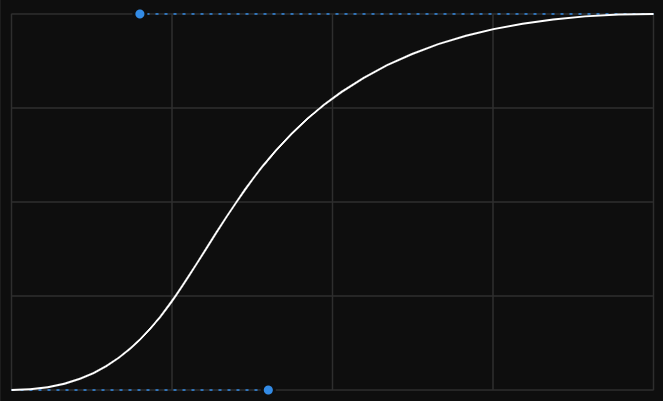
Easing curves are a foundational tool for any motion designer, and in Kease they are called “Simple.” They consist of two Bézier handles and affect the motion between two keyframes.
If you are aiming for more complex motion, you often end up combining multiple easing curves.
Extended Easing Curves
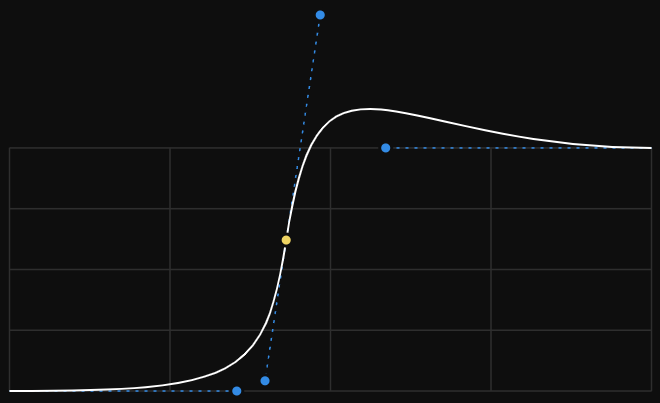
“Extended” curves, on the other hand, allow you to create a curve far more complex than a standard two-handle Bézier. Think of it as crafting a continuous, flowing motion over several keyframes and treating it as a single curve that can be applied elsewhere or saved as a preset.
Preset Library
A place for all your favorite easing curves, organized into groups, customizable in size and color, and optionally labeled by name or influence values.
The Library contains both Simple and Extended Presets.
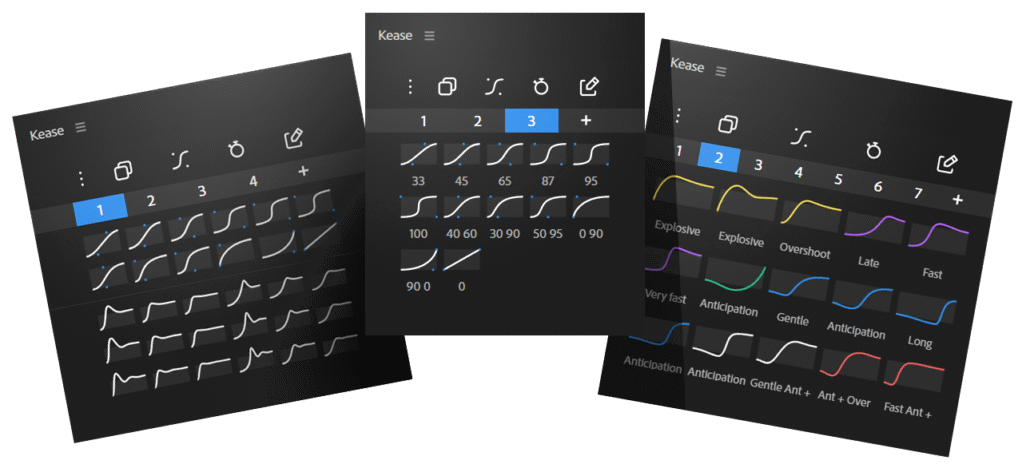
Intuitive UI
Organizing your preset library is straightforward, with drag-and-drop functionality that allows you to move individual presets or preset groups wherever you need them.
Plenty of options
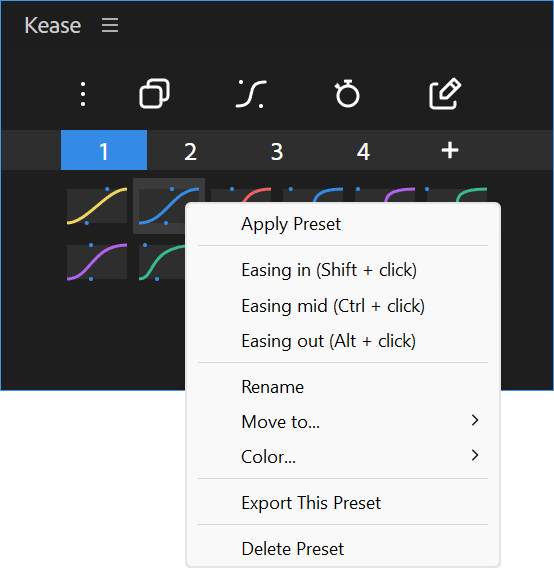
Right-click on a preset to open a feature-rich context menu and get a helpful reminder of all available shortcuts.
Simple Presets
They provide a one-click solution to adjust keyframe interpolation, controlling how an animation speeds up and slows down, making movements look smoother and more expressive.
Extended Presets
Easing curves on steroids
This unique and mind-blowing feature overcomes the limitations of standard easing curves. It automatically generates additional in-between keyframes, making it easy to create complex motions like overshoot, anticipation, bounce, and more.
Graph Editor
Kease Graph Editor brings a faster, more intuitive way to fine-tune your animation curves in After Effects. Built for speed and creativity, it lets you visualize, edit, save and apply Easing Curves effortlessly, both Simple and Extended.
Mirror handles
Move one handle of a Simple Preset’s Bezier curve and automatically mirror the opposite handle.
Windows: Ctrl + Alt + drag
macOS: Alt + Meta + drag
Intuitive Curve Control
Add and remove points
Win: Ctrl + click
Mac: Opt + click
Pull out the handles
Win: Alt+ click
Mac: Cmd + click
Independent move
Win: Alt + drag
Mac: Cmd + drag
Constrains
Win: Shift + drag
Mac: Shift + drag
Reset to default
Double click on an empty area
Copy & Paste Easing Curves
Easily transfer easing curves from one animation to another.
Simple Copy & Paste
Copy & Paste Values
Copy the values of one or more keyframes to another set of keyframes without changing their time interpolation
Precise control with Modifier Keys
Holding a Modifier Key while applying an easing curve helps you target a specific portion of your keyframe selection.
Windows
- Shift: targets the incoming section.
- Ctrl : targets the middle section.
- Alt: targets the outgoing section.
macOS
- Cmd: targets the outgoing section.
- Shift: targets the incoming section.
- Opt : targets the middle section.
It works everywhere
- when copying and pasting an Easing Curve
- when applying a Preset
- when applying a curve using the Graph Editor
Elevate your motion graphics workflow with premium collection of After Effects plugins. Whether you are a seasoned professional or just starting your VFX journey, powerful tools designed to streamline complex tasks, unlock creative possibilities, and save you hours of rendering time. From stunning glitch effects and seamless transitions to advanced 3D extrusion and text animation tools, each plugin in our library is rigorously tested for compatibility with the latest versions of Adobe after Effects. Enhance your video production value today and download industry-leading plugins that help you create breathtaking visuals without the technical headaches. Browse our full range and find the perfect extension to supercharge your editing suite now.
➡️ ➡️ For more after effects Plugins 😀 😀
➡️ ➡️ System requirements AE
Reviews
There are no reviews yet.