

layermonkey for After Effects
Primary Keyphrase: layer management script
Description:
Download LayerMonkey v1.17c for After Effects on Windows and Mac, a comprehensive layer management script that tames unruly timelines and speeds up your daily workflow. Featuring over 50+ tools for moving, trimming, stretching, selecting, pasting, aligning, and arranging layers—all packed into one intuitive interface.
Creates and animates unique layouts in seconds. Think TypeMonkey for layers!
LayerMonkey consolidates essential layer operations into a single, dockable panel. Move layers by specific amounts, trim multiple layers simultaneously, stretch time selections across layers, and instantly select layers by type (text, solids, shapes, etc.). The “Paste Special” function lets you paste copied layers with customizable options, while alignment and arrangement tools bring order to chaotic compositions with a single click.
Version 1.17c Key Features:
- Layer Movement Tools: Move layers by precise amounts in both time and stacking order
- Batch Trimming: Trim multiple layers to match durations or trim by specified amounts
- Time Stretch Selection: Stretch selected layers’ time across composition markers or custom ranges
- Smart Selection: Select all layers of specific types (text, solids, shapes, footage, etc.) instantly
- Paste Special: Paste copied layers with control over position, paste method, and destination
- Layer Arrangement: Distribute, align, and arrange layers with precision controls
- Mirror & Reverse: Mirror layer timing or reverse layer order for creative effects
- Cross-Platform Support: Works on both Windows and Mac with After Effects 2025 down through CS6
- Broad Compatibility: Supports all major After Effects versions for seamless integration
Perfect For:
- Motion graphics artists managing complex, multi-layer compositions
- Animators needing to quickly organize and manipulate multiple layers
- Anyone tired of manually moving, trimming, and aligning layers
- Studios wanting to standardize and accelerate layer management workflows
System Requirements:
- Adobe After Effects 2025, 2024, 2023, 2022, 2021, 2020, CC 2019, CC 2018, CC 2017, CC 2015.3, CC 2015, CC 2014, CC, CS6
- Windows 10/11 (64-bit) or macOS
- 4GB RAM minimum (8GB+ recommended)
- 25MB available disk space
- Enable “Allow Scripts to Write Files and Access Network” in Preferences
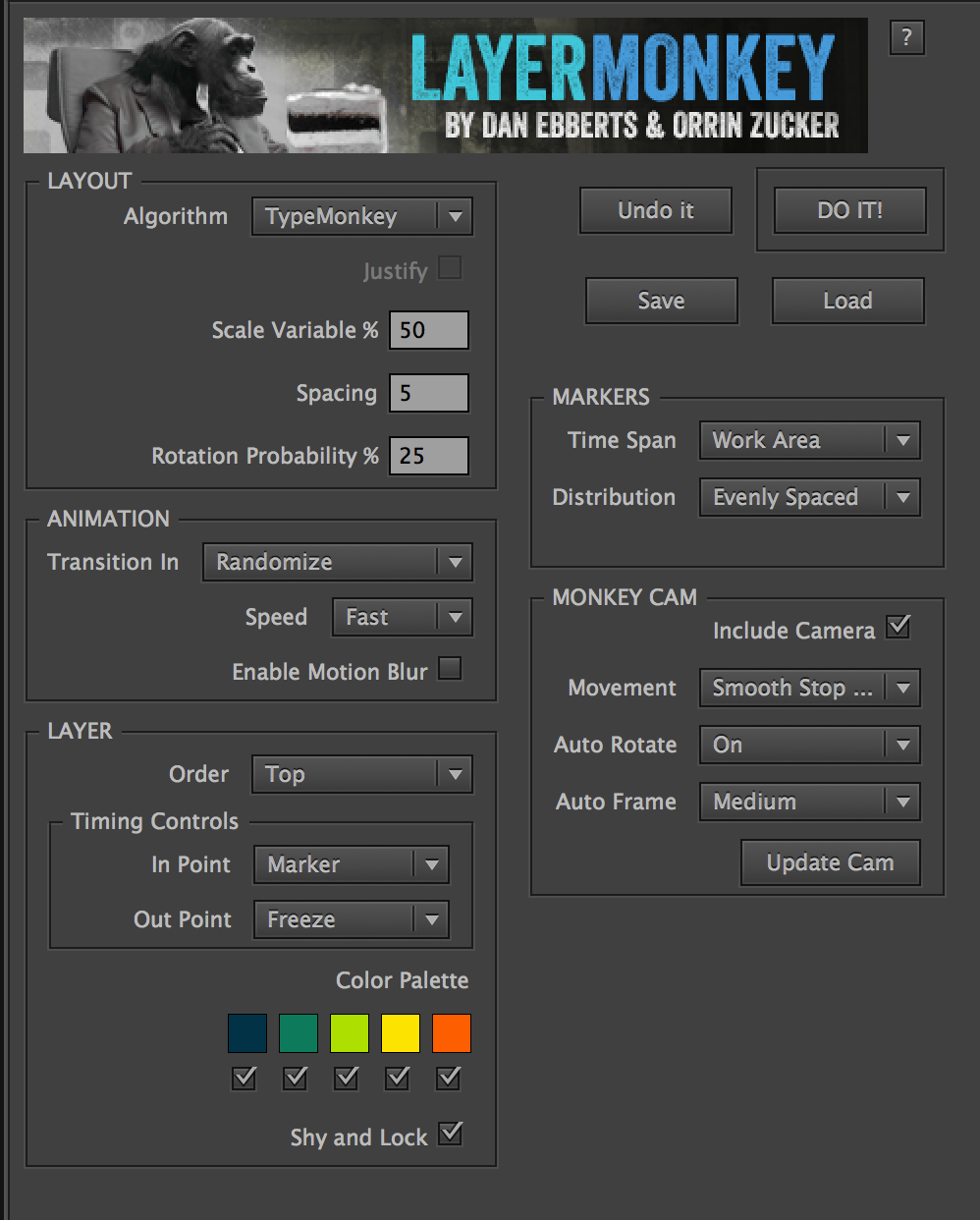
LayerMonkey is a versatile script for After Effects that arranges and animates your comp’s layers in time and space. It also creates a parented camera and generates a master control layer that makes timing and global adjustments a piece of cake. Now stills, videos and pre-comps can be used as kinetic elements in a complex monkey-generated composition with a simple push of a button.
 Key features
- Creates randomized complex kinetic layouts using layers in your comp based on parameters entered into the control panel.
- Features 3 different algorithms with a Justify option.
- Works with stills, video, pre-comps, shapes, solids, text, eps and pretty much any other type of layer AE accepts.
- Multiple controls for handling time-based layers.
- Variable layer order options.
- Keyframe-less timeline makes changes to timing as simple as sliding a marker.
- Creates a parented camera that points to each successive layer as it transitions on.
- Distributes markers across the timeline in 3 different ways.
- Exludes non- image based layers in comp such as nulls, cameras, audio and adjustments.
- Manual adjustments are easily made to size, position, rotation and opacity.
- Features a wide range of type transitions randomly selected by default, but can be specified as well.
- Marker Sync feature allows for push button alignment with preexisting marker layers, making syncing to music a breeze.
- Allows for different interpolation for camera movement, auto rotate and auto frame.
- Automatically builds and cleans to facilitate easy experimentation.
- Palette controls makes colorizing layers very easy.
- Kuler color palettes are now easily imported.
- Supports motion blur, lock & shy, and preset Load and Save.
- Free: Includes MonkeyTools– an ongoing collection of utilities specifically written to enhance the functionality of the Monkey Suite. Includes: UnShy Selected Layers, UnShy Text/Image Layers, UnShy Control Layers, Reset View, Invert Locks, Unlock All, Lock All, Scene Maker, Remove Duplicate Markers (to clean up Premiere-generated marker layers, Lock Childern & Lock Parents)
Elevate your motion graphics workflow with premium collection of After Effects plugins. Whether you are a seasoned professional or just starting your VFX journey, powerful tools designed to streamline complex tasks, unlock creative possibilities, and save you hours of rendering time. From stunning glitch effects and seamless transitions to advanced 3D extrusion and text animation tools, each plugin in our library is rigorously tested for compatibility with the latest versions of Adobe after Effects. Enhance your video production value today and download industry-leading plugins that help you create breathtaking visuals without the technical headaches. Browse our full range and find the perfect extension to supercharge your editing suite now.
➡️ ➡️ For more after effects Plugins 😀 😀
➡️ ➡️ System requirements AE
Reviews
There are no reviews yet.