

Marker Remap
marker remap script
Download Marker Remap v1.6 for After Effects on Windows and Mac, a powerful script that retimes compositions using split layer markers in just two easy steps . This innovative tool combines a Time Remapper and Marker Manager into one seamless workflow—letting you reuse pre-comps at different timings, frame-hold segments, trigger sequences in any order, and add behavior flags for looping or reversing .
Version 1.6 New Features:
- DELETE MARKERS button modifiers: [+X] Delete markers outside current time; [+SHIFT+ALT] Delete markers outside work area
- MARKER PANEL listbox modifiers: [+SHIFT] Replace current marker with selected marker; [+ALT] Set marker to reverse on click
- MARKER DURATION button (“F”): [+ALT] Reset current marker to original duration
- Updated helper script: “Add Marker (Fit to last).jsxbin” with left bracket flag for placing inPoint at work area start (“name[“)
Key Features of Marker Remap v1.6:
- Two Tools in One: Functions as both a Time Remapper and comprehensive Marker Manager
- Marker Extraction: Extract all or some composition markers with precision controls
- Cross-Layer Operations: Copy and paste entire marker sets across layers and compositions
- Timing Adjustments: Shift markers for easy timing edits; cut, paste or delete selected markers or ranges
- Powerful Flag System: Add flags to marker names for time reversal, looping, ping-pong, and easing behaviors
- Easing Flags: Apply easeIn, easeOut, or both using {name} syntax
- Range Mapping: Advanced control over marker ranges for complex sequencing
- Batch Marker Operations: Add markers sequentially, fit markers, or bake markers to keyframes
- Self-Contained Results: Once set up, everything works even on systems without Marker Remap installed
- Backward Compatible: v1.6 maintains compatibility with v1.3 expressions
Perfect For:
- Motion graphics artists who need to reuse pre-comps at entirely different timings
- Animators creating complex sequences that would take hours to retime manually
- Editors working with client revisions requiring rapid timing adjustments
- Anyone confused by native time remapping keyframes or time stretching workflows
- Studios needing to hand off files to clients without requiring special plugins
System Requirements:
- Adobe After Effects 2025, 2024, 2023, 2022, 2021, 2020, CC 2019, CC 2018, CC 2017
- Windows 10/11 (64-bit) or macOS
- 4GB RAM minimum (8GB+ recommended)
- 25MB available disk space
- Enable “Allow Scripts to Write Files and Access Network” in Preferences > Scripting & Expressions
Installation:
- Place
Marker Remap.jsxbininsideAfterEffects/Scripts/ScriptUI Panels - Place
AddMarker.jsxbininsideAfterEffects/Scripts/(optional helper script) - Restart After Effects
- Open the panel under Window > Marker Remap
Simple 3-Step Workflow:
- Add markers to the timeline of a comp, split around key actions (make sure nothing is selected, click ADD MARKER)
- Place that comp inside another comp, select it, and click ENABLE RETIMING—time remapping is enabled with code added to expression field
- Adjust pre-comp’s layer markers to retime segments—simply drag markers’ in/out points and you’re done!
Retime compositions using split layer markers + Marker manager
NEW IN v1.6 (update)
- NEW FUNCTIONALITY using modifiers on the following buttons:
- DELETE MARKERS button:
- [+X ] Delete markers outside of current time
- [+SHIFT+ALT] Delete markers outside of work area
- MARKER PANEL listbox:
- [+SHIFT] Replaces current marker with selected marker from listbox
- [+ALT] Sets marker to reverse on click (no need to set the reverse flag as a second click)
- MARKER DURATION button (“F”)
- [+ALT] Reset current marker to original duration (helpful when you’ve adjusted the length of a marker but want to back to the original timing)
- DELETE MARKERS button:
- Updated the helper script “Add Marker (Fit to last),jsxbin” that you can map to function keys to make adding a bunch of sequential markers more streamlined.
- “Add Marker (Fit to last).jsxbin” is like like a reverse “Add Marker”. You just advance the playhead to the next endpoint, hit your mapped key and a marker will be placed with its outPoint at the current time and the inPoint right after the preceding marker. Optionally, you can now use a new flag, Left Bracket, to place the inPoint wherever the comp’s Work Area inPoint is, like this: “name[“. Stay tuned for a video demo, it’s much easier to see than to read about!
Marker Remap lets you retime compositions using split layer markers in two easy steps!
First, add timeline markers, split around key actions in the composition you’d like to retime.
Once placed into a parent comp and selected, simply click ENABLE RETIMING and… that’s it!
Adjust, delete, rearrange or retime correspondingly-named layer markers.
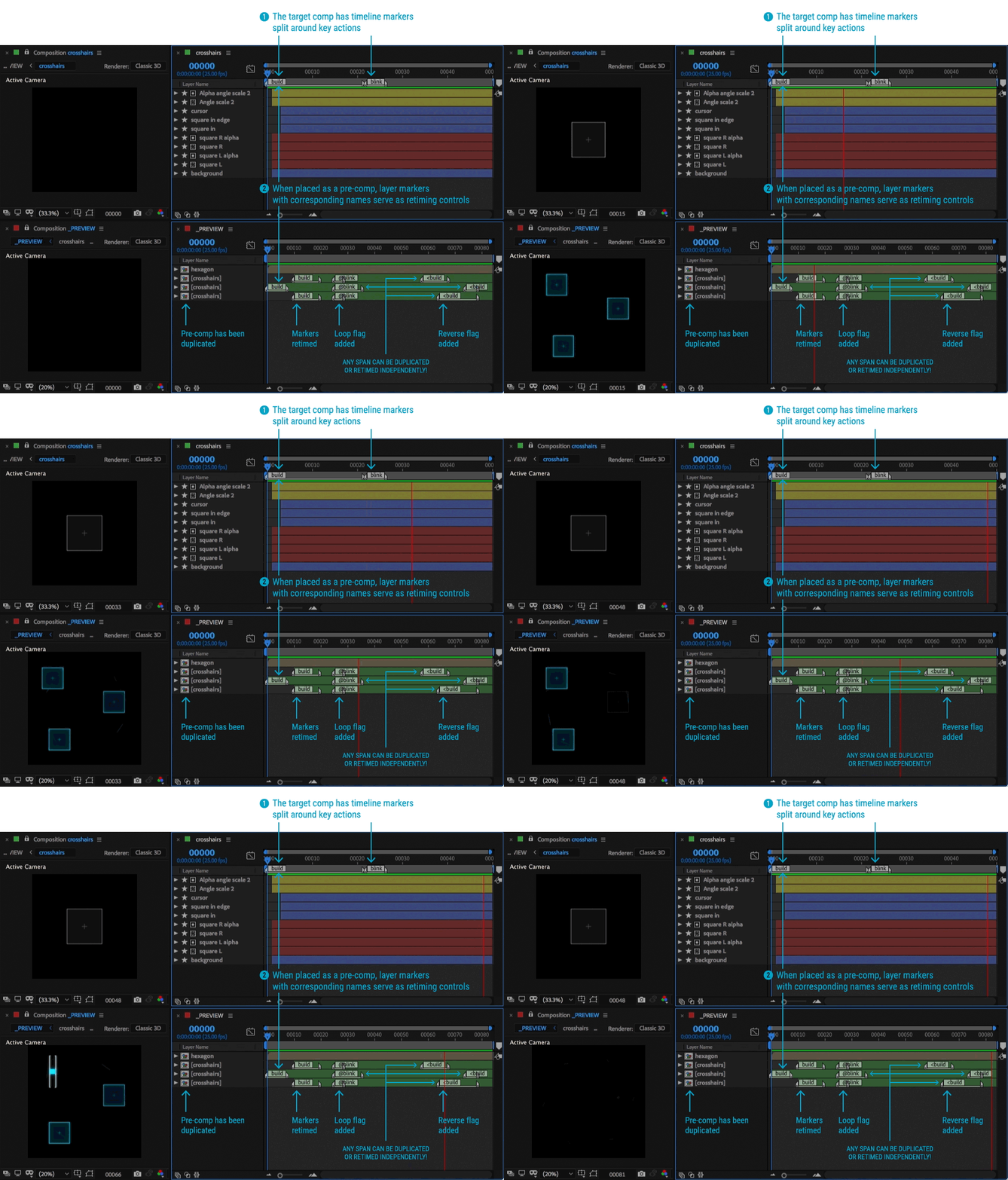
Here’s what a Marker Remap setup looks like:
It’s two tools in one: Time Remapper and Marker Manager
- Extract all or some comp markers
- Copy and paste entire marker sets across layers and comps
- Shift markers for easy timing edits
- Cut, paste or delete select markers or entire marker ranges to other parts of a layer
Marker Remap will change the way you work:
- Reuse pre-comps at entirely different timings
- Easily frame-hold pre-comp segments
- Trigger pre-comp sequences in any order
- Add flags to marker names to time reverse or loop marker segments
- Retime complex sequences that would take hours to retime manually
or that are confusing to keep track of with native time remapping keyframes
or time stretching workflows - Hand your files off to clients even if they don’t have the Marker Remap panel.
Once set up, everything is self-contained.
USAGE
Marker Remap is very easy to use and is very stable. You can use AE’s built in tools for adding markers, but using the Marker Remap Panel makes adding markers easy and controllable.
STEP 1: Add markers to the timeline of a comp, split around key actions.
To add timeline makers, make sure nothing is selected, and click ADD MARKER
STEP 2: Place that comp inside of another comp. Select it and click “ENABLE RETIMING”
Time Remapping gets enabled and code is added to the expression field.
STEP 3: Adjust pre-comp’s layer markers to retime segments
Simply drag the markers’ in and out points and you’re done! Those segments have been retimed. You can use the Marker Remap panel to repeat segments, or further modify the way the markers behave by adding behavior or easing flags.

As a rule, if nothing is selected, buttons will act on the comp’s timeline. If a layer is selected, buttons will act on that layer.

to see how powerful Marker Remap can be for UI simulations.
You don’t need the Marker Remap panel for it to work. Once set up, everything is self-contained within the file.
FAQ
Will Marker Remap functionality still work if my file is opened on a system that doesn’t have Marker Remap installed?
Yes! All expressions will remain in layers that have had ENABLE RETIMING enabled. The Marker Remap panel is there to speed up the setup process. But after that, everything’s set.
Why is my layer not remapping according to the split layer markers?
This could be due to one of several reasons:
- You haven’t clicked ENABLE RETIMING on the layer in question
- Your pre-comp doesn’t have corresponding timeline markers. Go into that comp and set them on the timeline.
- You have a new version of Marker Remap but an older version of the retiming code on your layer. Simply select the layer, and click ENABLE RETIMINGagain. The latest code will be applied. (Starting in v1.1, the Time Remapping expression code will state what version of code is applied to that layer. Always make sure that the version of the expression code matches the version number of your Marker Remap installation.)
- Another script or plug-in is also trying to control Time Remapping for that layer. In this case, you may not be able to use Marker Remap for that particular layer.
Does Marker Remap work in tandem with the new Responsive Design feature in AE CC 2019? How does it compare?
Marker Remap will not break with compositions that have markers with “Protected Regions” enabled. AE’s Responsive Design doesn’t interfere with Time Remapping since it uses the Time Stretch feature to stretch and protect the timing of nested pre-comps. That being said, it’s counterintuitive to use both since they are accomplishing similar ends and will get in the way of each other. As of this moment, there are some limitations to Responsive Design that Marker Remap solves:
- When managing a pre-comp in a parent comp, you can’t move or retime layer markers that have been set as a Protected Region (they lose their handles). By default, Marker Remap protects marker spans simply by being able to set them to durations equivalent to their counterparts inside the pre-comp (and they remain re-timeable!)
- When managing a pre-comp in a parent comp, Protected Regions can’t be modified with powerful flags that change their behavior (loop, reverse, ping-pong, range)
- When managing a pre-comp in a parent comp, Protected Regions can’t be repeated as you can using Marker Remap
- Responsive Design did not bring an amazing marker management panel like Marker Remap!
…so we’re still claiming a victory on this round… ha! Thanks for supporting!
What features are in the works?
- Colorize Marker Remap markers
- More easing variations (quad, quint, etc.)
And I’m eager to hear what you think Marker Remap needs for your workflow!


Elevate your motion graphics workflow with premium collection of After Effects plugins. Whether you are a seasoned professional or just starting your VFX journey, powerful tools designed to streamline complex tasks, unlock creative possibilities, and save you hours of rendering time. From stunning glitch effects and seamless transitions to advanced 3D extrusion and text animation tools, each plugin in our library is rigorously tested for compatibility with the latest versions of Adobe after Effects. Enhance your video production value today and download industry-leading plugins that help you create breathtaking visuals without the technical headaches. Browse our full range and find the perfect extension to supercharge your editing suite now.
➡️ ➡️ For more after effects Plugins 😀 😀
➡️ ➡️ System requirements AE
Reviews
There are no reviews yet.