

Motion Presets for Premiere Pro
motion presets for premiere pro
Download Motion Presets for Premiere Pro v1.1.0, a comprehensive collection of 8K ready cinematic motion presets designed to accelerate your video editing workflow. With over 200 professionally crafted presets spanning 12 essential categories, this toolkit delivers instant, high-quality animations for any project—from social media clips to feature-length productions.
A handy tool to make animations in Premiere Pro
Key Features of Motion Presets v1.1.0:
- 200+ Cinematic Presets: 12 professionally curated categories covering all essential motion graphics needs—Lower Thirds, Transitions, Titles, Social Media Graphics, Backgrounds, Effects, SubTitles, Text Animation, Sound Bars, Wipes, Call Outs, and Shakes
- Universal Compatibility: Works with both Intel and Apple Silicon Macs, plus Windows systems—no external applications or plugins required
- 8K Ready: All presets are 8K resolution compatible, ensuring pristine quality for the highest-resolution projects
- Effortless Installation: Simple drag-and-drop installation with clear folder structure for easy access
- MOGRT Format: Fully compatible with Premiere Pro’s native Motion Graphics Template system for seamless workflow integration
- Social Media Optimized: Includes specialized presets for various social platform requirements and aspect ratios
- Professional Results: Each preset is meticulously crafted to deliver polished, broadcast-quality animations instantly
- Time-Saving Workflow: Eliminate hours of manual keyframing with one-click preset application
Perfect For:
- Video editors seeking quick, professional motion graphics solutions
- Content creators producing social media videos with consistent branding
- Filmmakers needing broadcast-quality titles and transitions
- YouTube creators wanting eye-catching lower thirds and animations
- Anyone looking to speed up their Premiere Pro workflow without sacrificing quality
System Requirements:
- Adobe Premiere Pro 2021 through 2025
- Windows 10/11 (64-bit) or macOS (Intel and Apple Silicon)
- 4GB RAM minimum (8GB+ recommended)
- 200MB available disk space
- No additional plugins required
Installation:
- Download and extract the preset package
- Copy the entire “Motion Presets” folder to your Premiere Pro Essential Graphics templates directory:
- Windows:
C:\Users\[Username]\AppData\Roaming\Adobe\Common\Motion Graphics Templates\ - Mac:
/Users/[Username]/Library/Application Support/Adobe/Common/Motion Graphics Templates/
- Restart Premiere Pro
- Access presets via Window > Essential Graphics > Browse tab
Note: Version 1.1.0 includes compatibility updates for the latest Premiere Pro releases and expanded preset library .
A handy tool to make animations in Premiere Pro
Features
Made for Premiere
These animation presets
are custom made for use in Premiere Pro
HD
Full HD resolution
1920*1080
Easy to Use
Preview & apply
preset with one click
Different Categories
And Styles

2D Rotation

3D Rotation

Blur

Flicker

Glitch

Ball Position

Rotation Position

Scale

Scale Position

Scale Rotation

Shake
Additional features
Easy Apply

Apply in just one click
Previews
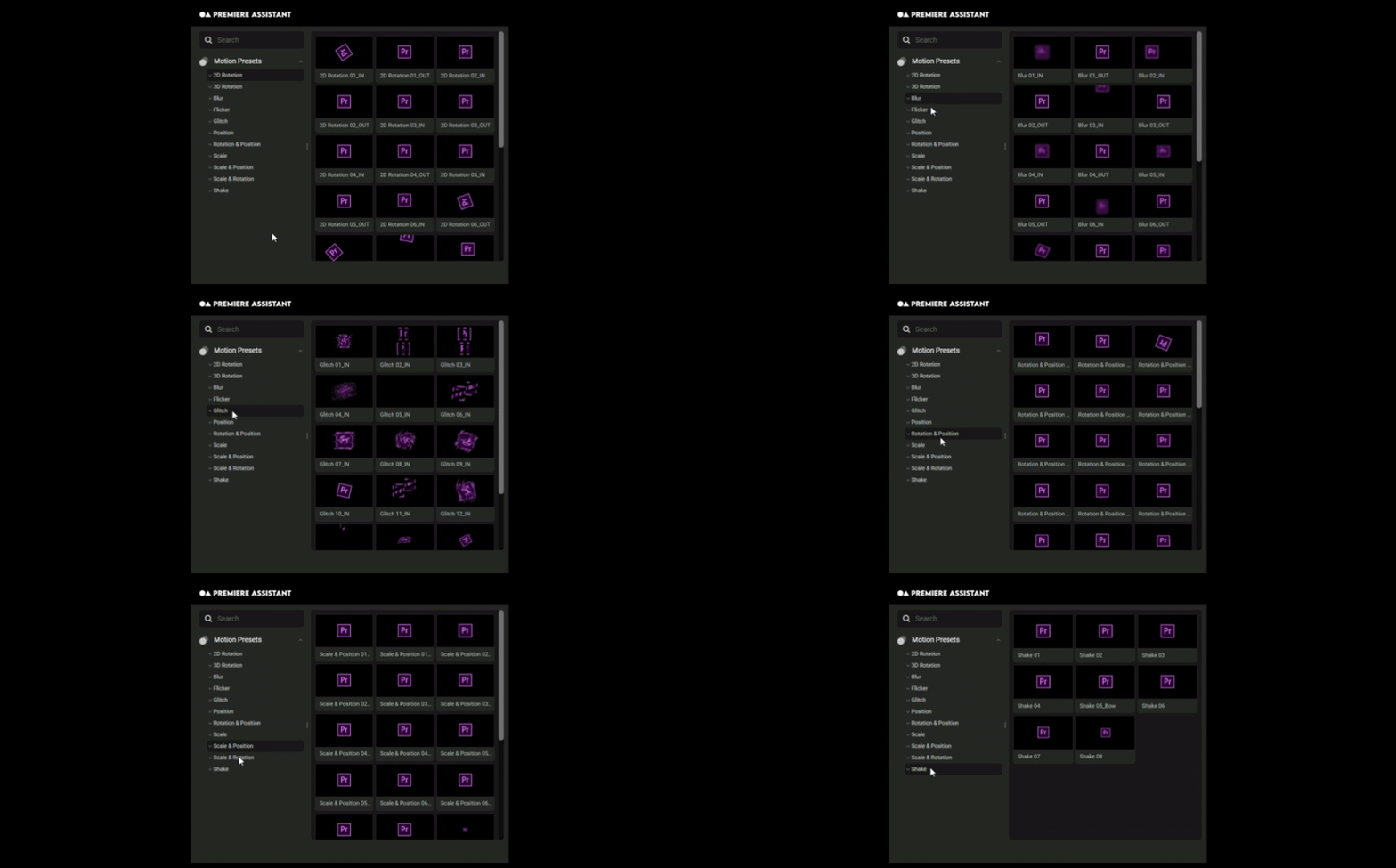
See all animation previews at once.
See How It Works
Elevate your motion graphics workflow with premium collection of After Effects plugins. Whether you are a seasoned professional or just starting your VFX journey, powerful tools designed to streamline complex tasks, unlock creative possibilities, and save you hours of rendering time. From stunning glitch effects and seamless transitions to advanced 3D extrusion and text animation tools, each plugin in our library is rigorously tested for compatibility with the latest versions of Adobe after Effects. Enhance your video production value today and download industry-leading plugins that help you create breathtaking visuals without the technical headaches. Browse our full range and find the perfect extension to supercharge your editing suite now.
➡️ ➡️ For more after effects Plugins 😀 😀
➡️ ➡️ System requirements AE
Reviews
There are no reviews yet.