
Orbit Script for After Effects
orbit script
Orbit Script V1.0.0 for After Effects – Dynamic 3D Orbit & Circular Motion Tool
Download Orbit Script V1.0.0 for After Effects on Windows and Mac, a powerful script that creates dynamic orbital and circular motion animations with just a few clicks. Perfect for creating orbiting objects, rotating camera paths, and circular motion graphics—all with intuitive controls and professional results .
Key Features of Orbit Script V1.0.0:
- One-Click Orbit Setup: Select any layer and instantly create orbiting motion around a central point or another layer
- Customizable Orbital Paths: Control radius, speed, direction, and elliptical shapes for diverse circular motion styles
- Multiple Orbit Types: Create standard circular orbits, elliptical paths, spiral motions, or custom orbital curves
- Camera Orbit Control: Generate orbiting camera paths around 3D scenes for dynamic fly-around shots
- Layer Parent Support: Orbit multiple layers simultaneously around the same center for coordinated motion
- Easing Controls: Add smooth acceleration and deceleration to orbital motion for natural, organic movement
- Keyframe-Ready: All orbital parameters are fully keyframeable for precise timing control
- Real-Time Preview: See orbit adjustments update instantly as you change parameters
- Cross-Platform Support: Works on both Windows and Mac systems
Perfect For:
- Motion graphics artists creating orbiting logos and product rotations
- Title sequence designers wanting dynamic circular text animations
- VFX artists building complex orbital particle systems
- 3D animators creating camera fly-around shots
- Anyone needing professional circular motion without manual keyframing
System Requirements:
- Adobe After Effects 2025, 2024, 2023, 2022
- Windows 10/11 (64-bit) or macOS
- 4GB RAM minimum (8GB+ recommended)
- 25MB available disk space
- Enable “Allow Scripts to Write Files and Access Network” in Preferences > Scripting & Expressions
Installation:
Copy the script file to your After Effects ScriptUI Panels folder:
- Windows:
C:\Program Files\Adobe\Adobe After Effects [version]\Support Files\Scripts\ScriptUI Panels\ - Mac:
/Applications/Adobe After Effects [version]/Scripts/ScriptUI Panels/
Access via Window menu > Orbit Script
Note: Version 1.0.0 is the initial release of this orbital motion tool . The script’s intuitive controls make it easy to create professional circular animations that would be time-consuming to keyframe manually .
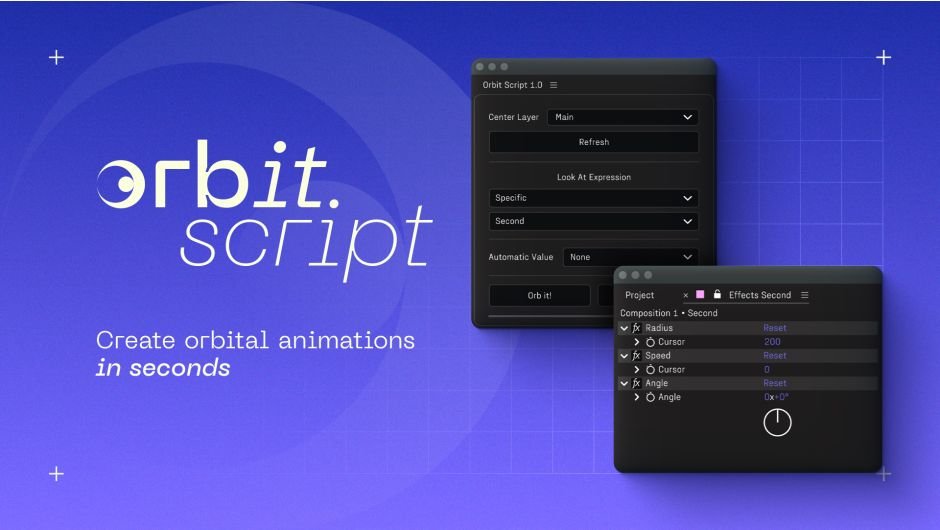
A fast and flexible tool to attach orbital animation to any layer, with Radius, Speed, Angle and smart Look-At options. Clean, predictable and fully keyframe-ready.
Orbit Script
Attach orbit motion to your layers in seconds. Pick a center, add controls, done.
Main features
• Center Layer: choose the pivot layer, then apply to any selection.
• One-click setup: adds three per-layer controls [Radius, Speed and Angle] and a clean position expression.
• Auto Radius (Inside/Outside): optional automatic radius based on Ellipse or circle-like Rounded Rectangle sizes and stroke widths (center ↔ selected layer).
• Non-destructive: Cancel removes the expression and the three controls in one go.
How it works
1. Select your pivot from the Center Layer dropdown.
2. Select one or more layers in the comp, then click Orb it!
3. Tweak Radius (distance), Speed (angular rate), Angle (phase/offset).
4. Optionally set Auto Radius to Inside or Outside for an instant, collision-free radius when using an ellipse shape or a circle-like rounded rectangle layer.
Panels overview
Script Panel
Effects Panel
What’s included
• Script (.jsxbin panel)
• Quick Guide (PDF)
• Mini Demo project Instructions (Installation guide containing the download link for the .aep file.)
Manual Installation
1. Copy the file into Scripts/ScriptUI Panels, restart AE.
2. Open via Window > Orbit Script 1.0.
Elevate your motion graphics workflow with premium collection of After Effects plugins. Whether you are a seasoned professional or just starting your VFX journey, powerful tools designed to streamline complex tasks, unlock creative possibilities, and save you hours of rendering time. From stunning glitch effects and seamless transitions to advanced 3D extrusion and text animation tools, each plugin in our library is rigorously tested for compatibility with the latest versions of Adobe after Effects. Enhance your video production value today and download industry-leading plugins that help you create breathtaking visuals without the technical headaches. Browse our full range and find the perfect extension to supercharge your editing suite now.
➡️ ➡️ For more after effects Plugins 😀 😀
➡️ ➡️ System requirements AE
Reviews
There are no reviews yet.