
PlumePack v3 for After Effects
plumepack project manager plugin
PlumePack v3.0.0 for Premiere Pro – Next-Generation Project Management & Media Consolidation Tool
Download PlumePack v3.0.0 for Premiere Pro on Windows and Mac, the completely rewritten next-generation project management plugin from Autokroma. Building on the success of PlumePack v2, this major version introduces powerful new features including transcoding, batch queue, presets, improved proxy management, and full compatibility with Premiere Pro 2025+ .
Key Features of PlumePack v3.0.0:
- Intelligent Media Consolidation: Copy only the media files actually used in your timeline—even from nested sequences, merged clips, and dynamic link comps that Premiere’s native tool misses
- Lossless Trimming: Remove unused frames from your media files without re-encoding—maintain original codec, quality, metadata, and source settings while significantly reducing file sizes
- NEW – Transcoding: Convert footage to ProRes, DNxHD, H.264, or other codecs during consolidation for improved compatibility and performance
- NEW – Batch Queue: Process multiple projects in sequence with full automation—ideal for overnight rendering and large-scale archiving
- NEW – Presets System: Save and reuse your favorite consolidation settings for consistent results across projects
- NEW – Advanced Proxy Management: Create, link, and manage proxy files with intelligent tracking and batch operations
- Preserve Folder Structure: Option to maintain your original media folder organization in the consolidated project
- Free Analysis Mode: Run the analysis without a license to preview exactly what PlumePack will do with your project before committing
- Cross-Platform Support: Works on both Windows and Mac systems
Perfect For:
- Post-production professionals archiving projects for future use
- Editors transferring projects between workstations or studios
- Anyone needing to reduce project file sizes without quality loss
- Teams collaborating on projects requiring clean, efficient media packages
- Users frustrated by Premiere Pro’s limited native Project Manager
System Requirements:
- Adobe Premiere Pro 2022 through 2025
- Windows 10/11 (64-bit) or macOS
- 4GB RAM minimum (8GB+ recommended)
- 100MB available disk space
Installation:
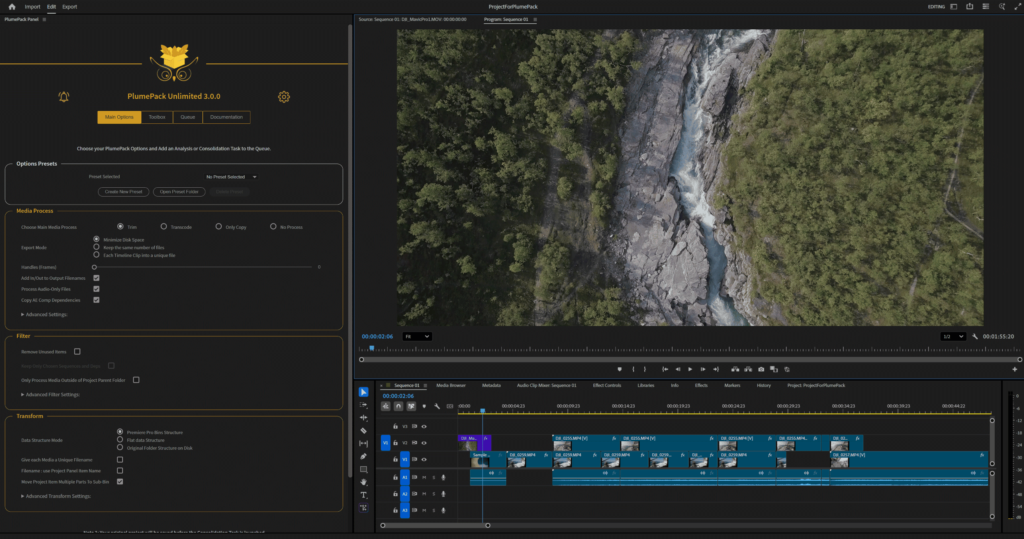
Run the installer and select your Premiere Pro version. After installation, access PlumePack via File > Project Manager or the dedicated PlumePack panel.
Note: PlumePack v3.0.0 is a major rewrite of the industry-standard project management tool for Premiere Pro . This version introduces powerful new features including transcoding, batch processing, and improved proxy management . Available as a standalone purchase or as part of the Autokroma bundle . Free demo available for testing . Upgrade pricing available for existing v2 users .
PlumePack collects your PrPro projects & trim medias to make it lightweight: Trim, Archive, Organize and more! NEW: Transcode, Queue, Presets.
Main Features
Improve your Workflow
Accelerate your production pipeline and collaborate more efficiently
- Get Smaller, Cleaner and Easier to Share Consolidated Projects
- Save HUGE amounts of disk space for editing, backups, delivery, and archiving
- Access Toolbox tools: Trim/Transcode Selected Clips, UnMerge merged clips, Reorder Timeline Tracks, and more
- FREE mode for Projects < 60GB, see below for other licenses
- Save and reuse configurations with Presets, Batch Consolidate multiple Projects in the Queue
Trim, Transcode or Copy
Choose the best Media Process mode for your needs
- Trim your files to remove unused frames losslessly: preserve original pixels, metadata and codecs. Supported for: ProRes, .BRAW, .R3D, H.264/H.265, DNxHD, Image Sequences and more
- Transcode the used part of your media to a prefered codec / format
- Copy your files and all dependent files (Proxy, After Effects assets, sidecar, XML, ..)
- Smart Replace all Trim/Transcoded/Copied media in the new PlumePacked Project
- Choose between 3 Optimization Modes: Optimize, Minimize File Number or Each Timeline Clip Into a Unique File
Clean, Filter and Organize
Simplify and clean your project before archiving or sharing
- Clean unused items in your new consolidated project
- Filter your project by selecting a list of sequences – Nested sequences included recursively
- Export every used media to a new location, with a unique filename relinked in the Project
- Organize your new folder based on your Premiere Pro bins structure or from your Original Disk Structure
- Fix known Premiere Pro Project Manager bugs for a reliable consolidation
Technical specifications
Requirements:
- One license is valid for the same user on up to two computers not used simultaneously.
- Adobe Premiere Pro from 23.0 (2023) to 25.x (2025) included.
- Microsoft Windows 10 and 11.
- macOS Apple Silicon (M1 and later) and Intel: macOS 12 (Monterey) to 15 (Sequoia).
Supported Codecs for Lossless Trimming:
- [.MOV, .MXF] Apple ProRes (XQ, 4444, HQ, Normal, LT, Proxy), ProRes RAW
- [.BRAW] Blackmagic RAW
- [.R3D] REDCODE R3D
- [.MOV, .MP4, .MXF] H.264 / AVC
- [.MOV, .MP4, .MXF] H.265 / HEVC
- [.MXF] Sony X-AVC
- [.ARI] ARRIRAW Image Sequence (Not MXF)
- [.PNG, .JPG, .DNG, .DPX, .TIFF, .PSD etc.] Image Sequence
- [.MOV, .AVI] Cineform
- [.MOV, .MXF] DNxHD / DNxHR
- [.MOV, .AVI] Vidvox HAP
- [.MOV] Apple QuickTime Animation RLE (in Beta)
- [.MOV, .MXF, .AVI] MPEG-2 (XDCAM) (in Beta)
- [.MOV, .AVI] Motion JPEG (in Beta)
- [.MOV] NDI HX (in Beta)
- [.AVI] vMix (in Beta)
Want more supported codecs? Contact us!
Available Output Formats for Transcoding:
- H264 Low / Medium / High BitRate
- H264 Adaptive Low / Medium / High BitRate
- Apple ProRes 422, 422 LT, 422 HQ, 4444, 4444 XQ
- Apple ProRes 422 – Audio 5 Channels
- GoPro Cineform YUV 10-bits
- GoPro Cineform RGB 12-bits with Alpha
Want more output codecs? Contact us!
Features and Limitations:
- Creates a new Project and new Folder containing all project media.
- Automatically replaces all media paths in the new Premiere Pro Project with copied, trimmed, or transcoded files.
- Includes automatic integrity checks for all trimmed/transcoded files and the resulting project.
- Generates a detailed report at the end of the process.
- Various elements supported for copy: Merged Clips, After Effects compositions, Generative Clips, …
- Presets (Pro & Unlimited only) allow you to save and recall configuration sets for faster workflows.
- The Queue feature (Unlimited only) lets you batch process multiple consolidation.
Elevate your motion graphics workflow with premium collection of After Effects plugins. Whether you are a seasoned professional or just starting your VFX journey, powerful tools designed to streamline complex tasks, unlock creative possibilities, and save you hours of rendering time. From stunning glitch effects and seamless transitions to advanced 3D extrusion and text animation tools, each plugin in our library is rigorously tested for compatibility with the latest versions of Adobe after Effects. Enhance your video production value today and download industry-leading plugins that help you create breathtaking visuals without the technical headaches. Browse our full range and find the perfect extension to supercharge your editing suite now.
➡️ ➡️ For more after effects Plugins 😀 😀
➡️ ➡️ System requirements AE
Reviews
There are no reviews yet.