
pt ExpressEdit 2 for After Effects
pt expressedit script
Download pt ExpressEdit 2 V2.7 for Premiere Pro on Windows and Mac, a powerful extension that streamlines timeline editing with customizable, one-click operations. Edit faster than ever by assigning your most-used editing commands to single keystrokes, dramatically reducing the time spent on repetitive tasks.
Key Features of pt ExpressEdit 2 V2.7:
- Customizable Keyboard Shortcuts: Assign any editing command to a single keystroke for lightning-fast operation
- One-Click Operations: Perform complex editing tasks with a single button press instead of multiple menu selections
- Comprehensive Command Library: Access to dozens of editing functions including ripple delete, split, lift, extract, zoom, and more
- Customizable Interface: Organize buttons and commands to match your personal workflow preferences
- Visual Feedback: Clear button states and indicators show which operations are available based on current timeline selection
- Batch Operations: Apply edits to multiple clips simultaneously for efficient timeline management
- Cross-Platform Support: Works seamlessly on both Windows and Mac systems
- Broad Compatibility: Supports Premiere Pro 2025, 2024, 2023, 2022
Perfect For:
- Video editors wanting to dramatically speed up their timeline workflow
- Anyone tired of memorizing complex keyboard shortcuts or menu locations
- Editors who prefer visual button interfaces over keyboard commands
- Post-production professionals handling high-volume editing work
- Studios looking to standardize and accelerate editing workflows
System Requirements:
- Adobe Premiere Pro 2025, 2024, 2023, 2022
- Windows 10/11 (64-bit) or macOS
- 4GB RAM minimum (8GB+ recommended)
- 25MB available disk space
- Enable “Allow Scripts to Write Files and Access Network” in Preferences > Scripting & Expressions
Installation:
Copy the extension files to your Premiere Pro Scripts folder as directed in the documentation. Access via Window > Extensions > pt ExpressEdit 2 after installation.
Note: Version 2.7 includes performance improvements and enhanced compatibility with recent Premiere Pro versions . The script transforms your editing experience by putting the most common operations literally at your fingertips .
Find and edit expressions throughout your project
Search, apply and edit expressions throughout your project. Expressions can be saved, or instantly applied to one or more properties. It can also check for broken expressions, re-enabling them automatically where possible.
HOW TO USE:
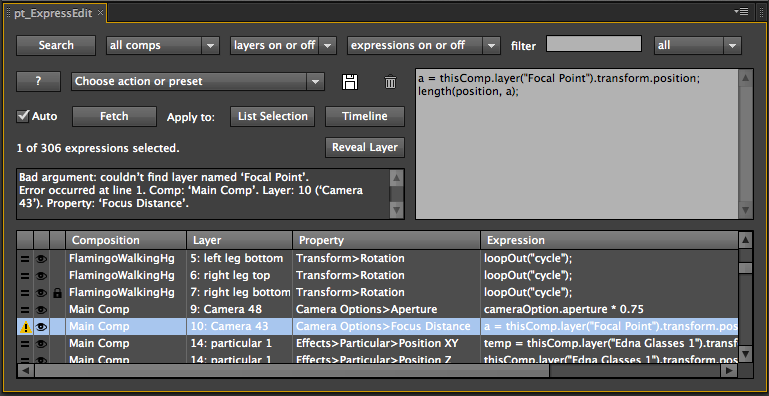
SEARCH: Use the search options to specify which expressions you’re looking for. Click the Search button to scan your project for expressions based on your search criteria.
FETCH: With Auto Fetch enabled, when you select an expression from the list it will appear in the text edit box ready for editing. When Auto Fetch is off, use the Fetch button to get the selected expression into the edit box. Select a property in your comp instead of the list to fetch the expression from there.
APPLY: Edit the expression in the text edit box, then hit the Apply button to apply it to any properties selected in the list. Note: You’ll need to use Ctrl-Return to get a line return in the text edit box.
ADD TO TIMELINE: Use this button to add the expression to any selected properties in the Timeline. This is useful if you want to add expressions to properties that don’t already have ones applied. You’ll need to do a new search for any newly added expressions to appear in the list.
AUTO TEST: With Auto Test enabled the script tests expressions during a search to ensure they are valid, revealing new errors or re-enabling them if previous errors are fixed. If you do something that breaks your expressions you can just Undo then run a search to re-enable them. While this option is recommended, you can turn it off if you want to do searches that won’t affect the result.
ACTIONS: Use the actions/preset pulldown to enabled, disable or remove any selected expressions. Use Refresh List if you’ve made any changes and want to update the list. Use Test Expressions to check the expressions are valid.
PRESETS: With an expression in the text edit box, click the Save button to save it as a preset. Select previously saved expressions from the bottom of the action/preset pulldown, then click Apply to add them to any properties selected in the list.

Elevate your motion graphics workflow with premium collection of After Effects plugins. Whether you are a seasoned professional or just starting your VFX journey, powerful tools designed to streamline complex tasks, unlock creative possibilities, and save you hours of rendering time. From stunning glitch effects and seamless transitions to advanced 3D extrusion and text animation tools, each plugin in our library is rigorously tested for compatibility with the latest versions of Adobe after Effects. Enhance your video production value today and download industry-leading plugins that help you create breathtaking visuals without the technical headaches. Browse our full range and find the perfect extension to supercharge your editing suite now.
➡️ ➡️ For more after effects Plugins 😀 😀
➡️ ➡️ System requirements AE
Reviews
There are no reviews yet.