

RetroDither for After Effects
retrodither plugin
Download RetroDither v1.11 for After Effects on Windows and Mac, a powerful dithering and halftone plugin that recreates classic 8-bit and 16-bit video game aesthetics, vintage newspaper printing effects, and retro computer graphics. Perfect for giving your footage that authentic pixelated, low-bit look with complete control over dithering patterns, color palettes, and scanline effects.
Key Features of RetroDither v1.11:
- Multiple Dithering Algorithms: Choose from Floyd-Steinberg, Burkes, Stucki, Sierra, Atkinson, and other classic dithering patterns for authentic period looks
- Color Palette Reduction: Reduce your footage to any number of colors—from 2-color monochrome to 256-color retro palettes
- Built-in Retro Palettes: Includes authentic palettes from classic systems like CGA, EGA, VGA, Game Boy, NES, and more
- Halftone Patterns: Generate classic halftone effects with adjustable dot size, shape (circle, line, square), and screen angle
- Scanline Generation: Add authentic CRT scanlines with adjustable thickness, brightness, and frequency
- Pixel Aspect Ratio Control: Adjust pixel shape for authentic retro display characteristics
- Real-Time Preview: See all effects update instantly as you adjust parameters
- Cross-Platform Support: Works on both Windows and Mac systems
Perfect For:
- Motion graphics artists creating retro video game aesthetics
- VFX designers needing vintage computer and pixel art effects
- Music video producers seeking 8-bit and 16-bit visual styles
- Title sequence creators wanting authentic retro gaming looks
- Anyone looking to add vintage digital character to their projects
System Requirements:
- Adobe After Effects 2025, 2024, 2023, 2022
- Windows 10/11 (64-bit) or macOS
- 4GB RAM minimum (8GB+ recommended)
- 25MB available disk space
Installation:
Copy the plugin file to your After Effects Plug-ins folder:
- Windows:
C:\Program Files\Adobe\Adobe After Effects [version]\Support Files\Plug-ins\ - Mac:
/Applications/Adobe After Effects [version]/Plug-ins/
Note: Version 1.11 includes performance improvements and enhanced compatibility with recent After Effects versions . The plugin is perfect for recreating the look of classic video games, vintage computers, and retro printing techniques .
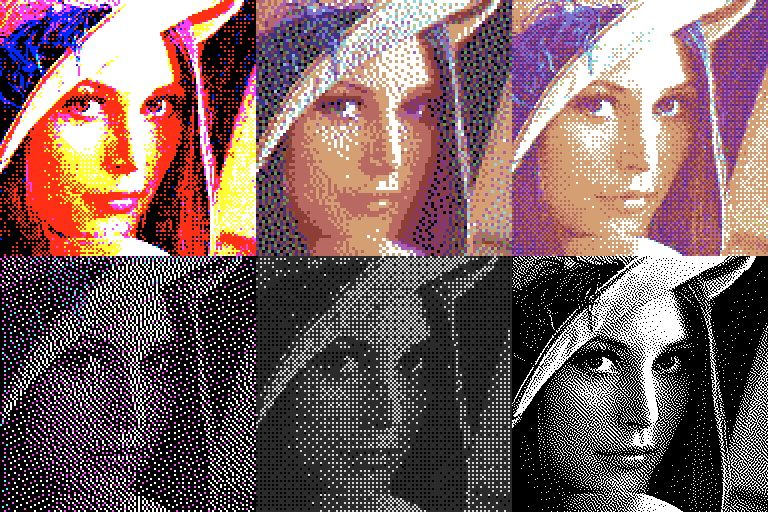
New external palette feature. Instant retro computer graphics! Using smart dithering and color schemes to easily re-create any retro computer look.
RetroDither is a GPU accelerated plugin for Adobe After Effects which allows creating stylized images with dithering and color schemes from retro game consoles and home computer platforms.
You could call it ‘save GIF for web’ on steroids on first sight, but in fact, RetroDithering is capable to do so much more, having more than 10 different ordered and error diffusion dithering algorithms and color palettes varying from several adaptive to classic hardware ones, such as ZX spectrum, CGA, MSX and many more.
Now you can do very authentic stylizing if you’re trying to add some retro feeling into your dither-punk motion graphics or footage.
Features
- NEW!!! Custom Palettes!
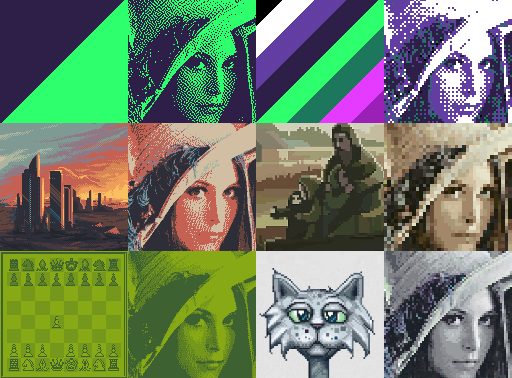
- Is a new feature that becomes enabled when you select “Custom…” from the Palette list. After having several user requests for adding more exotic palettes and color schemes in exotic formats, we decided to let users just add a reference image as a Palette source.
- Feel free to feed any pixel data as a custom palette – be it a reference image or just several pixels of your beloved colorscheme, Retrodither will gather all the colors and use them. You can even use videos!
- Just be cautious about Custom Palette image resolution, as high resolution images will take more processing time – so, the less Custom Palette layer size, the faster Retrodither will be able to analyze it.
- 20 different color palettes including C-64 and Apple II
- Adaptive color palettes work pretty similar to the ones in e.g. Adobe Photoshop “Save for Web” dialog , while named after hardware ones (CGA, ZX Spectrum, C64 etc.) are mimicking actual ancient hardware limitations.
- 12 different dithering methods
- RetroDither is generally capable of two types of dithering: error diffusion (including FloydSteinberg, JarvisJudice, Stucki, Atkinson, Burkes, Siera, StevensonArce algorithms) and ordered dithering using Bayer matrix.
- 0 to 8x downscaling
- Performs image downscaling for more stylized look.
- Threshold slider
- Is available to alter Bayer dithering algorithms, and also to manage 1bit color palette mapping.
- Grayscale
- Performs additional grayscale conversion of the input. Note that color palette is applied after this operation, which means you won’t necessary have grayscale image on the output of the effect; instead, RetroDither will map shades of gray to colors of output palette, which might give you quite interesting results.
- Serpentine scan
- Alters all error diffusion based (nonBayer) dithering algorithms, producing slightly different result (see the description).
- Fully GPU Accelerated!
Use any image as a custom palette!
Elevate your motion graphics workflow with premium collection of After Effects plugins. Whether you are a seasoned professional or just starting your VFX journey, powerful tools designed to streamline complex tasks, unlock creative possibilities, and save you hours of rendering time. From stunning glitch effects and seamless transitions to advanced 3D extrusion and text animation tools, each plugin in our library is rigorously tested for compatibility with the latest versions of Adobe after Effects. Enhance your video production value today and download industry-leading plugins that help you create breathtaking visuals without the technical headaches. Browse our full range and find the perfect extension to supercharge your editing suite now.
➡️ ➡️ For more after effects Plugins 😀 😀
➡️ ➡️ System requirements AE
Reviews
There are no reviews yet.