
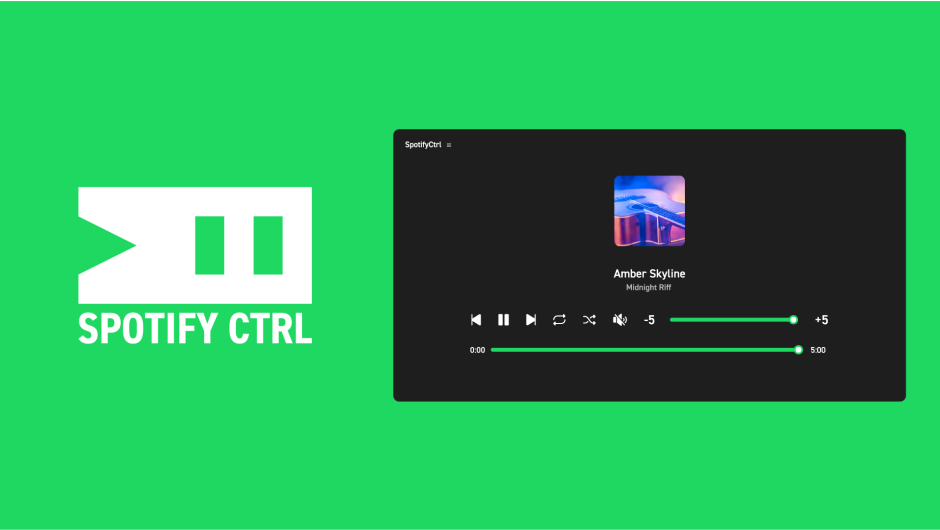
SpotifyCtrl for After Effects
spotify controller script
Download SpotifyCtrl v1.0.0 for After Effects on Windows and Mac, a powerful script that lets you control Spotify directly from within After Effects. Execute all the same functions as the official client application—play/pause, skip tracks, adjust volume, and manage playlists—while displaying current track information and album artwork in your composition. Perfect for music visualization projects, rhythm-based animations, and any workflow where audio control needs to stay integrated with your editing environment.
Key Features of SpotifyCtrl v1.0.0:
- Full Media Control: Complete playback controls including play/pause, previous/next track, repeat, shuffle, mute, volume adjustment, and search bar functionality—all from within After Effects
- Track Information Display: Automatically displays the currently playing track name, artist name, and album artwork directly in your composition
- Customizable Interface: Choose which elements to show or hide—independently control album artwork, track information, control buttons, and search bar for flexible UI design
- Seamless Integration: Control Spotify without switching away from your After Effects workspace—ideal for music-driven animation and motion graphics projects
- Cross-Platform Support: Works on both Windows and Mac systems with After Effects 2023-2026
Important Note: SpotifyCtrl requires a Spotify Premium account to function, as the necessary playback controls and data access are only available to Premium subscribers.
Perfect For:
- Motion graphics artists creating music visualization and rhythm-based animations
- Editors working on projects that require synchronized audio control
- Music video producers wanting to test tracks without switching applications
- Anyone who wants to keep their audio workflow integrated with their editing environment
System Requirements:
- Adobe After Effects 2026, 2025, 2024, 2023
- Windows 10/11 (64-bit) or macOS
- Spotify Premium account (required)
- Active Spotify application running on the same machine
- 4GB RAM minimum (8GB+ recommended)
- 25MB available disk space
- Enable “Allow Scripts to Write Files and Access Network” in Preferences > Scripting & Expressions
Installation:
Copy the script file to your After Effects ScriptUI Panels folder:
- Windows:
C:\Program Files\Adobe\Adobe After Effects [version]\Support Files\Scripts\ScriptUI Panels\ - Mac:
/Applications/Adobe After Effects [version]/Scripts/ScriptUI Panels/
Access via Window menu > SpotifyCtrl
Note: Version 1.0.0 is the initial release of this innovative integration tool . The script’s developer, CubeZeero, maintains it in a separate repository specifically for Spotify control functionality .
SpotifyCtrl is a plugin that allows you to control Spotify directly from After Effects.

SpotifyCtrl
SpotifyCtrl is a plugin that allows you to control Spotify directly from After Effects.
You can perform the same operations as in the official client app right within After Effects, and it also displays track information and artwork.
Of course, the volume bar and seek bar are supported as well.


Controller
It supports the same functions as the official client app, including play/pause, previous track, next track, repeat, shuffle, mute, volume, and the seek bar.

Song Information
In addition to the control buttons, you can display the currently playing track name, artist name, and artwork image.

Show/Hide Parts
The artwork image, track information, control buttons, and seek bar can each be shown or hidden individually.
Elevate your motion graphics workflow with premium collection of After Effects plugins. Whether you are a seasoned professional or just starting your VFX journey, powerful tools designed to streamline complex tasks, unlock creative possibilities, and save you hours of rendering time. From stunning glitch effects and seamless transitions to advanced 3D extrusion and text animation tools, each plugin in our library is rigorously tested for compatibility with the latest versions of Adobe after Effects. Enhance your video production value today and download industry-leading plugins that help you create breathtaking visuals without the technical headaches. Browse our full range and find the perfect extension to supercharge your editing suite now.
➡️ ➡️ For more after effects Plugins 😀 😀
➡️ ➡️ System requirements AE
Reviews
There are no reviews yet.