
Text Scatter for After Effects
text scatter script
Text Scatter v1 for After Effects – Dynamic Character Dispersion & Kinetic Typography Tool
Download Text Scatter v1 for After Effects on Windows and Mac, a powerful kinetic typography script that instantly creates dynamic dispersion animations where text characters scatter, explode, or drift apart. Perfect for music videos, title sequences, and engaging motion graphics that demand eye-catching text effects.
Key Features of Text Scatter v1:
- Character Dispersion: Automatically animates each character to scatter in customizable patterns—radial explosion, random drift, directional spray, or organic flow
- Multiple Scatter Styles: Choose from various dispersion behaviors including explosive burst, gentle drift, spin-out, fade-scatter, and particle-like dispersion
- Adjustable Scatter Strength: Control how far characters travel from their original positions with simple intensity sliders
- Directional Control: Set scatter direction—outward from center, specific angles, random directions, or toward/away from custom points
- Timing Controls: Adjust scatter duration, delay between characters, and easing for perfectly timed animations
- Return Animation Options: Characters can stay scattered, slowly return to position, or continue drifting for endless creative variations
- Individual Character Control: Each character becomes independently animatable while maintaining the original text’s formatting
- Non-Destructive Workflow: All animations remain fully editable without baking to keyframes
- Cross-Platform Support: Works on both Windows and Mac systems
Perfect For:
- Music video producers creating lyric animations with explosive text effects
- Title sequence designers wanting dynamic, attention-grabbing typography
- Motion graphics artists building engaging intro animations
- Content creators looking for unique text reveals and transitions
- Anyone wanting to add professional scatter effects without manual keyframing
System Requirements:
- Adobe After Effects 2025, 2024, 2023, 2022
- Windows 10/11 (64-bit) or macOS
- 4GB RAM minimum (8GB+ recommended)
- 25MB available disk space
- Enable “Allow Scripts to Write Files and Access Network” in Preferences > Scripting & Expressions
Installation:
Copy the script file to your After Effects ScriptUI Panels folder:
- Windows:
C:\Program Files\Adobe\Adobe After Effects [version]\Support Files\Scripts\ScriptUI Panels\ - Mac:
/Applications/Adobe After Effects [version]/Scripts/ScriptUI Panels/
Access via Window menu > Text Scatter
Note: Version 1 is the initial release of this character dispersion tool . The script’s intuitive controls make it easy to create professional scatter animations that would be extremely time-consuming to keyframe manually .
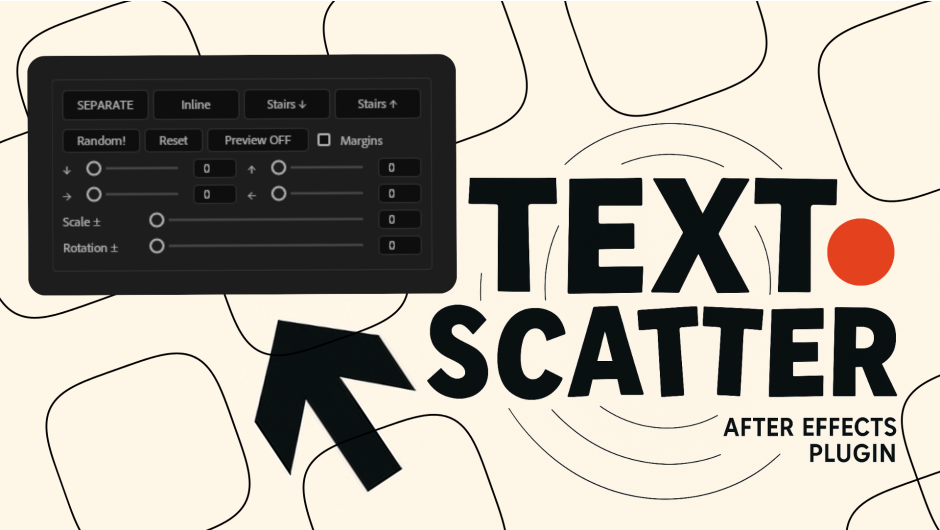
Quickly split text into words, randomize them, and organize layers with one click.
Text Scatter is a simple yet powerful tool for Adobe After Effects that lets you instantly split text into words and turn them into individual layers. Once separated, you can randomize their order or organize them into clean layouts

Quality-of-Life Features
- Stay organized while designing: the red limit box helps you visualize and control your composition area in real time.
- Switch instantly between three layout modes — Inline, Stairs Up, and Stairs Down —
to arrange your text exactly how you want. Built for speed, clarity, and effortless iteration.
Separate & Random Functions
The Separate feature instantly splits any text layer into individual words or characters, giving you full control over each element.
Once separated, the Random function lets you rearrange their order with a single click.
Perfect for creating dynamic layouts, scattered motion effects, or eye-catching text animations in seconds.

Why use Text Scatter?
Perfect for motion designers, editors, and creators who need fast, flexible, and dynamic text layouts
— all without complex setups or time-consuming adjustments.
Works seamlessly with any font or language, and includes a non-destructive workflow with a Reset button to instantly restore your layout.
The Separate action converts words into individual layers and does not preserve their exact, pixel-perfect positions.
If you need exact placement retention, consider tools specialized in that.

Elevate your motion graphics workflow with premium collection of After Effects plugins. Whether you are a seasoned professional or just starting your VFX journey, powerful tools designed to streamline complex tasks, unlock creative possibilities, and save you hours of rendering time. From stunning glitch effects and seamless transitions to advanced 3D extrusion and text animation tools, each plugin in our library is rigorously tested for compatibility with the latest versions of Adobe after Effects. Enhance your video production value today and download industry-leading plugins that help you create breathtaking visuals without the technical headaches. Browse our full range and find the perfect extension to supercharge your editing suite now.
➡️ ➡️ For more after effects Plugins 😀 😀
➡️ ➡️ System requirements AE
Reviews
There are no reviews yet.