
TextDuratifier for After Effects
text duratifier script
Download TextDuratifier v1.1.0 for After Effects on Windows and Mac, a powerful script that lets you set the exact duration of your text layers with precision control. Perfect for creating timed lower thirds, captions, and title sequences where precise timing is essential for professional results.
Key Features of TextDuratifier v1.1.0:
- Precise Duration Control: Set exact frame counts or time values for any selected text layer with simple numeric input
- Auto-Adjust Layer Timing: Automatically trims or extends layer duration to match your specified time
- Multi-Layer Support: Apply duration settings to multiple text layers simultaneously for consistent timing across your project
- Real-Time Preview: See timing adjustments update instantly in your composition
- Frame-Accurate Precision: Work in frames or seconds for exact control over text visibility
- Preserves Existing Animation: Maintains keyframes and expressions while adjusting overall layer duration
- Cross-Platform Support: Works on both Windows and Mac systems
- Broad Compatibility: Supports After Effects 2025, 2024, 2023, 2022
Perfect For:
- Video editors creating precisely timed lower thirds and title cards
- Motion graphics artists working with caption and subtitle sequences
- Anyone needing exact duration control for text elements
- Content producers creating template-based text overlays with specific timing requirements
- Studios wanting to standardize text duration across multiple projects
System Requirements:
- Adobe After Effects 2025, 2024, 2023, 2022
- Windows 10/11 (64-bit) or macOS
- 4GB RAM minimum (8GB+ recommended)
- 10MB available disk space
- Enable “Allow Scripts to Write Files and Access Network” in Preferences > Scripting & Expressions
Installation:
Copy the script file to your After Effects ScriptUI Panels folder:
- Windows:
C:\Program Files\Adobe\Adobe After Effects [version]\Support Files\Scripts\ScriptUI Panels\ - Mac:
/Applications/Adobe After Effects [version]/Scripts/ScriptUI Panels/
Access via Window menu > TextDuratifier
Note: Version 1.1.0 includes performance improvements and enhanced compatibility with recent After Effects versions . The script’s precise duration controls make it essential for projects requiring exact text timing .
TextDuratifier automatically adjusts the duration of text layers based on their content and the viewer’s reading speed, so you don’t have to listen to the text over and over to set its timing. It’s the perfect tool for text-based videos and for working with text in an unfamiliar language.
TextDuratifier automatically adjusts the duration of text layers based on their content and the viewer’s reading speed, so you don’t have to listen to the text over and over to set its timing.
It’s the perfect tool for text-based videos and for working with text in an unfamiliar language.
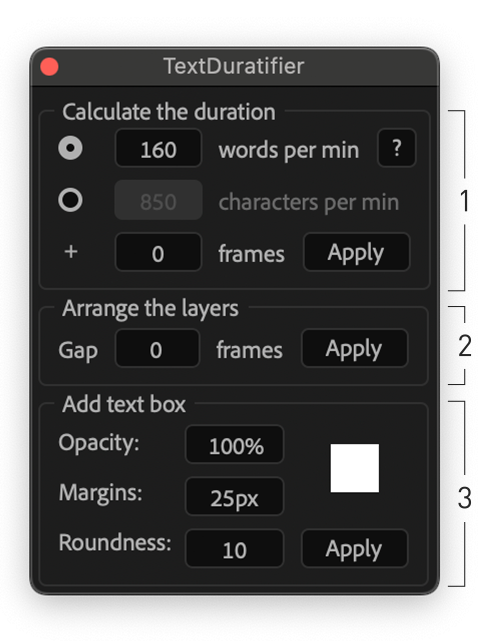
It contains three main functions:
- Setting the duration of a layer based on the content
- Arranging layers one by one on the timeline
- Creating an adaptive background for text
Just 3 clicks for managing many layers
Click 1: Calculate the duration
The duration of layers is set based on the reading speed, which defaults to the optimal value. You can adjust this manually if needed.
The script has two duration modes: words per minute and characters per minute. Try switching the mode if the result doesn’t feel ideal for some layers.
There’s an option to add extra frames to layer durations, which is helpful for animations at the beginning or end of a layer, holding the viewer’s attention, or extending single-word layers that can be too short.
Click 2: Arrange the layers
Arrange the layers sequentially with a single click. You can also add a gap between the layers by setting the number of frames.
Click 3: Add text box
Add an adaptive text box by setting the text margin, as well as its roundness, opacity and color.
Elevate your motion graphics workflow with premium collection of After Effects plugins. Whether you are a seasoned professional or just starting your VFX journey, powerful tools designed to streamline complex tasks, unlock creative possibilities, and save you hours of rendering time. From stunning glitch effects and seamless transitions to advanced 3D extrusion and text animation tools, each plugin in our library is rigorously tested for compatibility with the latest versions of Adobe after Effects. Enhance your video production value today and download industry-leading plugins that help you create breathtaking visuals without the technical headaches. Browse our full range and find the perfect extension to supercharge your editing suite now.
➡️ ➡️ For more after effects Plugins 😀 😀
➡️ ➡️ System requirements AE
Reviews
There are no reviews yet.