
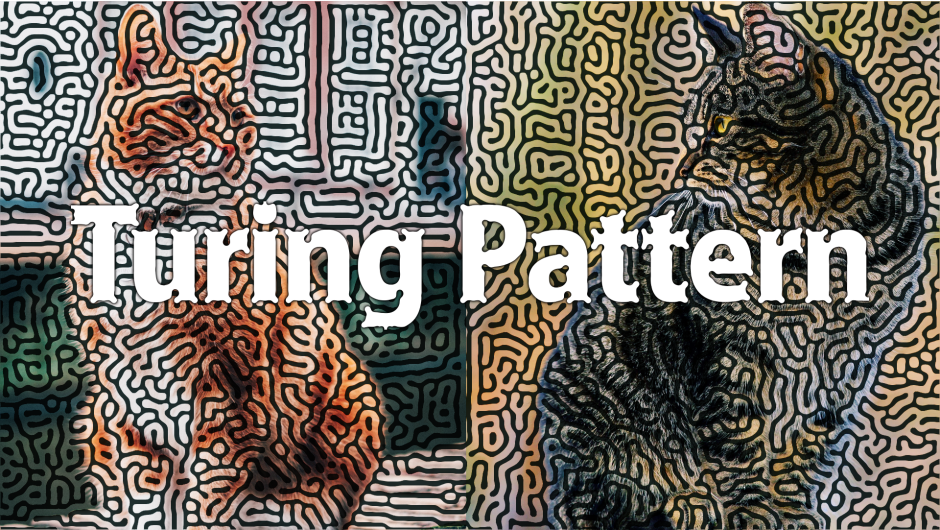
TuringPattern for After Effects
turing pattern plugin
Download Turing Pattern v1.1 for After Effects on Windows and Mac, a powerful reaction-diffusion simulation plugin based on Alan Turing’s groundbreaking mathematical models of morphogenesis. Generate stunning organic patterns, biological textures, and evolving cellular automata visuals that mimic natural growth processes—perfect for creating unique backgrounds, abstract animations, and scientific visualizations.
Key Features of Turing Pattern v1.1:
- Reaction-Diffusion Simulation: Authentic implementation of Turing’s mathematical models for generating organic, evolving patterns that resemble animal coats, coral growth, and biological textures
- Real-Time Evolution: Watch patterns emerge and transform over time with adjustable simulation speed
- Multiple Pattern Types: Generate spots, stripes, mazes, and complex organic structures by adjusting reaction parameters
- Parameter Controls: Fine-tune diffusion rates, reaction speeds, feed rates, kill rates, and other simulation variables for endless pattern variations
- Seed Options: Control initial pattern seeds for reproducible results or random generation
- Color Mapping: Apply custom color palettes to your generated patterns for unique visual styles
- Animation Ready: Patterns evolve naturally over time, creating infinite, non-repeating animations perfect for backgrounds and transitions
- GPU Accelerated: Optimized for fast simulation performance
- v1.1 Update: Performance improvements and enhanced parameter controls
- Cross-Platform Support: Works on both Windows and Mac systems
Perfect For:
- Motion graphics artists creating organic, biological-looking backgrounds and textures
- VFX designers generating unique abstract patterns and transitions
- Scientific visualizers demonstrating reaction-diffusion and morphogenesis concepts
- Music video producers seeking hypnotic, evolving visuals
- Anyone wanting to explore the mathematical beauty of Turing patterns in motion
System Requirements:
- Adobe After Effects 2025, 2024, 2023, 2022
- Windows 10/11 (64-bit) or macOS
- GPU recommended for optimal simulation performance
- 4GB RAM minimum (8GB+ recommended)
- 25MB available disk space
Installation:
Copy the plugin file to your After Effects Plug-ins folder:
- Windows:
C:\Program Files\Adobe\Adobe After Effects [version]\Support Files\Plug-ins\ - Mac:
/Applications/Adobe After Effects [version]/Plug-ins/
Note: Version 1.1 includes performance improvements and enhanced pattern controls over the initial release . The plugin brings Alan Turing’s groundbreaking mathematical insights directly into your motion graphics workflow for truly unique organic effects .
Generate turing patterns from footage in After Effects.
Please note that it currently only works on Windows.
Organic and distinctive patterns.
Generates turing patterns from images plug-in for AfterEffects.
The computation is done using a GPU and is fast.
Please note that it currently only works on Windows.
Easy to use UI
Easy operation mode and, two modes are available for detailed operation.


Example


Unleash the power of patterns with our revolutionary plug-in! Transform any image into mesmerizing Turing Patterns.
Elevate your motion graphics workflow with premium collection of After Effects plugins. Whether you are a seasoned professional or just starting your VFX journey, powerful tools designed to streamline complex tasks, unlock creative possibilities, and save you hours of rendering time. From stunning glitch effects and seamless transitions to advanced 3D extrusion and text animation tools, each plugin in our library is rigorously tested for compatibility with the latest versions of Adobe after Effects. Enhance your video production value today and download industry-leading plugins that help you create breathtaking visuals without the technical headaches. Browse our full range and find the perfect extension to supercharge your editing suite now.
➡️ ➡️ For more after effects Plugins 😀 😀
➡️ ➡️ System requirements AE
Reviews
There are no reviews yet.