
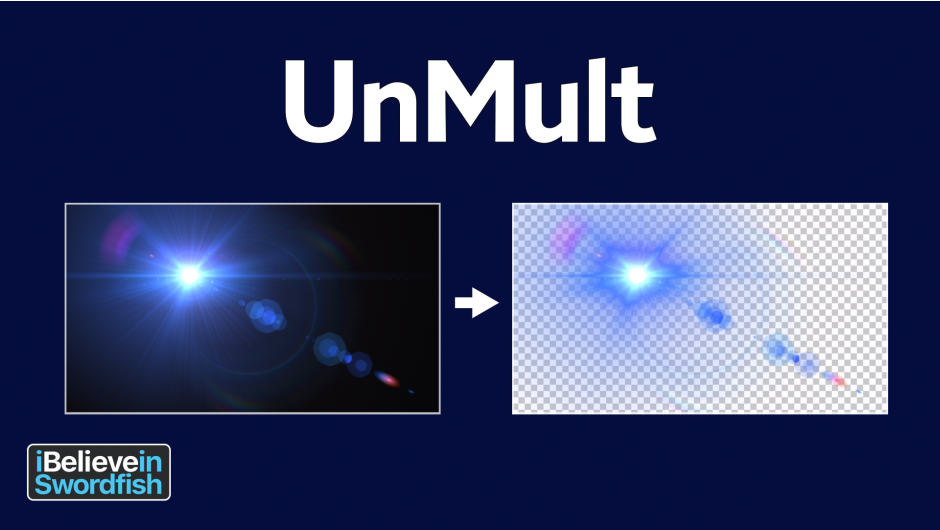
UnMult for After Effects
unmult plugin
Download UnMult v1.2 for After Effects and Premiere Pro on Windows and Mac, a free and essential plugin that instantly removes black backgrounds from video素材 with a single click. Perfect for working with light effects, lens flares, fire, smoke, and any footage shot on black—creates clean alpha channels without the need for screen/blend modes .
Key Features of UnMult v1.2:
- One-Click Black Removal: Instantly remove black backgrounds from any footage or效果素材 with a single click—no more fiddling with blend modes
- Alpha Channel Generation: Automatically creates proper alpha channels for素材 originally on black backgrounds, enabling normal compositing workflows
- Perfect for Light Effects: Ideal for lens flares, sparks, fire, smoke, and other效果素材 that are typically provided on black backgrounds
- Better Than Blend Modes: Often produces cleaner, more accurate results than using Screen or Add blend modes, especially for complex素材
- RGB Unpremultiplication: Works by “unpremultiplying” RGB channels to restore full color saturation while matching alpha attenuation
- Non-Destructive Processing: Modifies pixel values to use semi-transparent alpha while maintaining visual appearance of the original效果
- Cross-Platform Support: Fully compatible with both Windows and Mac systems, including native Apple M1/M2/M3 chip support
- Broad Application Compatibility: Works seamlessly in After Effects, Premiere Pro, and Media Encoder 2021-2025
- Completely Free: No cost, no watermarks, no limitations—just essential functionality for every motion graphics artist
Perfect For:
- Motion graphics artists working with stock light effects and lens flares
- VFX compositors integrating fire, smoke, and particle素材
- Video editors who frequently use素材 libraries with black backgrounds
- Anyone tired of fighting with blend modes for black-background素材
- Studios looking to streamline their compositing workflow
System Requirements:
- Adobe After Effects 2021-2025
- Adobe Premiere Pro 2021-2025
- Adobe Media Encoder 2021-2025
- Windows 10/11 (64-bit) or macOS (Intel and Apple Silicon native)
- 4GB RAM minimum (8GB+ recommended)
- 1MB available disk space
Installation:
Copy the plugin file to your Adobe Common Plug-ins folder:
- Windows:
C:\Program Files\Adobe\Common\Plug-ins\7.0\MediaCore\ - Mac:
/Library/Application Support/Adobe/Common/Plug-ins/7.0/MediaCore/
Note: UnMult is developed by iBelieveInSwordfish and is completely free to use . It’s particularly useful for light effects素材 that need to be composited with normal blend modes instead of screen or add . For best results, use with素材 that have pure black backgrounds .
Remove black to add an alpha channel to a lighting effect
The UnMult plug-in generates an alpha channel for a lighting effect, allowing it to be applied to your footage using the Normal transfer mode in After Effects or another program. It does this by un-premultiplying the RGB to reach full saturation and then attenuating the alpha by the same amount.
UnMult assumes your lighting effect (a lens flare, for example) is applied to a black solid with a fully opaque alpha channel. After applying UnMult, the lighting effect may appear unchanged, but the pixel values will have been modified to use a semi-transparent alpha.
Elevate your motion graphics workflow with premium collection of After Effects plugins. Whether you are a seasoned professional or just starting your VFX journey, powerful tools designed to streamline complex tasks, unlock creative possibilities, and save you hours of rendering time. From stunning glitch effects and seamless transitions to advanced 3D extrusion and text animation tools, each plugin in our library is rigorously tested for compatibility with the latest versions of Adobe after Effects. Enhance your video production value today and download industry-leading plugins that help you create breathtaking visuals without the technical headaches. Browse our full range and find the perfect extension to supercharge your editing suite now.
➡️ ➡️ For more after effects Plugins 😀 😀
➡️ ➡️ System requirements AE
Reviews
There are no reviews yet.