
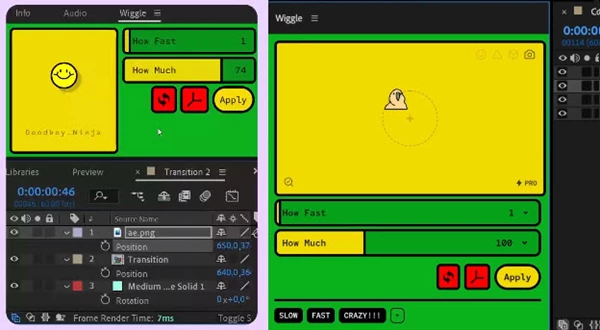
Wiggle Pro for After Effects
wiggle pro script
Download Wiggle Pro v2.0.0 for After Effects on Windows and Mac, a powerful script that lets you create complex, natural-looking wiggle animations with unprecedented control. Perfect for adding organic movement, jitter, shake, and secondary motion to any layer—without writing a single expression .
Key Features of Wiggle Pro v2.0.0:
- Physics-Based Wiggle Engine: Generate natural, organic movement that simulates real-world physics—no more mechanical-looking random motion
- Multiple Wiggle Types: Choose from various wiggle styles including elastic, bounce, noise-based, and custom curve-controlled motion
- Individual Axis Control: Independently control wiggle intensity, speed, and behavior on X, Y, and Z axes for precise movement
- Frequency & Amplitude Control: Fine-tune how fast and how far your layers wiggle for exactly the right feel
- Real-Time Preview: See wiggle effects update instantly as you adjust parameters, enabling rapid experimentation
- Non-Destructive Workflow: All wiggle parameters remain fully editable without baking to keyframes
- Expression-Based Results: Creates clean, portable expressions that work even without the script installed
- Cross-Platform Support: Works on both Windows and Mac systems
Perfect For:
- Motion graphics artists adding organic secondary motion to animations
- Character animators creating natural jiggle and follow-through effects
- VFX designers adding camera shake and handheld camera feel
- UI/UX designers prototyping realistic micro-interactions
- Anyone wanting to add professional wiggle effects without complex expressions
System Requirements:
- Adobe After Effects 2025, 2024, 2023, 2022
- Windows 10/11 (64-bit) or macOS
- 4GB RAM minimum (8GB+ recommended)
- 25MB available disk space
- Enable “Allow Scripts to Write Files and Access Network” in Preferences > Scripting & Expressions
Installation:
Copy the script file to your After Effects ScriptUI Panels folder:
- Windows:
C:\Program Files\Adobe\Adobe After Effects [version]\Support Files\Scripts\ScriptUI Panels\ - Mac:
/Applications/Adobe After Effects [version]/Scripts/ScriptUI Panels/
Access via Window menu > Wiggle Pro
Note: Version 2.0.0 is a major update featuring a completely redesigned physics engine and expanded wiggle types . The script’s intuitive controls make it easy to create sophisticated organic motion that would be extremely time-consuming to keyframe manually .
Live, Looping, Non-Confusing Wiggle

Never guess numbers again
The Wiggle panel unlocks a no-code wiggle workflow. The smiley face shows you exactly what you’re going to get. Once you’re done, just click Apply and the expression will be applied to selected properties.
Live Preview
See your wiggle in real time. No more guessing what your wiggle will look like. The preview updates as you change the settings.
Looping Wiggle!
Never again will you have to google search ‘looping wiggle expression’ and try to figure out how to make it work. You’re a designer, not a programmer. Let Wiggle do the heavy lifting.
Save Presets for later use
Save time by creating and reusing presets of your favorite wiggle settings, then apply them with a single click.
Custom Preview Emotes
Choose between different fun characters in your preview, or bring your own custom image to make it truly yours!
Elevate your motion graphics workflow with premium collection of After Effects plugins. Whether you are a seasoned professional or just starting your VFX journey, powerful tools designed to streamline complex tasks, unlock creative possibilities, and save you hours of rendering time. From stunning glitch effects and seamless transitions to advanced 3D extrusion and text animation tools, each plugin in our library is rigorously tested for compatibility with the latest versions of Adobe after Effects. Enhance your video production value today and download industry-leading plugins that help you create breathtaking visuals without the technical headaches. Browse our full range and find the perfect extension to supercharge your editing suite now.
➡️ ➡️ For more after effects Plugins 😀 😀
➡️ ➡️ System requirements AE
Reviews
There are no reviews yet.