
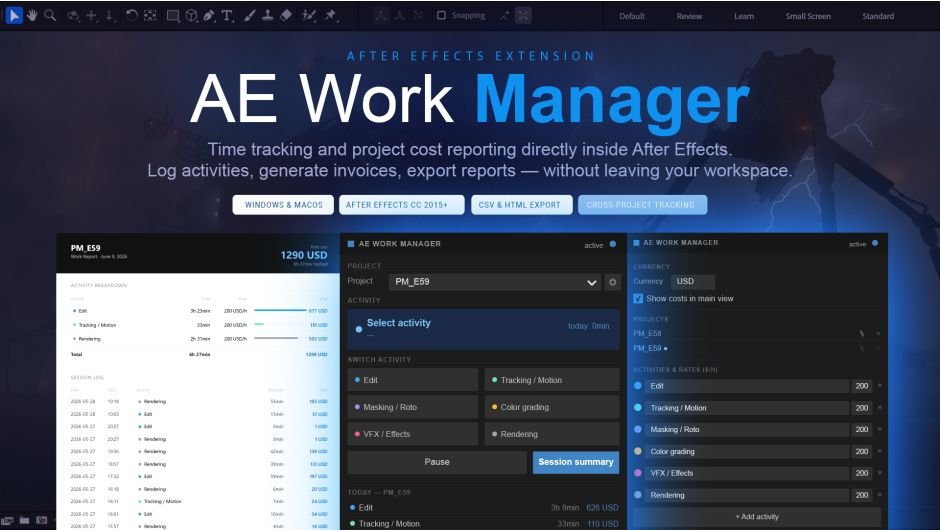
AE Work Manager for After Effects
AE Work Manager V1.0.0 for After Effects
The Ultimate Project Timer, Cost Tracker, and Workflow Organizer for After Effects
Download AE Work Manager V1.0.0 today. Consequently, you can finally bring order to your freelance business or studio production pipeline with a complete time tracking, project management, and version control system built directly into After Effects . Because freelance motion designers and studios frequently juggle multiple projects, clients, and deadlines, having access to an integrated management tool is absolutely essential. Nevertheless, tracking hours manually with spreadsheets or external timers often leads to guesswork, lost revenue, and administrative headaches. Fortunately, AE Work Manager eliminates this bottleneck completely. Moreover, it offers automatic session recovery, detailed cost breakdowns, and version control features that ensure you never lose track of your work or billable hours . In short, you can run your creative business like a professional studio with minimal effort.
Integrated Time Tracking with Activity Logging
The foundation of this plugin lies in its seamless, non-intrusive time tracking system. For instance, you can log time across fully customizable activity types — including Editing, Tracking, Color Grading, VFX, Rendering, and more — with a single click, without ever interrupting your creative flow . Furthermore, the panel records silently in the background while you work, ensuring every minute is accounted for. Since sessions are saved automatically after every activity switch, your data remains safe even if After Effects crashes or closes unexpectedly . Consequently, you can focus entirely on your creative work while the plugin handles the tedious task of tracking your time.
Smart Version Control and Incremental Saving
Professional projects demand reliable version management to avoid losing important work. Therefore, AE Work Manager includes an intelligent incremental saving and version tracking system that allows you to instantly switch between project iterations without the risk of losing critical edits . This feature is invaluable for exploring creative directions, rolling back changes, or meeting client revision requests. Additionally, the tool helps you maintain perfect order in your project files, making it an indispensable assistant for freelancers, studio motion designers, and VFX professionals working with large volumes of data .
Professional Cost Tracking and Reporting
One of the most powerful features of AE Work Manager is its robust cost tracking and reporting system. For example, you can view a full breakdown of time and cost per activity using a clean visual bar chart, with customizable hourly rates and totals . Once your project wraps, a single click generates a detailed breakdown with times, costs, and a ready-to-export report. The plugin offers two export formats: an Internal report with full detail (including rates) for your records, and a Client report showing time only without visible rates . Additionally, you can export raw session data as CSV for use in spreadsheets or external billing tools, with each export automatically timestamped and named after the project .
Customizable Activities, Rates, and Currency Support
Flexibility is essential for adapting the tool to your specific business needs. Accordingly, you can add, rename, or remove activity types and set individual hourly rates for each one . You can also save your configuration as the default for all future projects, eliminating repetitive setup. Furthermore, the plugin supports any preferred currency symbol — USD, EUR, PLN, or any other — which appears consistently across the panel and all exports . This ensures your billing remains accurate and professional regardless of your location or client base.
Multi-Project Management and Responsive Interface
Managing multiple clients simultaneously requires efficient project switching. Therefore, AE Work Manager allows you to track time across multiple projects, switch between them without losing data, and rename or remove finished projects from the settings panel . The panel itself is fully responsive, scaling dynamically as you resize it so the full UI remains visible at any height, and it docks anywhere in the After Effects interface, saving its position between sessions automatically . Thus, the tool adapts seamlessly to your workspace and workflow preferences.
Perfect for Freelancers, Studios, and Post-Production Professionals
This plugin is particularly well-suited for freelance motion designers and animators who need to track billable hours accurately for client invoicing. Similarly, studio teams will appreciate the ability to manage multiple projects and generate comprehensive reports for project costing and resource allocation. Additionally, VFX professionals and editors working on complex, deadline-driven projects will benefit from the version control and organizational features. Ultimately, AE Work Manager accelerates your entire project management and administrative pipeline.
System Requirements and Compatibility
AE Work Manager supports a comprehensive range of After Effects versions, spanning from CC 2014 through After Effects 2026, ensuring broad compatibility with most production environments . The plugin works across both Windows 10/11 and macOS operating systems . You will need a standard workstation with at least 8GB of RAM, though system requirements are minimal given the plugin’s lightweight nature. The file size is approximately 299 MB .
Installation and Usage Guide
To install, first download the plugin installer from your library. Next, close Adobe After Effects if it is running. Then, install the extension following the standard aescripts + aeplugins installation process. After installation, launch After Effects and navigate to Window > Extensions > AE Work Manager. Finally, set up your activity types, hourly rates, and currency preference in the settings panel, select your active project, and begin tracking your time automatically as you work. When the project is complete, generate your cost breakdown and export your report with a single click. Thus, your professional project management workflow will be ready instantly.
What is Included Inside?
The pack contains the complete AE Work Manager V1.0.0 extension for After Effects . Furthermore, it includes the integrated time tracking system with per-activity logging, automatic session recovery, and incremental version control. Additionally, you receive the full cost tracking and reporting suite with HTML and CSV export options, customizable activities and rates, multi-project management, and a responsive dockable interface. Ultimately, you receive everything needed for professional project management and time tracking.
Final Thoughts on the Plugin
Effortless integrated time and project management evokes profound creative freedom. Therefore, this plugin provides the ultimate foundation for your freelance or studio workflows. You can track billable hours, manage multiple projects, and generate professional reports with unprecedented speed and simplicity. Consequently, your project management vision becomes a stunning reality.
Time tracking and project cost reporting directly inside AE. No spreadsheets, no external timers, no guessing.
Log time per activity — Editing, Tracking, Color Grading, VFX, Rendering and more — with one click. The panel records silently in the background while you work. When the project wraps, one click gives you a clean breakdown with times, costs and a ready-to-export report.
What it does
Features
| ⏱Per-activity time trackingLog time across fully customizable activity types — Editing, Tracking, Color Grading, VFX, Rendering and more. One click to switch, no interruption to your workflow. | 💾Session recoverySessions are saved automatically after every activity switch. If After Effects crashes or closes unexpectedly, all data is restored the next time you open the panel. |
| 📊Session summary on demandView a full breakdown of time and cost per activity only when you’re ready — with a visual bar chart, hourly rates and totals. | 📄HTML report exportGenerate a clean, print-ready report with two variants: Internal (full detail with rates) and Client (time only, no rates visible). |
| 📁CSV exportExport raw session data for use in spreadsheets or external billing tools. Each export is timestamped and named after the project. | ⚙️Customizable activities & ratesAdd, rename or remove activity types and set individual hourly rates. Save your configuration as the default for all future projects. |
| 💱Currency supportSet your preferred currency symbol — USD, EUR, PLN or any other. Appears consistently across the panel and all exports. | 📂Multiple projectsTrack time across multiple projects. Switch between them without losing data. Rename or remove finished projects from the settings panel. |
| 📐Responsive panelThe panel scales dynamically as you resize it — all elements shrink proportionally so the full UI remains visible at any height. | 🔲Dockable panelDocks anywhere in the After Effects interface. Saves its position between sessions automatically. |
Interface
Screenshots
 Main panel — track activities, view live log and running cost Main panel — track activities, view live log and running cost Settings — customize activities, rates, currency and projects Settings — customize activities, rates, currency and projects |  Session summary — time and cost breakdown with bar chart Session summary — time and cost breakdown with bar chart HTML report — clean, print-ready, ready to send or archive HTML report — clean, print-ready, ready to send or archive |
Tutorial
Full walkthrough
Technical
System Requirements
| Operating SystemWindows 10 / 11 · macOS | After EffectsCC 2014 – 2026+ |
| DependenciesNone — works out of the box | Also available forCinema 4D · Blender · Premiere Pro |
Elevate your motion graphics workflow with premium collection of After Effects plugins. Whether you are a seasoned professional or just starting your VFX journey, powerful tools designed to streamline complex tasks, unlock creative possibilities, and save you hours of rendering time. From stunning glitch effects and seamless transitions to advanced 3D extrusion and text animation tools, each plugin in our library is rigorously tested for compatibility with the latest versions of Adobe after Effects. Enhance your video production value today and download industry-leading plugins that help you create breathtaking visuals without the technical headaches. Browse our full range and find the perfect extension to supercharge your editing suite now.
➡️ ➡️ For more after effects Plugins 😀 😀
➡️ ➡️ System requirements AE
Reviews
There are no reviews yet.