
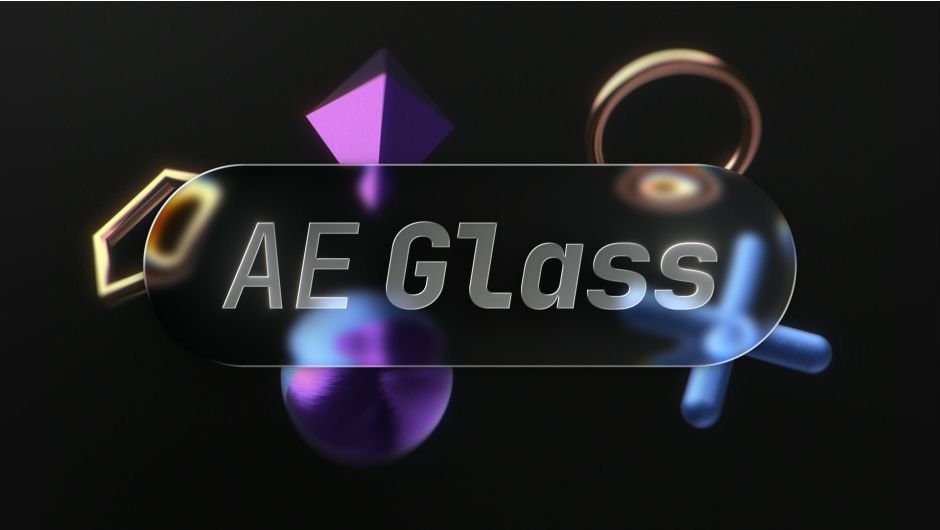
AEGlass for After Effects
AEGlass v1.0 for After Effects
The Ultimate Real-Time Glass and Refraction Effect for After Effects
Download AEGlass v1.0 today. Consequently, you can create stunning glassmorphism, frosted panels, liquid-glass UI elements, and refractive text effects directly inside After Effects with a single, intuitive plugin . Because modern motion design increasingly demands sleek glass aesthetics — from UI mockups and lower-thirds to logo reveals and HUD overlays — having access to a dedicated glass effect tool is absolutely essential. Nevertheless, achieving realistic glass refraction and dispersion manually requires complex layering, blurring, and displacement techniques that consume hours of production time. Fortunately, AEGlass eliminates this bottleneck completely. Moreover, it functions as a native After Effects effect, requiring no GPU and delivering real-time performance across 8 and 16-bit color depths . In short, you can apply premium glass effects to any source material with just ten simple sliders.
Realistic Refraction and Dispersion Engine
The core of this plugin lies in its sophisticated optical simulation. For instance, AEGlass accurately simulates light refraction, bending the layers beneath your glass layer to create authentic transparent and magnifying effects . Furthermore, the plugin includes Dispersion controls, which separate light into its component colors — mimicking the prismatic effect seen in real glass . The Depth parameter adds a volumetric feel, making your glass elements appear thick and substantial rather than flat. Consequently, your glass effects will achieve a level of realism previously only possible with complex 3D renderers.
Ten-Second Setup with Ten Sliders
Professional artists value efficiency above all else. Therefore, AEGlass is designed to be remarkably simple to use. You simply apply the effect to an Adjustment Layer, and control everything with just ten sliders . For instance, you can adjust Magnify to control the refractive scaling, use Effect Scale to fine-tune the impact on edges, and apply Rim Scale to create that distinctive glass edge highlight . Since the plugin works on any source — including shapes, text, solids, PNGs with alpha, and precomps — you can apply glass effects to virtually any layer type in your project .
Versatile Glass Styles and Applications
AEGlass is not limited to a single look. Consequently, it can produce a wide range of glass aesthetics. For example, you can create liquid-glass UI buttons and toggles, frosted panels for glassmorphism cards, refractive lower-thirds, glass logos, and dynamic social graphics . The plugin also excels at HUD overlays and logo reveals, making it a versatile tool for both UI designers and motion graphics artists. The effect works on any layer with a Fill; however, shape layers require a Fill to function correctly, as a stroke with no fill leaves the effect only a thin outline to work from.
Known Limitations and Considerations
To achieve the best results with AEGlass, you should keep a few important limitations in mind. For instance, the effect does not work on strokes alone — shape layers require a fill, as the effect needs a solid shape to refract properly . Additionally, AEGlass renders in 2D and does not follow 3D layer transforms or camera perspective . The host layer’s Adjustment switch must be on, as the effect refracts the layers below; with it off, the layer renders unchanged . Finally, inside a collapsed precomp, the glass renders where the backdrop lives, so keeping the precomp layer at its default transform is recommended .
Perfect for Motion Designers, UI Artists, and Video Editors
This plugin is particularly well-suited for motion designers creating glassmorphism UI elements and modern HUD overlays. Similarly, UI and app mockup artists will appreciate the ability to quickly add realistic glass panels and buttons to their designs. Additionally, video editors and lower-third creators can use AEGlass to add premium refractive text and graphics. Ultimately, AEGlass v10 accelerates your entire motion design pipeline.
System Requirements and Compatibility
AEGlass v10 is a native After Effects effect, requiring no GPU acceleration and working across both Windows and macOS platforms . It supports After Effects versions 2025 and 2026 . You will need a standard workstation with at least 8GB of RAM, though system requirements are minimal given the plugin’s lightweight nature.
Installation and Usage Guide
To install, first download the plugin installer from your library. Next, close Adobe After Effects if it is running. Then, run the installer and follow the on-screen instructions. After installation, launch After Effects. Finally, apply the effect to an Adjustment Layer, ensure the layer’s Adjustment switch is on, and use the ten sliders to dial in your perfect glass effect. Thus, your professional glass effect workflow will be ready instantly.
What is Included Inside?
The pack contains the complete AEGlass v10 plugin installer for After Effects. Furthermore, it includes the full suite of glass controls including Refraction, Depth, Dispersion, Splay, Magnify, Effect Scale, and Rim Scale.
Final Thoughts on the Plugin
Effortless glass and refraction effects evoke profound creative freedom. Therefore, this plugin provides the ultimate foundation for your motion design and UI workflows. You can apply realistic glass effects with unprecedented speed and simplicity. Consequently, your glass vision becomes a stunning reality.
AE Glass adds real glass: fast, fully live refraction, frost, edge light, and dispersion to any shape, text, mask, logo, and more. One drop, no displacement maps, zero setup.
AEGlass
Real glass. One drop.
Drop it on any shape, text, logo or mask and it turns to glass. Live refraction, frost, edge light and dispersion. No displacement maps, no setup.
The Liquid Glass look,built into your layers.
Refraction
It bends and magnifies whatever sits behind it, in real time. Move the background and the glass follows.
Frost
From crystal clear to a soft, diffuse panel.
Edge light
A directional rim light catches the edge, so it reads like a real lit surface.
Dispersion
A spectral fringe at the rim, the rainbow you get off thick glass.
Works on
Drop it on (almost) anything.
Shapes, text, logos, masks, solids, even PNGs and precomps. You don’t need to precompose anything, but it plays nice if you do.
All in Effect Controls
Just sliders. Nothing to learn.
Ten sliders in one panel, every one animatable. No maps to build, nothing to rig.
Made for
UI & app mockupsLiquid-glass UIButtons & togglesLiquid-glass titlesGlassmorphism cardsFrosted panelsLower-thirdsSocial graphicsLogo revealsHUD & overlays
Quick start
Up and running, no setup.
A tour of all ten sliders.
Native After Effects effect, no GPU required, 8 & 16-bit color. Works on any source via the Adjustment Layer switch: shapes, text, solids, masks, and layers with their own alpha (logos, PNGs, precomps).
Limitations
Collapse Transformations — inside a collapsed precomp, the glass renders where the backdrop lives; keep the precomp layer at its default transform.
Strokes — won’t work on their own. Shape layers need a Fill; a stroke with no fill leaves the effect only a thin outline to work from, not a shape.
3D layers — renders in 2D; 3D layer transforms and camera perspective are not followed. Keep glass layers 2D.
Adjustment Layer required — the effect refracts the layers below, so the host layer’s Adjustment switch must be on. With it off, the layer renders through unchanged (and the effect reminds you).
Elevate your motion graphics workflow with premium collection of After Effects plugins. Whether you are a seasoned professional or just starting your VFX journey, powerful tools designed to streamline complex tasks, unlock creative possibilities, and save you hours of rendering time. From stunning glitch effects and seamless transitions to advanced 3D extrusion and text animation tools, each plugin in our library is rigorously tested for compatibility with the latest versions of Adobe after Effects. Enhance your video production value today and download industry-leading plugins that help you create breathtaking visuals without the technical headaches. Browse our full range and find the perfect extension to supercharge your editing suite now.
➡️ ➡️ For more after effects Plugins 😀 😀
➡️ ➡️ System requirements AE
Reviews
There are no reviews yet.