
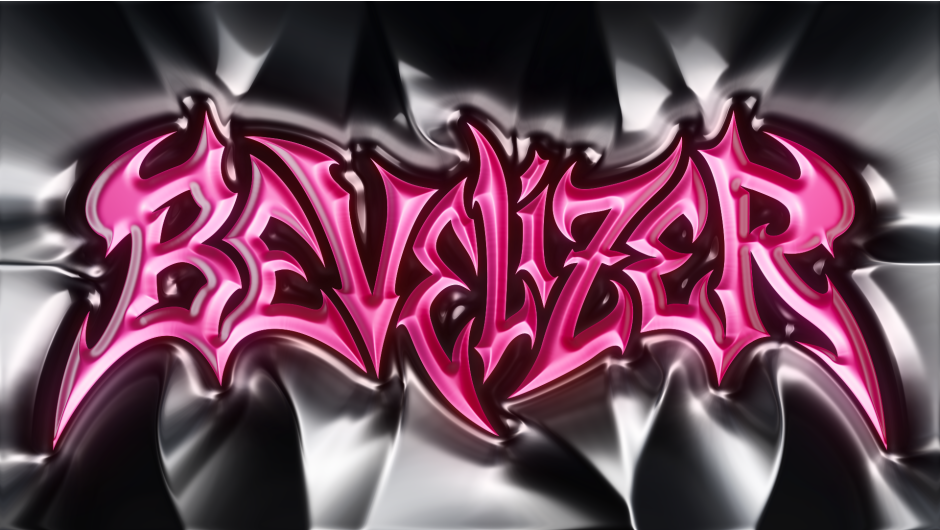
Bevelizer for After Effects
Bevelizer v1 for Adobe After Effects
The Ultimate Real-Time 3D Bevel and Extrusion Plugin for After Effects
Download Bevelizer v1 today. Consequently, you can instantly transform flat text, vector shapes, masks, and logos into stunning 3D beveled surfaces with realistic depth, reflections, and lighting — all rendered in real-time directly inside After Effects . Because motion designers and video editors frequently need to create eye-catching 3D titles and graphics, having access to a fast, intuitive extrusion tool is absolutely essential. Nevertheless, achieving genuine 3D bevel effects typically involves time-consuming workarounds or heavy external renderers. Fortunately, Bevelizer eliminates this bottleneck completely. Moreover, this native GPU-accelerated plugin uses CUDA and Metal to deliver smooth 60fps performance at Full HD, ensuring your creativity flows without interruption . In short, you can add professional 3D depth to any design element with unprecedented speed and control.
Real-Time GPU Acceleration and Instant Feedback
The hallmark of this plugin is its exceptional real-time performance. For instance, every parameter you adjust updates instantly in the viewport, allowing you to see exactly how your bevel will look as you work. Furthermore, this lag-free interactivity lets you iterate rapidly and experiment freely, making the design process far more intuitive than traditional 3D workflows.
Intelligent Shape Detection and Editable Bevel Curves
The core of Bevelizer lies in its sophisticated edge detection and customizable beveling system. For example, you can choose between Luma (brightness-based) or Alpha (transparency-based) detection to perfectly capture the boundaries of video footage, text, or logos . A Height Map mode is also available, using grayscale depth images directly for displacement-like effects . Additionally, the custom Bevel Curve Editor gives you precise control over the cross-section profile of your chamfer, allowing you to shape the bevel with up to 16 control points . Consequently, you can create everything from sharp, angular facets to soft, rounded extrusions.
Professional Controls for Depth, Height, and Smoothness
Professional results demand fine-grained control over the final look. Therefore, the plugin includes adjustable Bevel Size and Height parameters, enabling you to control the width of the effect and the perceived depth from -100 to +100, with negative values creating inset effects . Furthermore, you can apply Gaussian smoothing and a separable blur to achieve silky-smooth gradients and flawless edges . Since every parameter is fully keyframable, you can animate bevel size, height, and rotation over time for dynamic, breathing motion graphics .
Extensive MatCap Library and Custom Textures
One of the most powerful features of Bevelizer is its comprehensive MatCap (Material Capture) gallery. For instance, the plugin includes 82 professional presets across five categories: Crystals, Matte, Metallic, Plastic, and Stylized . You can apply these environment maps with a single click to achieve a wide range of looks, from gem-like reflections to soft, diffuse materials and artistic toon shaders. Furthermore, you can use custom environment map layers and even launch a free companion web tool directly from the MatCap Gallery to create your own unique textures .
Versatile Features for Motion Graphics and Design
Creativity thrives on flexibility and inspiration. Therefore, Bevelizer includes features that break creative blocks. For example, the Randomize function can instantly generate fresh combinations of parameters and materials, with options for subtle Smart Jitter or a Full Shuffle that randomly picks curve presets and matcaps . Additionally, you can rotate the lighting environment 360° and switch between MatCap (spherical) and Planar (standard square) mapping modes . Thus, you have complete control over the final lighting and texture of your 3D design.
Perfect for Motion Designers, Video Editors, and Graphic Artists
This plugin is particularly well-suited for motion designers creating high-impact titles, lower-thirds, and dynamic graphics . Similarly, video editors will appreciate the ability to quickly enhance logos and text without leaving their timeline. Additionally, graphic artists looking to elevate their designs with 3D depth will find Bevelizer an essential tool. Ultimately, Bevelizer v1 accelerates your entire motion design and post-production pipeline.
System Requirements and Compatibility
Bevelizer supports an extensive range of After Effects versions, spanning from CC 2015.3 through the latest 2026 releases . The plugin is fully compatible with both Windows and macOS operating systems. You will need a standard workstation with at least 8GB of RAM and a compatible GPU for optimal performance.
Installation and Usage Guide
To install, first download the plugin installer from your library. Next, close Adobe After Effects if it is running. Then, run the installer and follow the on-screen instructions. After installation, launch After Effects and locate Bevelizer in the Effects panel. Finally, apply the effect to your text or shape layer, choose your Edge detection method, customize your bevel curve, apply a MatCap from the gallery, and animate your parameters to bring your 3D design to life. Thus, your professional 3D bevel workflow will be ready instantly.
What is Included Inside?
The pack contains the complete Bevelizer v1 plugin installer for After Effects. Furthermore, it includes 82 professional MatCap presets, the customizable Curve Editor, and the Randomize feature. Additionally, you receive the Height Map and Alpha/Luma edge detection systems. Ultimately, you receive everything needed for professional real-time 3D beveling.
Final Thoughts on the Plugin
Effortless real-time 3D bevel creation evokes profound creative freedom. Therefore, this plugin provides the ultimate foundation for your motion design and title animation workflows. You can add professional 3D depth to your designs with unprecedented speed and control. Consequently, your creative vision becomes a stunning reality.
The plugin designed for creating chamfers (bevels) is perfect for styling text or any other shapes.


Transform flat shapes into stunning 3D beveled surfaces. Real-time. GPU-powered.
Scroll to explore
01
See it.
Believe it.
Watch flat vectors come alive with depth, shadows, and professional matcap lighting — all rendered in real-time within After Effects.
02
What makes it special
GPU Powered
CUDA and Metal acceleration delivers 60fps on Full HD. Your creativity flows without interruption.
82 Matcaps
Pro environment maps across 5 categories.
Curve Editor
Shape your bevel with intuitive bezier controls.
Fully Animatable
Every parameter is keyframable. Animate bevel size, height, and rotation for dynamic motion graphics that breathe.
03
Every parameter
at your fingertips
Shape Source &
Threshold
Choose between Luma or Alpha channel for edge detection. Fine-tune the threshold to capture exactly the boundaries you need.
- —Luma: Detects edges based on brightness — ideal for video footage.
- —Alpha: Uses transparency for clean shape isolation — perfect for text, vectors, and logos.
- —Height Map: Uses luminance directly as height data — ideal for displacement maps and grayscale depth images.
Bevel Size &
Smoothness
Control the width of your bevel effect and apply Gaussian smoothing for silky-smooth gradients. Separable blur ensures optimal performance.
Bevel Height &
Direction
Adjust the perceived depth of your bevel from -100 to +100. Negative values create inset effects, positive values produce raised surfaces.
Custom Bevel
Curve
Design your own bevel profile with the built-in bezier curve editor. Up to 16 control points for precise shape definition.
Matcap
Gallery
Browse and apply 82 professional matcap presets with a single click. Or use your own custom environment map layer.
Crystals10
gem-like reflective surfaces
Matte31
soft, diffuse materials
Metallic11
chrome and metal finishes
Plastic12
glossy polymer looks
Stylized18
artistic and toon shaders
Bevelizer
Creator
Need a unique look? Create your own custom matcap textures with our free companion web tool.
- —Free Web Tool: No installation — works in your browser.
- —One-Click Access: Launch from Matcap Gallery via “Create Matcap” button.
Environment Rotation
& Mode
Rotate the lighting environment 360° and switch between MatCap (spherical mapping) and Planar (standard square textures) modes.
Randomize
Settings
Stuck in a creative rut? Hit Randomize to instantly generate fresh combinations of parameters and materials.
- —Smart Jitter: Subtle variations keep results usable.
- —Full Shuffle: Randomly picks curve presets and matcaps.
Elevate your motion graphics workflow with premium collection of After Effects plugins. Whether you are a seasoned professional or just starting your VFX journey, powerful tools designed to streamline complex tasks, unlock creative possibilities, and save you hours of rendering time. From stunning glitch effects and seamless transitions to advanced 3D extrusion and text animation tools, each plugin in our library is rigorously tested for compatibility with the latest versions of Adobe after Effects. Enhance your video production value today and download industry-leading plugins that help you create breathtaking visuals without the technical headaches. Browse our full range and find the perfect extension to supercharge your editing suite now.
➡️ ➡️ For more after effects Plugins 😀 😀
➡️ ➡️ System requirements AE
Reviews
There are no reviews yet.