
blender cad tools main
Blender CAD Tools Main for Blender – The Ultimate Precision Modeling & Engineering Suite
Download Blender CAD Tools Main for Blender on Windows and Mac, a professional-grade addon designed to bring parametric modeling, precise measurements, and engineering workflows directly into the Blender environment. With advanced boolean operations, exact dimensioning tools, and STEP file compatibility, Blender CAD Tools Main transforms how mechanical engineers, product designers, and architects create technical models, eliminating the gap between artistic freedom and industrial precision.
Key Features of Blender CAD Tools Main:
Parametric History Stack: Create features (extrusions, cuts, fillets) that remain editable; change a dimension value later and the entire model updates automatically without rebuilding
Precision Dimensioning & Constraints: Apply exact length, angle, and radius constraints to sketches and geometry, ensuring your model meets strict manufacturing tolerances
Advanced Boolean Engine: A robust, error-free boolean system specifically optimized for hard-surface and mechanical parts, handling complex intersections without mesh artifacts
STEP & IGES Import/Export: Native support for industry-standard CAD file formats, allowing seamless data exchange with SolidWorks, Fusion 360, AutoCAD, and FreeCAD
Technical Drawing Generation: Automatically generate 2D orthographic projections, section views, and dimensioned blueprints from your 3D model for documentation or CNC machining
Fillet & Chamfer Control: Apply variable radius fillets and precise chamfers to edges with G1/G2 continuity, essential for injection molding and stress reduction
Measurement & Analysis Tools: Real-time tools to measure distances, angles, surface area, and volume, plus deviation analysis to compare against reference meshes
Sketch-Based Modeling: Draw 2D profiles with geometric constraints (parallel, perpendicular, tangent) and extrude them into solid 3D bodies instantly
Cross-Platform Support: Works flawlessly on both Windows and Mac systems including Apple Silicon M1/M2/M3 chips
Perfect For:
Mechanical engineers prototyping parts, gears, and assemblies within Blender
Product designers needing exact dimensions for 3D printing and manufacturing
Architects creating precise technical details, railings, and structural components
Makers and hobbyists who want to combine organic sculpting with hard-surface precision
Anyone frustrated by Blender’s lack of native parametric history and exact constraint tools
System Requirements:
Blender 3.6, 4.0, 4.1, 4.2, 4.3+ (Latest LTS recommended)
Windows 10/11 (64-bit) or macOS 10.15+
8GB RAM minimum (16GB+ recommended for complex assemblies)
Python 3.10+ (Included with modern Blender versions)
Installation:
Open Blender and go to Edit > Preferences > Add-ons:
Click “Install…” and select the downloaded .zip file for Blender CAD Tools Main
Enable the checkbox next to “Mesh: Blender CAD Tools”
Access via the Object Context Menu > CAD Tools or the 3D Viewport Sidebar (N-panel) > CAD Tab
Note: The “Main” version includes the full parametric kernel and unlimited STEP export slots, making it the definitive choice for professionals requiring end-to-end engineering workflows inside Blender.


CAD Tools for Blender
Simplify Your CAD Workflow in Blender
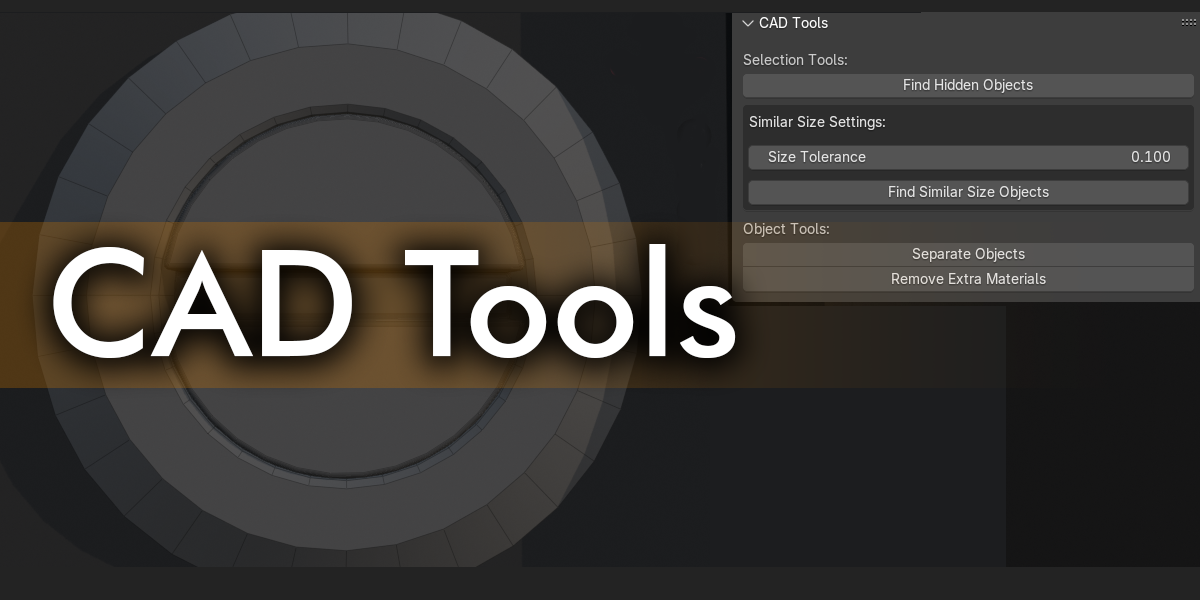
CAD Tools is a powerful Blender addon designed specifically for professionals and hobbyists working with imported CAD files. This essential toolkit addresses the common challenges and frustrations of working with complex CAD geometry in Blender’s environment.
Key Features:
Find Hidden Objects
Automatically locate and reveal objects that are hidden in the viewport but set to render, eliminating the tedious task of manually searching through your scene hierarchy.
Similar Size Detection
Quickly identify objects of similar dimensions with an adjustable tolerance slider. Perfect for finding small components like rivets, bolts, or any repeated elements across your CAD imports. Selected objects are automatically assigned a metallic material for easy visualization.
Material Cleanup
Remove unused material slots from selected objects with a single click, cleaning up the material clutter commonly found in imported CAD files.
NEW IN LATEST VERSION:
delete ALL materials of all selected objects button.
Object Separation
Instantly separate selected objects WITHOUT GOING INTO EDIT MODE (essential for high poly objects) by loose parts, making it easy to work with components that were merged during the import process.
Benefits:
- Save Time: Automate repetitive cleanup tasks that typically take hours to complete manually
- Improve Organization: Quickly identify and categorize similar components
- Enhance Performance: Clean up unnecessary data for smoother viewport navigation
- Streamline Workflow: Intuitive tools designed specifically for CAD-to-Blender workflows
Compatible with Blender 2.80 and above, CAD Tools integrates seamlessly into your workflow with a dedicated panel in the 3D View sidebar.
Whether you’re an architect finalizing visualizations, an engineer preparing models for 3D printing, or a designer working with manufacturer-supplied CAD data, CAD Tools provides the essential functionality to make your Blender experience more efficient and enjoyable.
Supercharge your 3D creation workflow with premium selection of Blender Add-ons. Whether you are modeling intricate characters, sculpting realistic environments, or animating cinematic sequences, the right add-on can transform how you work inside Blender. Our curated collection includes powerful tools for UV unwrapping, procedural texture generation, rigging automation, rendering optimization, and more—each rigorously tested for compatibility with the latest Blender versions. Eliminate tedious manual processes and unlock advanced functionality that lets you focus on what matters most: bringing your creative vision to life. Explore our full range of professional Blender plugins today and take your 3D projects to the next level.
➡️ ➡️ For more Blender Plugins 😀 😀
Reviews
There are no reviews yet.