

Blender Maya Converter for Blender
Blender Maya Converter (Bmc) v1.0 for Blender – The Ultimate Cross-Platform Pipeline Bridge
Version: V1.0
File Size: 1 MB
Download Blender Maya Converter (Bmc) v1.0 for Blender on Windows and Mac, a specialized addon designed to streamline the exchange of assets, scenes, and animation data between Blender and Autodesk Maya. With intelligent node translation, robust FBX/ALECMBIC optimization, and automated scale correction, Bmc v1.0 transforms how studios manage mixed-software pipelines, eliminating the common headaches of broken shaders, flipped normals, and messed-up animation curves when moving projects between the two industry giants.
Key Features of Bmc v1.0:
Smart Material Conversion: Automatically translates Blender Principled BSDF shaders to Maya Arnold/Standard Surface materials (and vice versa), preserving roughness, metallic, and normal map connections
Animation Curve Fidelity: Ensures interpolation types (Linear, Bezier, Stepped) are perfectly preserved during export/import, preventing “jittery” or smoothed-out motion in the target software
Automated Scale & Axis Correction: Instantly fixes the notorious Y-up vs. Z-up and unit scale discrepancies (meters vs. centimeters) so assets drop into the correct position without manual adjustment
Rig & Skin Integrity: Advanced handling of bone hierarchies, skin weights, and custom attributes to ensure character rigs deform identically in both applications
Batch Processing Mode: Convert entire folders of assets or multiple scenes simultaneously, ideal for migrating large libraries from one software to the other
Custom Attribute Mapping: Allows users to define custom rules for translating specific user-defined attributes or metadata that aren’t covered by standard formats
Error Reporting Log: Generates a detailed report after conversion highlighting any unsupported nodes or potential issues, allowing for quick troubleshooting before rendering
Optimized Workflow v1.0: Streamlined export presets specifically tuned for Maya 2024/2025 compatibility, reducing file size and import times for complex scenes
Cross-Platform Support: Works flawlessly on both Windows and Mac systems including Apple Silicon M1/M2/M3 chips
Perfect For:
Studios transitioning from Maya to Blender (or vice versa) needing to migrate legacy assets
Freelancers collaborating with clients who use different software ecosystems
Animation teams leveraging Blender’s modeling tools and Maya’s advanced rigging/systems
VFX houses integrating Blender geometry into larger Maya-based pipeline shots
Anyone frustrated by the manual cleanup required after standard FBX exports
System Requirements:
Blender 3.6, 4.0, 4.1, 4.2, 4.3+ (Latest LTS recommended)
Autodesk Maya 2020, 2022, 2023, 2024, 2025 (for full round-trip testing)
Windows 10/11 (64-bit) or macOS 10.15+
8GB RAM minimum (16GB+ recommended for heavy scene conversion)
Installation:
Open Blender and go to Edit > Preferences > Add-ons:
Click “Install…” and select the downloaded .zip file for Blender Maya Converter
Enable the checkbox next to “Import-Export: BMC”
Access via the File Menu > Import/Export > Blender Maya Converter or the 3D Viewport Sidebar (N-panel) > BMC Tab
Note: Version 1.0 includes a unique “Pre-Flight Check” tool that scans your Blender scene for Maya-incompatible features (like certain modifiers or nodal setups) before export, suggesting automatic fixes to ensure a smooth transfer.

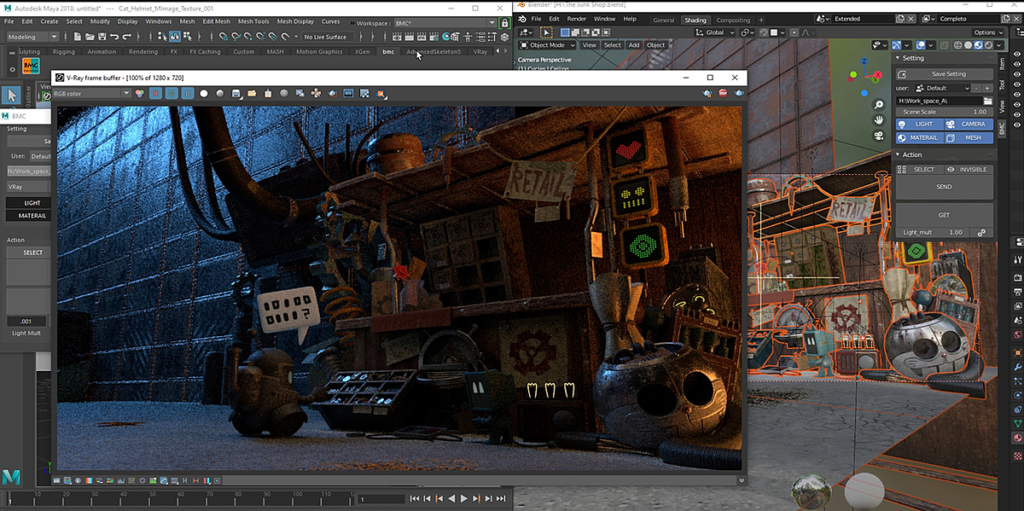


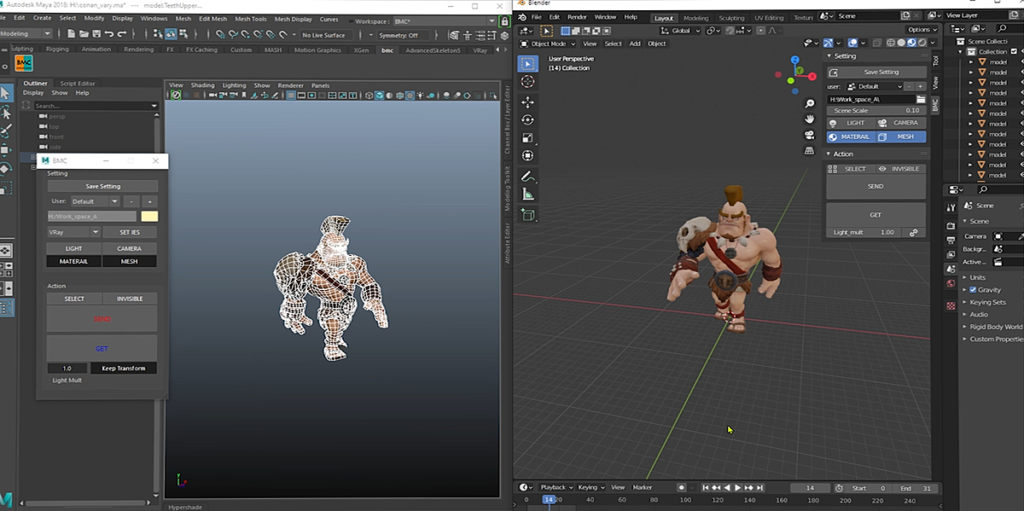

Blender Maya Converter is
Blender Maya Converter is a tool for transferring Mesh Light (Vray) Camera and Material (Vray) between Maya and Blender.
This tool for an artist who needs to transfer scenes between Blender and Maya. Might be in use rendering, modeling or another tool of both software, which is a better tool for each.
For a sample, when you finish your model in Maya. You use Maya Vray render, but need to render with Eevee or Cycle in a blender, you can send your scenes to a blender and automatically convert shade and light to blender system.
On the other hand, you can be modelled with blender tool and shading and lighting, but need to render with vray.You can send your scene to Maya and automatically convert shade and light to Maya Vray render system and set quality upon yours.
Compatibility:
- Blender 2.80 or above
- Maya 2017 Vray v4. 0 (Vray Next) or above Features
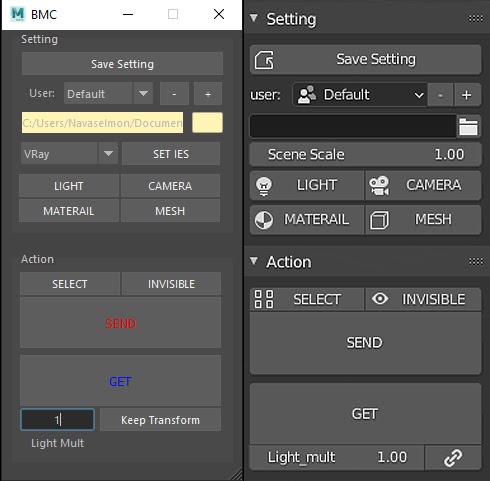
- [ Save Setting] Save your setting and communicate with another user. You can use this option to make user settings and save different file paths for communicating with another artist, which uses different software (in this time is Blender and Maya).For transfer assets to each other.
- [ Folder Path] setting the folder path for transfer file between user.
- [ – / +] add and remove user for saving difference setting.
- [ SEND/GET] send and get object between Blender and Maya.
- SEND/GET [MESH] turn-on this option when you need to send or get mesh.
- SEND/GET [LIGHT] turn-on this option when you need to send or get light
- SEND/GET [CAMERA] turn-on this option when you need to send or get a camera.
- SEND/GET [MATERIAL] turn-on this option when you need to send or get material relate to mesh.
- SEND [SELECT] sends only select object if this option is turn-on and export all objects.
- SEND [INVISIBLE] sends all objects, even object is invisible when an option is turn-on.
- GET [Light Mult] Multiply the intensity of light by your number.
- GET [Keep Transformation] If you have already imported an object and adjust the position, rotation or scale the existing model, need to import it again. If you turn on this option Import object still the same position rotation and scale. If not, turn-on your object reset to your original file.
- [ SET IES] set IES file for all gray IES light is selected
( only Maya) - SEND/GET [Scenes Scale] set scene scale for send and get (only Blender)Support Material Node
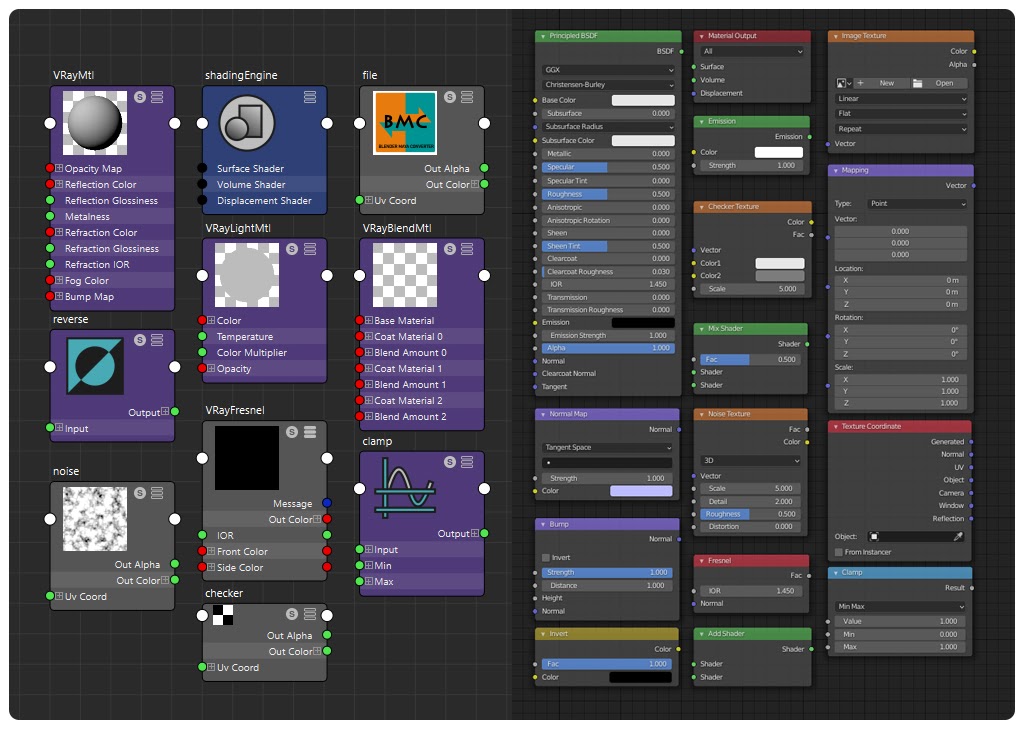 | BSDF_PRINCIPLED / VRayMtl TEX_IMAGE / file TEX_NOISE / noise INVERT / reverse MIX_SHADER / VRayBlendMtl NORMAL_MAP, BUMP / VRayMtl (build-in) |
Supercharge your 3D creation workflow with premium selection of Blender Add-ons. Whether you are modeling intricate characters, sculpting realistic environments, or animating cinematic sequences, the right add-on can transform how you work inside Blender. Our curated collection includes powerful tools for UV unwrapping, procedural texture generation, rigging automation, rendering optimization, and more—each rigorously tested for compatibility with the latest Blender versions. Eliminate tedious manual processes and unlock advanced functionality that lets you focus on what matters most: bringing your creative vision to life. Explore our full range of professional Blender plugins today and take your 3D projects to the next level.
➡️ ➡️ For more Blender Plugins 😀 😀
Reviews
There are no reviews yet.