
Brand Keeper for After Effects
Brand Keeper V1.2.0 for After Effects
The Ultimate Centralized Brand Asset Management Panel for After Effects
Download Brand Keeper V1.2.0 today. Consequently, you can store and access every client brand asset — including colors, fonts, logos, graphics, reference files, notes, and style guidelines — directly inside a single, convenient panel in Adobe After Effects . Because professional motion designers and video editors constantly switch between folders, PDFs, emails, and cloud storage to find brand assets, maintaining consistency across deliverables often becomes a frustrating, time-consuming process. Fortunately, Brand Keeper eliminates this interruption entirely. Moreover, it centralizes all essential brand information, allowing you to keep your creative flow uninterrupted and reduce costly mistakes. In short, you can manage multiple brands, projects, and clients with zero alt-tabbing.
One Panel, Zero Alt-Tabbing Workflow
The core of this extension lies in its ability to eliminate context switching. For instance, you can store brand colors, fonts, and logos alongside client notes, project references, and guidelines, all within a simple and intuitive panel interface . Furthermore, the extension ensures quick access to frequently used assets, helping you maintain brand consistency across every deliverable . Since all critical information is readily available, you can focus entirely on your creative work without constantly searching for files or details.
Professional Features for Agencies and Freelancers
Brand Keeper is designed to support a wide range of professional workflows. For example, you can organize assets for multiple clients, manage social media campaigns, create commercial advertisements, or produce corporate videos . Additionally, the extension is ideal for creative agencies, freelance creators, and in-house marketing teams who need to maintain brand consistency across multiple projects . The lightweight panel interface integrates seamlessly into your daily production tasks, significantly improving project setup and organization .
Broad Compatibility and Easy Installation
Brand Keeper V1.2.0 supports a comprehensive range of After Effects versions, including AE 2025 and AE 2026 . The extension is available for both Windows and macOS operating systems. You will need a standard workstation with at least 8GB of RAM, though system requirements are minimal given the extension’s lightweight nature.
Perfect for Motion Designers, Agencies, and Freelancers
This extension is particularly well-suited for motion designers and video editors who handle multiple brands or clients simultaneously. Similarly, creative agencies and freelance creators will appreciate the ability to standardize asset access across their entire team. Additionally, marketing teams and advertising studios will find the organized brand management invaluable for maintaining consistency across campaigns. Ultimately, Brand Keeper V1.2.0 accelerates your entire motion design and project management pipeline.
Installation and Usage Guide
To install, first download the extension files from your library. Next, close Adobe After Effects if it is running. Then, install the extension following the standard aescripts + aeplugins installation process. After installation, launch After Effects and navigate to Window > Extensions > Brand Keeper. Finally, add your client’s brand colors, fonts, logos, assets, and notes to the panel, and access everything instantly while you work. Thus, your professional brand management workflow will be ready instantly.
What is Included Inside?
The pack contains the complete Brand Keeper V1.2.0 extension for After Effects. Furthermore, it includes the centralized brand management panel, asset organization tools, and quick-access functionality . Additionally, you receive a comprehensive user guide and installation instructions. Ultimately, you receive everything needed for professional brand asset management.
Final Thoughts on the Extension
Effortless brand asset management evokes profound creative freedom. Therefore, this extension provides the ultimate foundation for your motion design workflows. You can manage multiple brands and clients with unprecedented speed and organization. Consequently, your brand management vision becomes a stunning reality.
Keep your client’s brand colors, fonts, assets, and notes inside After Effects. One panel. Zero alt-tabbing.
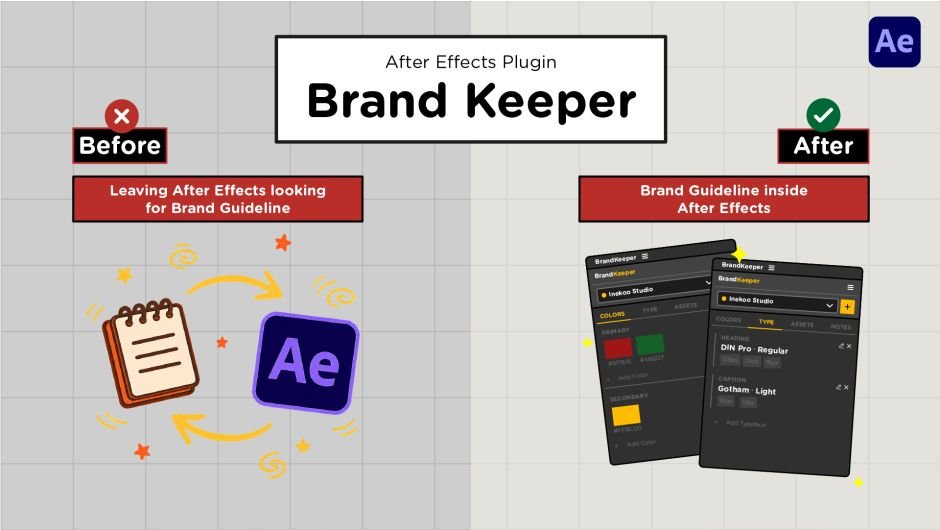
Stop leaving After Effects to check your brand guidelines
Every motion designer knows the workflow: you’re deep in a composition, and you need to verify a hex code, a font weight, or a logo clearance rule. So you alt-tab to Notion. Or open a PDF. Or dig through a browser tab. By the time you’re back, the flow is gone.
BrandKeeper fixes this by bringing your brand guidelines directly into After Effects as a native panel.
What BrandKeeper does
BrandKeeper is a brand identity manager that lives inside your After Effects workspace. Create a brand profile once, add your colors, typefaces, font sizes, logo files, and brand rules and everything is available instantly from the panel, every time you open After Effects.
The panel is organized into four focused tabs:
Colors
Store primary and secondary palettes as visual swatches. Click any swatch to instantly copy its HEX code to your clipboard. No more typing color codes from memory or hunting through design files.

Type
Document every typeface in use: font family, role (Heading, Body, Caption), weight, and the exact size system your client requires. Everything in one place, always visible.

Assets
Store your logo files and brand assets in the panel. Click Import next to any file to add it directly into your active After Effects composition, no file browsing, no drag and drop from Finder or Explorer.

Notes
Store global brand rules (tone of voice, usage restrictions, do’s and don’ts) alongside comp-specific notes that stay attached to whichever composition you’re working on.

Built for real production workflows
- Brand Library: All brands are saved to a global library on your machine. Switch between clients instantly from the panel dropdown. Your library lives across all projects, it is not tied to a single AEP file.
- Brand Export and Import : Export any brand profile as a .bkbrand file and hand it off to a colleague, a freelancer, or a client. They import the file into their own BrandKeeper and instantly have access to the same colors, typefaces, assets, and notes, exactly as you defined them. No briefing required, no version mismatch
Who is BrandKeeper for?
- Motion designers who work with multiple clients and need quick brand reference during production
- Freelancers managing a rotating roster of client brands
- Studio teams where brand consistency across multiple artists matters
- Anyone who has ever lost focus switching between After Effects and a brand guidelines document
Technical notes
- Pure CEP panel — no internet connection required during use
- Compatible with After Effects 2021–2025
- Works on macOS and Windows
- Brand data stored locally — your client information never leaves your machine
Key Features
- One-click HEX copy from color swatches
- Primary and secondary color palette organization
- Typeface library with role, weight, and size system documentation
- Drag-and-drop asset storage with direct import into active composition
- Global brand library — create and manage unlimited brands
- Per-composition notes alongside global brand rules
- Export brand as .bkbrand file for team sharing
- Import .bkbrand files from teammates or clients instantly
- Cross-platform: macOS and Windows
What’s New in v1.2.0
This update is a major overhaul of the Assets tab, plus several improvements to the Colors tab based on user feedback.
Assets
- Multi-file drag-and-drop: drop several files into the panel at once instead of one at a time
- Thumbnail previews for every asset entry so you can see what you are working with at a glance
- Folder system: create, rename, delete, and collapse/expand folders to keep assets organized
- Color marker per folder for visual grouping
- Multi-select assets via Shift+click or Cmd/Ctrl+click, then drag them all into a folder at once
- Collapse All and Expand All folders with a single button
- Bulk action bar: select multiple assets and Import to Comp, Remove, or Clear all at once
- Real-time search and filter with auto-expand of matching folders
Colors
- Custom labels per swatch: name your colors “Salmon”, “Navy”, “Warm Red”, or anything that makes sense for your brand
- Drag-to-reorder color swatches within Primary and Secondary groups
Elevate your motion graphics workflow with premium collection of After Effects plugins. Whether you are a seasoned professional or just starting your VFX journey, powerful tools designed to streamline complex tasks, unlock creative possibilities, and save you hours of rendering time. From stunning glitch effects and seamless transitions to advanced 3D extrusion and text animation tools, each plugin in our library is rigorously tested for compatibility with the latest versions of Adobe after Effects. Enhance your video production value today and download industry-leading plugins that help you create breathtaking visuals without the technical headaches. Browse our full range and find the perfect extension to supercharge your editing suite now.
➡️ ➡️ For more after effects Plugins 😀 😀
➡️ ➡️ System requirements AE
Reviews
There are no reviews yet.