
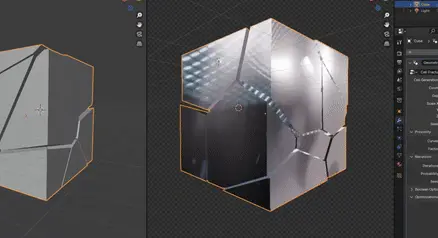
Cell Fracture Modifier for Blender
Cell Fracture Modifier v1.1 for Blender – The Ultimate Procedural Shattering & Destruction Tool
Versions: v1.1
File Size: 200 KB
Download Cell Fracture Modifier v1.1 for Blender on Windows and Mac, a powerful non-destructive addon that instantly breaks any mesh into realistic convex shards using Voronoi cell decomposition. With adjustable crack patterns, source point control, and seamless integration with Blender’s rigid body physics, Cell Fracture Modifier transforms how you create destruction effects, eliminating the need for manual boolean operations or pre-baked simulations.
Key Features of Cell Fracture Modifier v1.1:
Procedural Voronoi Fracturing: Generates complex, organic crack patterns based on mathematical cell structures, ensuring every break looks unique and natural without repeating textures
Non-Destructive Workflow: Applies fracturing as a live modifier, allowing you to tweak cell count, randomness, and recursion depth at any time before committing to final geometry
Smart Source Points: Automatically distributes fracture seeds based on volume, surface area, or vertex groups, giving you precise control over where large or small shards form
Interior Material Support: Automatically assigns a secondary material to the newly created inner faces of the shards, perfect for simulating concrete cores, wood grain, or broken glass edges
Physics Ready Output: Instantly converts fractured pieces into active rigid bodies with correct mass and collision shapes, ready to drop, explode, or shatter in real-time simulations
Recursive Sub-Fracturing: Option to sub-divide large cells further for ultra-high-detail debris, ideal for close-up slow-motion destruction shots
Custom Crack Width: Adjustable gap between shards to simulate material expansion or dust accumulation before the object even breaks
Improved Stability v1.1: Faster calculation engine for high-cell counts (1000+), better handling of non-manifold geometry, and optimized memory usage for large-scale destruction scenes
Cross-Platform Support: Works flawlessly on both Windows and Mac systems including Apple Silicon M1/M2/M3 chips
Perfect For:
VFX artists creating building collapses, exploding vehicles, and smashing props for film and games
Game developers generating low-poly destructible assets for real-time engines
Motion designers animating abstract shattering transitions for logos and titles
Architectural visualizers demonstrating structural failure or demolition sequences
Anyone tired of manually boolean-cutting objects to simulate breaks
System Requirements:
Blender 3.6, 4.0, 4.1, 4.2, 4.3+ (Latest LTS recommended)
Windows 10/11 (64-bit) or macOS 10.15+
8GB RAM minimum (16GB+ recommended for high-cell count simulations)
Rigid Body World enabled for dynamic simulations
Installation:
Open Blender and go to Edit > Preferences > Add-ons:
Click “Install…” and select the downloaded .zip file for Cell Fracture Modifier
Enable the checkbox next to “Mesh: Cell Fracture Modifier”
Access via the Object Context Menu > Cell Fracture or the 3D Viewport Sidebar (N-panel) > Cell Fracture Tab
Note: Version 1.1 introduces a new “Weak Point” feature that allows you to paint areas on the mesh where cracks are more likely to originate, giving artists directional control over how an object shatters under impact.
How to use:
Append the Cell Fracture nodegroup to your scene and use it on an object
Cell Generation: Set to Mesh Boolean if a the Voronoi Cells should be intersected with the input mesh. If set to Convex Hull the whole mesh will be treated as such
Count: Number of initial Points per Mesh Island per Recursion
Gap: Additional gap between each voronoi cell
Scale: Scale which will be applied before and after cell fracturing (can be used to create splinters)
Seed: Seed for the random position of the cells
Proximity – Curves: Curve object for the proximity of the points
Proximity – Factor: Moves the random points closer to the nearest evaluated curve point (useful for glass shattering)
Recursion – Iterations: Number of Iterations of the Cell Fracture algorithm
Recursion – Probability: Random Probability if a Mesh Island should be fractured again
Recursion – Seed: Seed for Probability
Boolean Options: Same as in the Mesh Boolean node 5
Optimizations – Triangulate: Triangulates the mesh before fracturing it (useful on flat shaded meshes with quads or n-gons to avoid visual artifacts)
Optimizations – Auto Convex Hull: Will automatically switch to Convex Hull Cell Generation if Mesh Boolean is activated but the mesh is convex
Optimizations – Delete Outside Points: Deletes all points that are outside of the input mesh
Optimizations – Interior Attribute: Creates a “inside” attribute for every face that was created from the Voronoi Fracture
Optimizations – Separate Islands: Separates the Mesh Islands on the first Recursion Iteration. Set to False if you have a closed mesh with wall thickness
Supercharge your 3D creation workflow with premium selection of Blender Add-ons. Whether you are modeling intricate characters, sculpting realistic environments, or animating cinematic sequences, the right add-on can transform how you work inside Blender. Our curated collection includes powerful tools for UV unwrapping, procedural texture generation, rigging automation, rendering optimization, and more—each rigorously tested for compatibility with the latest Blender versions. Eliminate tedious manual processes and unlock advanced functionality that lets you focus on what matters most: bringing your creative vision to life. Explore our full range of professional Blender plugins today and take your 3D projects to the next level.
➡️ ➡️ For more Blender Plugins 😀 😀
Reviews
There are no reviews yet.