
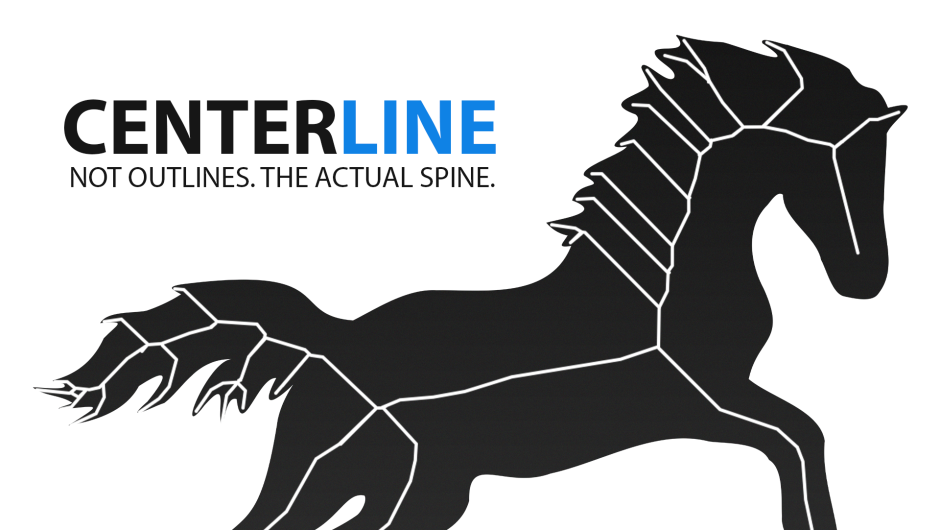
CenterLine for After Effects
CenterLine V1.0.4 for After Effects
The Ultimate Raster-to-Vector Skeleton Extraction Tool for After Effects
Download CenterLine V1.0.4 today. Consequently, you can instantly extract clean, single-pixel skeletal vector paths from any raster artwork — including bitmap sketches, logos, calligraphy, and handwritten text — with just a few clicks . Because motion designers and video editors frequently need to create smooth write-on animations, hand-drawn typography, and logo reveals, having access to an efficient vectorization tool is absolutely essential. Nevertheless, traditional auto-tracers only generate outer outlines, creating double-walled paths that are unsuitable for clean stroke animations . Fortunately, CenterLine solves this problem elegantly. Moreover, it transforms your artwork into lightweight, native After Effects Shape Layers, ready for perfect Trim Paths animations, with mathematically precise bezier curves and dramatically reduced anchor points . In short, you can convert any bitmap design into smooth, animatable vector strokes with unprecedented speed and quality.
Scientific Centerline Extraction Pipeline
The core of this plugin lies in its sophisticated mathematical pipeline of three classic computer graphics algorithms working in perfect synchronization. For instance, CenterLine begins with the Zhang-Suen thinning algorithm — a morphological erosion solver that strips outer stroke walls down to a single-pixel skeletal spine using a precomputed 8-bit LUT for high-frequency, real-time feedback directly in your composition view . Subsequently, the Schneider Bézier fitting algorithm translates raw pixel chains into continuous, mathematically perfect third-order Bézier curves, creating minimal node counts for easy editing in After Effects . Finally, the Ramer-Douglas-Peucker optimization simplifies the generated vector path by decimating redundant nodes within a user-defined threshold, dramatically lowering final comp vertex weights . Consequently, you achieve clean, lightweight vectors that retain the original artwork’s structural integrity.
Variable Width Mapping and Organic Stroke Profiles
Unlike standard vectorization tools, CenterLine preserves the organic feel of hand-drawn artwork. The plugin uses a distance transform to read original stroke thickness and maps that dynamic width back onto your new vector lines, creating natural, variable-thickness stroke profiles . Furthermore, you can position up to 8 independent control points anywhere along your path, and the plugin blends distinct stroke sizes over the layout using inverse-distance weighting . For added realism, the Taper feature adds a customizable taper starting at the open endpoints of your vector strokes, and the Stroke Roughness control displaces the outer pixel bounds with high-speed noise, recreating tactile pencil, ink, or charcoal edges . Thus, your animated strokes maintain the authentic character of the original artwork.
Comprehensive Control Parameters for Professional Results
CenterLine provides robust effect control parameters, grouped logically for fast navigation inside the AE Effect Controls panel . For instance, the Source & Extraction Settings include Threshold (determines the luma/alpha value to separate background pixels from foreground strokes), Channel (isolate individual image components for thinning), and Invert Input (extract dark centerlines on light paper backgrounds) . The Vector Cleanup & Bézier Fitting section offers Smooth Iterations (for morphological spur pruning), Gap Close (smart pixel bridging over blank gaps), and Fit Tolerance (fidelity control for curve adherence) . Additionally, you can enable Dashes to break open vector lines into customizable, repeating dashed segments — perfect for creating marching line overlays and technical animations .
One-Click Shape Layer Export and Seamless Workflow
Once your skeleton is processed, CenterLine offers instant Shape Layer generation. Specifically, you can export the processed skeleton directly into native After Effects Shape Layers, or copy raw SVG paths to your clipboard in a single click . The plugin also includes a Reveal Original feature — an auto-masking reveal that draws the original pixels of your source layer only inside the extracted skeleton stroke bounds . This is perfect for creating hybrid animations where the original artwork fades in as the stroke writes on. Since the entire workflow is designed for speed, you can go from artwork to animated stroke in just four simple steps .
V1.0.4 Update and Broad Compatibility
Version 1.0.4 introduces a critical fix: when updating to a new plugin version, project settings no longer reset, and parameter disk IDs are now frozen through the DiskIDs mechanism, decoupling saved project data from internal code order . CenterLine supports a comprehensive range of After Effects versions, spanning from 2022 through 2026, ensuring broad compatibility across most production environments . The plugin is fully compatible with both Windows and macOS operating systems. You will need a standard workstation with at least 8GB of RAM, though system requirements are minimal given the plugin’s efficient C++ architecture .
Perfect for Motion Designers, Video Editors, and Animators
This plugin is particularly well-suited for motion designers creating hand-drawn typography, logo reveals, and write-on title sequences. Similarly, video editors and animators will appreciate the ability to transform sketches and calligraphy into polished vector animations. Additionally, anyone working with architectural drawings, technical illustrations, or organic calligraphy will find the variable width mapping and precision controls invaluable. Ultimately, CenterLine V1.0.4 accelerates your entire motion design and animation pipeline.
System Requirements and Compatibility
CenterLine supports After Effects 2022, 2023, 2024, 2025, and 2026 on both Windows and macOS operating systems . You will need a standard workstation with at least 8GB of RAM.
Installation and Usage Guide
To install, first download the plugin installer from your library. Next, close Adobe After Effects if it is running. Then, copy the CenterLine.aex file to your After Effects Plug-ins folder, typically located at C:\Program Files\Adobe\Common\Plug-ins\7.0\MediaCore on Windows or /Library/Application Support/Adobe/Common/Plug-ins/ on macOS. After installation, launch After Effects and locate CenterLine in the Effects panel. Finally, apply the effect to your artwork layer, adjust the Threshold in the Effect Controls to separate the foreground strokes, fine-tune the vector cleanup and variable width settings, and click Export Shape Layer to generate your native AE shape path, ready for Trim Paths animation . Thus, your professional vectorization and animation workflow will be ready instantly.
What is Included Inside?
The pack contains the complete CenterLine V1.0.4 plugin for After Effects . Furthermore, it includes the Zhang-Suen thinning engine, Schneider Bézier fitting, Ramer-Douglas-Peucker optimization, variable width mapping with up to 8 control points, and the Reveal Original feature. Additionally, you receive full compatibility with After Effects 2022 through 2026. Ultimately, you receive everything needed for professional raster-to-vector skeleton extraction.
Final Thoughts on the Plugin
Effortless skeleton vectorization evokes profound creative freedom. Therefore, this plugin provides the ultimate foundation for your typography and motion design workflows. You can transform any bitmap artwork into smooth, animatable vector strokes with unprecedented speed and precision. Consequently, your creative vision becomes a stunning reality.
CenterLine is an After Effects plugin that extracts clean, single-pixel skeletal vector paths from any raster artwork. Using Zhang-Suen thinning, Schneider Bézier fitting, and Ramer-Douglas-Peucker optimization, it instantly converts bitmap sketches, logos, or calligraphy into lightweight, native After Effects Shape Layers, ready for perfect, smooth write-on animations with Trim Paths, and many more abilities.

Interactive Visual Comparison
Hover over any card below to wipe from the original raster input to the clean, generated centerline vector outline.


BEFORE
AFTER
Handwritten Sketch Core
Extract single-pixel vector paths from heavy, overlapping pencil or ink scanner drawings.


BEFORE
AFTER
Logo Outline Thinning
Convert double-walled outline shapes back into clean, singular animating center-path strokes.


BEFORE
AFTER
Architectural Drawing Precision
Bridges pixel cracks and maps thinned architectural sketches onto continuous Bezier splines.


BEFORE
AFTER
Organic Calligraphy Strokes
Extract the skeletal path while mapping dynamic width profiles back onto vectors.

The Scientific Core
CenterLine is built on a mathematical pipeline of three classic computer graphics algorithms working in perfect synchronization.
Step 1 — Extraction
Zhang-Suen Thinning
A morphological erosion solver. Analyses neighbor pixel boundaries using a precomputed 8-bit LUT to strip outer stroke walls down to a single-pixel skeletal spine.
Step 2 — Curvature
Schneider’s Algorithm
Translates raw pixel chains into continuous, mathematically perfect third-order Bezier curves. Creates minimal node counts for easy editing in After Effects.d > e
Step 3 — Optimization
Ramer-Douglas-Peucker
Simplifies the generated vector path by decimating redundant nodes within a user-defined threshold, dramatically lowering final comp vertex weights.
High-Performance Vectorization
Traditional autotracers only create outlines. CenterLine extracts the core medial skeleton — single-line mathematical paths ready for animation.
Zhang-Suen Thinning
C++ optimized morphological thinning powered by a precomputed 8-bit LUT — delivering high-frequency, real-time feedback directly in your comp view.
Schneider Bezier Fitting
Transforms raw pixel chains into mathematically perfect, continuous curves — radically lowering anchor node counts while keeping structural forms intact.
Variable Width Mapping
Uses a distance transform to read original stroke thickness and maps that dynamic width back onto new vector lines creating organic stroke profiles.
Interactive Width Points
Position up to 8 independent control points anywhere. The plugin blends distinct stroke sizes over the layout using inverse-distance weighting.
Subpixel Progress
Calculates anti-aliased tapered capsules using sub-pixel float geometry. Line write-ons animate with pixel-perfect fluidity, free of stepping artifacts.
Instant Shape / SVG Export
Extract the processed skeleton and push it into native After Effects Shape Layers, or copy raw SVG paths to your clipboard in a single click.
Complete Parameter Dictionary
Robust effect control parameters, grouped logically for fast navigation inside the AE Effect Controls panel.
Threshold
Determines the luma/alpha value to separate background pixels from foreground strokes before running thinning.
Channel
Isolate individual image components for thinning. Choose between Luminance, Red, Green, Blue, or Alpha.
Invert Input
Flips the color space, allowing you to extract dark centerlines on light paper backgrounds.
Line Width
Defines a fallback or uniform stroke thickness for the thinned vector lines.
Line Color / End
Double color pickers to map a dynamic gradient along the length of your vector path.
Match Original Width
Calculates the Euclidean distance transform of the source drawing to construct matching, variable-thickness vector lines.
Taper
Adds a customizable taper starting at the open endpoints of your vector strokes.
Reveal Original
Acts as an auto-masking reveal, drawing the original pixels of your source layer only inside the extracted skeleton stroke bounds.
Smooth Iterations
Number of passes for morphological spur pruning. Deletes isolated pixels and trims short noise branches.
Gap Close (px)
Smart pixel bridging. Merges thinned pixel segment chains over blank gaps dynamically.
Use Bezier Fit
Runs Schneider’s Bezier curve solver to convert thinned pixel polylines into clean, low-node mathematical splines.
Fit Tolerance
Fidelity control. Tightens or relaxes curve adherence (expressed in 1/10th pixel steps).
Enable Dashes
Breaks open vector lines into customizable, repeating dashed segments.
Dash / Gap Length
Controls individual sizes of dashed strokes and spacing parameters.
Offset (px)
Displaces the dashing pattern. Animate this property to generate perfect marching line overlays.
Stroke Roughness
Displaces the outer pixel bounds with high-speed noise, recreating tactile pencil, ink, or charcoal edges.
The CenterLine Vector Workflow
Create highly complex write-on reveals from logos or raw illustrations in four simple steps.
1
Prepare Art
Place your text, vector outline, or rasterized hand-drawn illustration layer inside a fresh composition precomp.
2
Tune Threshold
Apply the CenterLine effect. Move the Threshold slider to separate background noise from your core drawing structure.
3
Vectorize
Click “Create Shape Layer” inside the effect controller. CenterLine converts the skeleton to native After Effects paths.
4
Animate
Add a native “Trim Paths” operator to the new Shape Layer. Animate the progress values to build clean reveals!
Technical Architecture
Platform CompatibilityAfter Effects CC 2025 – 2026+
OS SupportWindows 10/11 x64, macOS Apple Silicon / Intel
Render PipelineNative C++ Multi-threaded & Thread-Safe
Licensing ModelOfficial aescripts licensing framework
- 0:00 Introduction to Centerline Plugin
- 0:48 Standard Strokes vs. Centerline
- 1:18 Example 1: Applying to a Text Layer
- 1:30 Understanding and Selecting Chains
- 1:51 Blending Chains into a Single Path
- 2:15 Adjusting the Animation Start Point
- 2:36 Exporting as Shape Layers and Vector Paths
- 3:29 Revealing the Original Image
- 3:51 Previewing and Color-Coding Chains
- 4:39 Example 2: Tracing Raster Images (Script Fonts)
- 4:54 Using the Invert Input Feature
- 5:43 Matching Original Image Width
- 6:17 Skeleton Cleanup and Smoothing Paths
- 6:47 Example 3: Map Route Animation
- 7:32 Adding and Customizing Particles
- 8:05 Particle Tip Mode
- 8:33 Conclusion
- 0:00 What is CenterLine?
- 0:20 Geometrical Challenges (Junctions & Branches)
- 0:34 CPU-Based Processing Speed
- 0:41 How Pixel and Geometry Analysis Works
- 1:02 Improving Results via Cleanup & Thresholds
- 1:10 Minimizing Chains for Clean Vectors
- 1:26 Getting the Best Results
- 00:00 Intro & Overview
- 00:13 Source Settings (Threshold, Channels, Invert, Map Layer)
- 00:53 Output Style (Width, Color, Gradient, Taper, Caps, Reveal)
- 01:50 Animation (Reveal Progress, Chain Stagger, Path Offset)
- 02:24 Skeleton Cleanup (Smooth, Gap Close, Bezier Fit, Junctions)
- 03:27 Chain Selection (Preview, Start Point, Order, Reset)
- 04:14 Merge Operations (Merge by Shape, Slots 1-5)
- 04:56 Width Points (Custom Thickness Points)
- 05:14 Dash Pattern (Dash/Gap Length, Offset)
- 05:30 Stroke Texture (Roughness Amount & Scale)
- 05:46 Particles (Scatter, Tip Mode, Particle Colors, Turbulence)
- 06:35 Multi Stroke (Outline Only, Ring Width & Color)
- 06:51 Export Options (JSON, SVG, Shape Layers, Blend Selected)
- 07:33 Outro & Summary
Elevate your motion graphics workflow with premium collection of After Effects plugins. Whether you are a seasoned professional or just starting your VFX journey, powerful tools designed to streamline complex tasks, unlock creative possibilities, and save you hours of rendering time. From stunning glitch effects and seamless transitions to advanced 3D extrusion and text animation tools, each plugin in our library is rigorously tested for compatibility with the latest versions of Adobe after Effects. Enhance your video production value today and download industry-leading plugins that help you create breathtaking visuals without the technical headaches. Browse our full range and find the perfect extension to supercharge your editing suite now.
➡️ ➡️ For more after effects Plugins 😀 😀
➡️ ➡️ System requirements AE
Reviews
There are no reviews yet.