
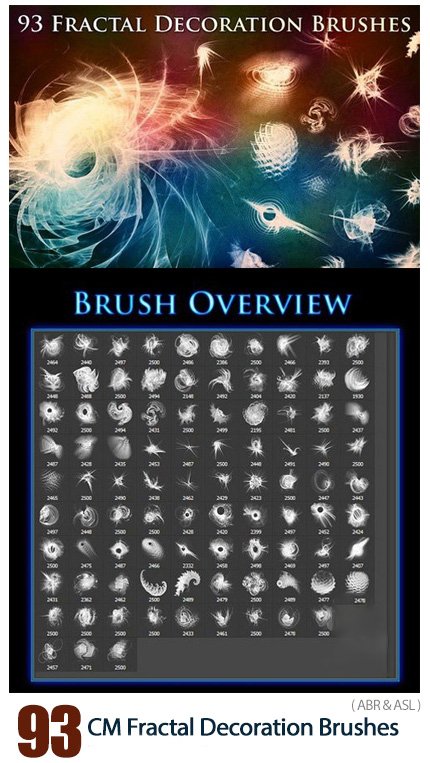
CM 93 Fractal Decoration Brushes
93 Photoshop Brushes Fractal Decorative Shapes for Design | 176 MB | ABR & ASL format
In this collection, you can see 93 Photoshop brushes with the title of fractal decorative shapes for design, which are placed on the site for download in ABR and ASL formats.
CM 93 Fractal Decoration Brushes
a lot with the fractal rendering tool apophysis, and in the process I have ended up with a lot of nice designs. The results I have used to create brushes, which are nice if you need some abstract decoration or fantasy/magical looking stamps you can add to your design. The included designs could be categorized into various groups like square, circle, spikes or organic designs.
In this product you will find 93 Fractal Decoration Brushes in the following formats:
- Photoshop Brushes (.ABR, 2500px)
- Affinity Brushes (.AFBRUSHES, 2500px)
- Procreate Brushes (.BRUSHSET, 2500px)
- PNG (2500px)
- The original colored JPEG renderings
Additionally included are:
- 47 Photoshop Styles(.ASL)
- 21 Affinity Styles(.AFSTYLES)
- Links to Tutorials(.PDF)
These brushes are useful for:
- abstract and surreal art
- background decorations
- fantasy and fractal designs
- product design
- magical spells
- simulate a flower tattoo on skin
- and much more


The Brush tool allows you to paint on any layer, much like a real paintbrush.
It’s easy to use the Brush tool to paint in your document. Simply Import The Brushes, locate and select the Brush tool from the Tools panel, then click and drag in the document window to paint. You can also press the B key on your keyboard to select the Brush tool at any time.
Brush Size: If you want to make the brush larger or smaller, click the Brush Picker drop-down arrow in the Control panel, then adjust the Size slider. You can also press the bracket keys [ ] to quickly increase or decrease the brush size at any time.
Hardness: If you want to make the edges of the brush harder or softer, you can adjust the hardness from the same drop-down menu. A harder brush will have clear, defined edges, whereas a softer brush will have blurry, less-defined edges. For most situations, we recommend setting the hardness to 50% or less because it will help to make individual brush strokes less obvious.
Brush Tip: If you want to create a unique effect, there are different brush tips to choose from in the same drop-down menu. Some of these are designed to mimic real-life drawing tools like pens and markers, while others are simpler.
Opacity: By default, the opacity of your brush is set to 100%, meaning the brush will use the highest intensity. However, you can reduce the opacity of your brush to make it less intense.
➡️ ➡️ For More Brushes Products 😀 😀
System Requirement For Photoshop CC



Reviews
There are no reviews yet.