
Copy Object Name to Data for Blender
Copy Object Name to Data v1.0.0 for Blender – The Ultimate Naming Consistency & Pipeline Tool
Download Copy Object Name to Data v1.0.0 for Blender on Windows and Mac, a streamlined utility designed to instantly synchronize an object’s name with its underlying data block name (mesh, curve, armature, etc.). With one-click execution, batch processing capabilities, and customizable prefix/suffix handling, Copy Object Name to Data transforms how you organize scenes for game engines, 3D printing, and professional pipelines, eliminating the common confusion of having “Cube.001” linked to “Mesh.045” and ensuring clean, predictable asset naming conventions.
Key Features of Copy Object Name to Data:
Instant Synchronization: Copies the active Object name directly to its associated Data block name immediately, ensuring both identifiers match perfectly without manual typing
Batch Processing Mode: Select multiple objects and update all their data names simultaneously, perfect for cleaning up imported assets or organizing complex scenes with hundreds of items
Smart Duplicate Handling: Automatically detects and manages numbered duplicates (e.g., “Chair.001”) to prevent data block conflicts while maintaining logical sequencing
Customizable Formatting: Options to strip specific prefixes, suffixes, or special characters before copying, allowing you to enforce strict naming standards (e.g., removing “_rig” before applying to mesh data)
Data Type Support: Works seamlessly across all major data types including Meshes, Curves, Surfaces, Metaballs, Text, Armatures, Lattices, and Empty objects
Undo Friendly: Fully integrated with Blender’s undo stack, allowing you to revert changes instantly if a naming convention needs adjustment
Pipeline Ready: Essential for game development workflows (Unity/Unreal) where matching object and mesh names are often required for automated scripts, LOD grouping, or collision detection
Lightweight & Fast: Written in efficient Python, the addon executes instantly even on scenes with thousands of objects, adding zero overhead to your workflow
Cross-Platform Support: Works flawlessly on both Windows and Mac systems including Apple Silicon M1/M2/M3 chips
Perfect For:
Game developers preparing assets for export where consistent naming is critical for engine integration
3D printing specialists needing clear, matching filenames for STL/OBJ exports
Technical artists enforcing strict naming conventions in large studio pipelines
Freelancers cleaning up messy files received from clients or downloaded from marketplaces
Anyone tired of manually renaming data blocks in the Outliner or Properties panel one by one
System Requirements:
Blender 3.6, 4.0, 4.1, 4.2, 4.3+ (Latest LTS recommended)
Windows 10/11 (64-bit) or macOS 10.15+
No external dependencies required
Installation:
Open Blender and go to Edit > Preferences > Add-ons:
Click “Install…” and select the downloaded .zip file for Copy Object Name to Data
Enable the checkbox next to “Object: Copy Object Name to Data”
Access via the Object Context Menu > Copy Name to Data or the 3D Viewport Sidebar (N-panel) > Tools Tab
Note: Version 1.0.0 includes a “Dry Run” preview feature that highlights which names will change before committing, ensuring you don’t accidentally overwrite unique data block names in complex shared-library scenarios.
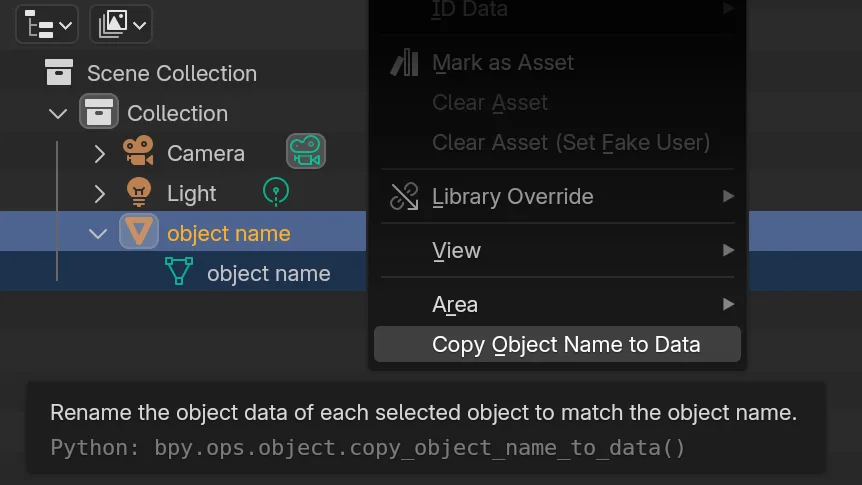
This adds a simple operator to copy object names to object data. It will appear in the right-click context menu in the Outliner.
Often, when naming objects (the orange part) it is helpful to give the data (the green part) a matching name. This add-on makes this task much easier.
Supercharge your 3D creation workflow with premium selection of Blender Add-ons. Whether you are modeling intricate characters, sculpting realistic environments, or animating cinematic sequences, the right add-on can transform how you work inside Blender. Our curated collection includes powerful tools for UV unwrapping, procedural texture generation, rigging automation, rendering optimization, and more—each rigorously tested for compatibility with the latest Blender versions. Eliminate tedious manual processes and unlock advanced functionality that lets you focus on what matters most: bringing your creative vision to life. Explore our full range of professional Blender plugins today and take your 3D projects to the next level.
➡️ ➡️ For more Blender Plugins 😀 😀
Reviews
There are no reviews yet.