
Curve Face Color for Blender
Curve Face Color v1.1 for Blender – The Ultimate Procedural Curve Styling Tool
Versions: v1.1
File Size: 6.8 KB
Download Curve Face Color v1.1 for Blender on Windows and Mac, a specialized addon designed to bring advanced per-face coloring capabilities directly to Curve objects. By converting curve segments into manageable face data or utilizing advanced shader attributes, Curve Face Color v1.1 transforms how you create neon signs, fiber optics, glowing cables, and stylized outlines, eliminating the need to manually convert curves to meshes just to apply varied colors along a single path.
Key Features of Curve Face Color v1.1:
Per-Segment Coloring: Assign unique colors to individual curve segments or control points instantly, allowing for complex multi-colored paths without splitting the object into hundreds of separate curves
Gradient & Ramp Control: Apply smooth color gradients along the curve length using intuitive ramp editors, perfect for creating fading neon lights, heat maps, or energy flows
Material Slot Automation: Automatically generates and assigns distinct material slots for each colored segment, streamlining the workflow for rendering with multiple emissive or glass shaders
Geometry Nodes Integration: Fully compatible with Geometry Nodes, allowing you to drive face colors using attributes, fields, or external data for dynamic, animated color changes
Bevel Profile Compatibility: Works seamlessly with custom bevel profiles, ensuring that color variations wrap correctly around 3D tube shapes without texture stretching or alignment issues
Vertex Paint to Curve: Convert existing Vertex Paint data from a mesh directly onto a converted curve, preserving intricate color patterns during the mesh-to-curve workflow
Non-Destructive Workflow: All color assignments are stored as attributes or material indices, allowing you to edit the curve shape, resolution, or bevel depth at any time without losing color data
Optimized for Eevee & Cycles: Shader setups are optimized for real-time glow in Eevee (using Bloom) and physically accurate light emission in Cycles, making it ideal for sci-fi and architectural lighting
Cross-Platform Support: Works flawlessly on both Windows and Mac systems including Apple Silicon M1/M2/M3 chips
Perfect For:
Motion graphics artists creating animated neon text, logo reveals, and data visualization lines
Sci-fi environment designers building complex circuitry, fiber optic bundles, and laser grids
Architectural visualizers adding colorful LED strip lighting to interior and exterior designs
Stylized game developers creating cartoonish outlines or magical spell effects
Anyone frustrated by the limitation of single-material curves and the hassle of manual mesh conversion
System Requirements:
Blender 3.6, 4.0, 4.1, 4.2, 4.3+ (Latest LTS recommended)
Windows 10/11 (64-bit) or macOS 10.15+
4GB RAM minimum (8GB+ recommended for complex multi-segment curves)
No external dependencies required
Installation:
Open Blender and go to Edit > Preferences > Add-ons:
Click “Install…” and select the downloaded .zip file for Curve Face Color
Enable the checkbox next to “Curve: Curve Face Color”
Access via the Object Data Properties panel > Curve Face Color Tab or the 3D Viewport Sidebar (N-panel)
Note: Version 1.1 introduces a new “Randomize Colors” feature that allows you to instantly generate varied color schemes for procedural cable looms or abstract art pieces with a single click, along with improved handling of closed loops and cyclic curves.
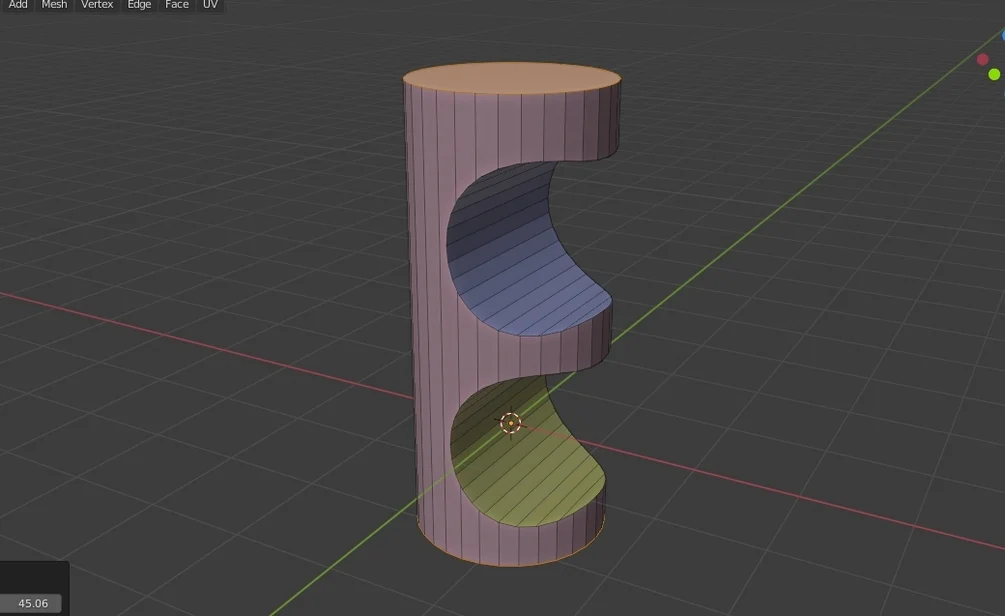
Curve Face Color is a convenient tool for assigning color based on the face curvature, seam or marked sharp.
The parameter “edge angle” is used for grouping face into different “face group”.
Then each face group will be assigned a random color (material).
It is useful for :
– For Boolean cut result, if you want to assign specific material to the “cut” surface, which is curvature and not flat.
– Each face group has a unique material. You can select the faces easily afterward (blender has a “Select” button to select all faces using the material
– You can also use marked seam or sharp (marked by blender’s edge function) to group the faces.
You can change the Edge Angle parameter. The smaller number means that slight curvature between faces will still be considered as “sharp” and put into separated group.
Usage :
To run the tool, you just need to switch to Edit mode > Face mode,
then right click on the viewport, and select “Curve Face Color” at the bottom of the pop up context menu.
Supercharge your 3D creation workflow with premium selection of Blender Add-ons. Whether you are modeling intricate characters, sculpting realistic environments, or animating cinematic sequences, the right add-on can transform how you work inside Blender. Our curated collection includes powerful tools for UV unwrapping, procedural texture generation, rigging automation, rendering optimization, and more—each rigorously tested for compatibility with the latest Blender versions. Eliminate tedious manual processes and unlock advanced functionality that lets you focus on what matters most: bringing your creative vision to life. Explore our full range of professional Blender plugins today and take your 3D projects to the next level.
➡️ ➡️ For more Blender Plugins 😀 😀
Reviews
There are no reviews yet.