
draw xray v3.0 with snap for Blender
Draw X-Ray 3.0 with Snap for Blender – The Ultimate Technical Annotation & Blueprint Tool
Version: V3.0
File Size: 10 MB
Download Draw X-Ray 3.0 with Snap for Blender on Windows and Mac, a specialized annotation addon designed for technical artists, riggers, and modelers who need to draw precise measurements, diagrams, and notes directly over their 3D models in the viewport. By combining freehand drawing capabilities with intelligent vertex/edge/face snapping, Draw X-Ray transforms how you create documentation, plan retopology, and communicate design changes, eliminating the need for external screenshot tools or imprecise manual sketching.
Key Features of Draw X-Ray 3.0 with Snap:
- Precision Snapping Engine: The core feature of v3.0 allows your brush strokes to automatically snap to Vertices, Edges, Faces, and Grid Intersections, ensuring your annotations align perfectly with the underlying geometry for accurate technical diagrams.
- X-Ray Visibility Mode: Draws strokes that remain visible even when occluded by the mesh surface, perfect for illustrating internal structures, rigging pivots, or hidden topology without rotating the view constantly.
- Smart Measurement Tools: Includes built-in rulers and protractors that snap to geometry points, allowing you to draw exact distances and angles directly on the model for engineering or hard-surface reference.
- Layer Management: Organize drawings into separate layers (e.g., “Retopo Plan,” “UV Seams,” “Client Notes”) with independent visibility toggles, colors, and opacity settings.
- 3D Stroke Projection: Optionally projects 2D viewport strokes onto the 3D surface depth, creating annotations that stick to the model as you rotate the camera, ideal for presentation turntables.
- Customizable Brush Presets: Save and load brush settings for specific tasks like “Fine Detail,” “Thick Outline,” “Arrow Markers,” or “Dimension Lines” with adjustable pressure sensitivity.
- Export to SVG/PNG: Export your annotated views as high-resolution images or scalable vector graphics (SVG) for inclusion in technical manuals, PDFs, or client reports.
- Animation Support: Keyframe the visibility and position of drawings to create step-by-step instructional videos or animated breakdowns of complex models.
Perfect For:
- Riggers & Tech Artists drawing joint placements, deformation zones, and control schemes directly on characters.
- Retopology Artists planning edge flow and loop cuts before starting the actual modeling process.
- Hard Surface Modelers marking panel lines, screw locations, and mechanical seams for reference.
- Instructors & Tutorial Creators creating clear, precise visual aids for teaching Blender techniques.
- Engineering & 3D Printing Professionals adding dimension lines and tolerance notes to prototypes.
System Requirements:
- Blender: 3.6, 4.0, 4.1, 4.2, 4.3+ (Latest LTS recommended).
- OS: Windows 10/11 (64-bit) or macOS 10.15+.
- Graphics Tablet: Highly recommended for pressure-sensitive drawing, though mouse usage is supported with smoothing filters.
- No external dependencies required.
Installation:
- Download the Draw X-Ray 3.0 with Snap
.zipfile. - Open Blender and go to Edit > Preferences > Add-ons.
- Click Install…, select the downloaded file, and enable the checkbox next to 3D View: Draw X-Ray.
- Access via the Toolbar (T-panel) in the 3D Viewport under the Draw tab, or activate the tool from the left-hand toolbox.
Note:
Version 3.0 represents a major overhaul of the snapping logic, introducing “Magnetic Snap” which gently pulls your stroke towards the nearest geometric feature within a configurable radius, making it incredibly easy to trace over complex topology without needing perfect hand steadiness. It also includes a new “Dimension Auto-Label” feature that automatically calculates and displays the length of a line drawn between two snapped points.
Video guide from Jayanam– showing the retopo Xray overlay (feature in both free and $ version)
Pros compared to build-in Blender retopo overlay:
- This tool allows for clearer visualization of how your retopo mesh interacts with your high-poly model. You can easily identify which areas of the retopo mesh protrude beyond the high-poly surface and which areas lie beneath it (unlike built-in retopo overlay, which obscure this information)
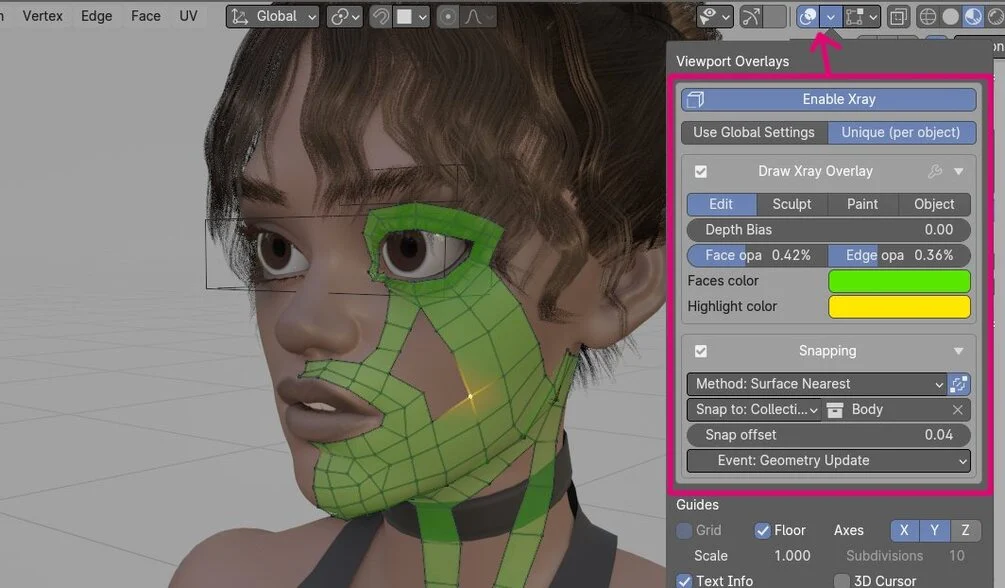
- customizable: faces overlay color, opacity,
- supports drawing in: Sculpt, Edit, Paint, Object modes
- option draw with-or without modifiers applied
Cons:
- slower – it is coded in python, so it wont be as fast as native C++ code.
How to use:
- Install DrawXray like any other Blender add-on – see Blender docs
- In 3D View Top Bar > Viewport Overlays > ‘Enable Xray‘ – if you go to mesh edit mode, you will se new overlay rendered on top of your mesh
- Xray Overlay can be enabled in following modes: Edit, Sculpt, Paint, Object (Shift+Click to select multiple modes).
- Paid version has Snapping section, where you can set snap target (All scene objects, single target or collection)
Paid version (extension)
comes with custom snapping engine and retopo tool:
- Xray snap engine takes into account mesh curvature: sink lowpoly mesh into valleys, push outside on peaks. See this YouTube video below for details
- Xray will negate mesh shrinking effect caused by subdivision modifier (see same video above),
- Quad stroke – draw and extrude single edge strip (new in 4.0)
- Strip Wrap around joints feature (new in 4.1)
- Strip Stroke – draw and extrude multiple edges at once (new in 4.2)
- paid version comes with built-in auto-updater (new in 4.0)
Video above focuses mostly on retopo Quad tools. At the very end I show demo retopology of character head.
Second video where I show improved snapping algorithm for: concave vs convex mesh parts, and subdivided vs non-subdivided mesh.
Studio vs Standard license: if you are company with above 180k $ income, please purchase Studio version. Both licenses (Studio and Standard) can be used commercially
Note: I included fixed version of F2 add-on (mesh_f2_xray.py) – which wont crash when using F2 together with DrawXray. To use patched F2 addon: disable the build-in F2 version and replace it with fixed version (it is named ‘F2 Xray Fix‘). For your information, I provided patch to blender devs, with the fix, but it got ignored…
Supercharge your 3D creation workflow with premium selection of Blender Add-ons. Whether you are modeling intricate characters, sculpting realistic environments, or animating cinematic sequences, the right add-on can transform how you work inside Blender. Our curated collection includes powerful tools for UV unwrapping, procedural texture generation, rigging automation, rendering optimization, and more—each rigorously tested for compatibility with the latest Blender versions. Eliminate tedious manual processes and unlock advanced functionality that lets you focus on what matters most: bringing your creative vision to life. Explore our full range of professional Blender plugins today and take your 3D projects to the next level.
➡️ ➡️ For more Blender Plugins 😀 😀
Reviews
There are no reviews yet.