
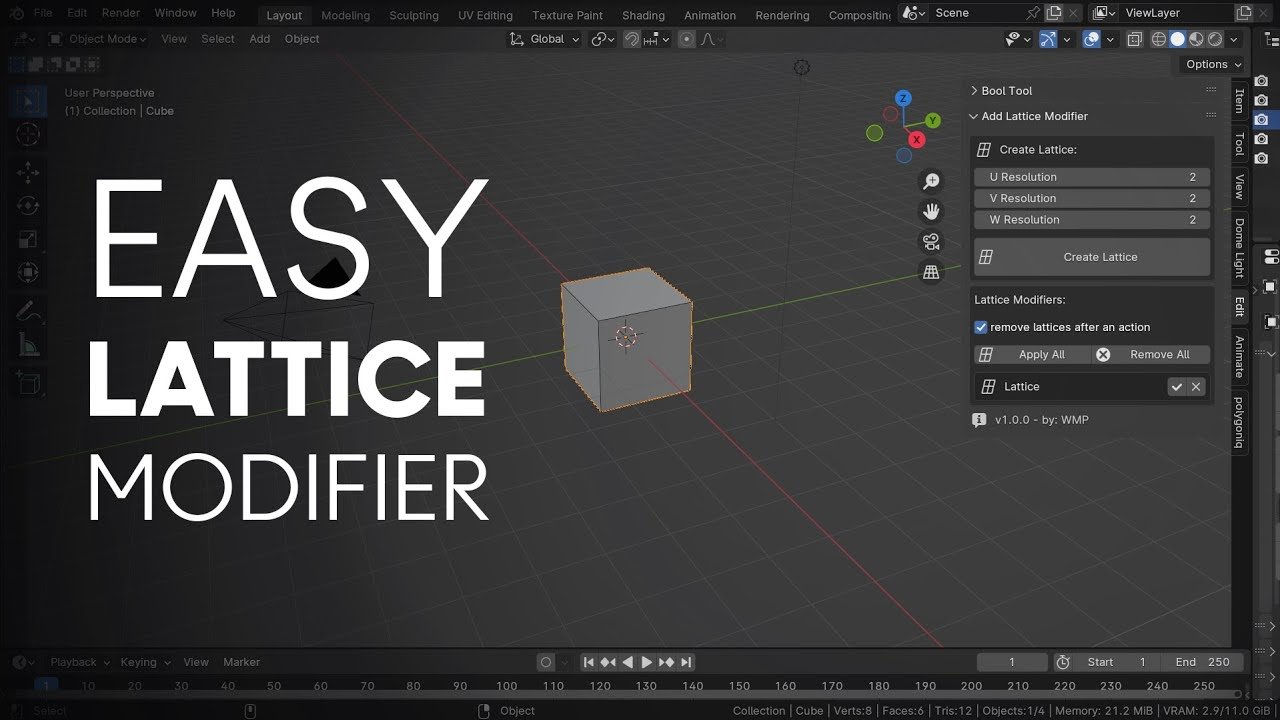
Easy Lattice Modifier for Blender
Easy Lattice Modifier v1.0.0 for Blender – The Ultimate Non-Destructive Deformation Tool
Versions: v1.0.1
File Size: 10 KB
Download Easy Lattice Modifier v1.0.0 for Blender on Windows and Mac, a streamlined utility designed to simplify the creation, setup, and manipulation of Lattice deformers. By automating the tedious process of adding lattice objects, setting resolution, and parenting meshes, Easy Lattice Modifier transforms how artists perform broad shape changes, bulk adjustments, and soft deformations, eliminating the need for manual object alignment or complex constraint setups.
Key Features of Easy Lattice Modifier v1.0.0:
- One-Click Lattice Generation: Instantly creates a perfectly sized and centered Lattice object around your selected mesh with a single button press, automatically applying the Lattice Modifier to the target.
- Smart Resolution Control: Quick-select presets (Low, Medium, High) or custom input fields to define the U, V, and W resolution of the lattice grid, balancing between broad control and fine detail.
- Automatic Parenting & Linking: Automatically parents the Lattice to the target object (or keeps it independent based on preference) and ensures the modifier is correctly linked, preventing common “broken link” errors.
- Edit Mode Integration: Adds a shortcut to instantly jump into the Lattice’s Edit Mode, allowing you to grab control points and deform the underlying mesh immediately without hunting in the Outliner.
- Vertex Group Masking: Optional integration to limit the lattice’s influence to specific vertex groups, enabling localized deformations like bulging muscles or bending specific sections of a pipe.
- Non-Destructive Workflow: Keeps the deformation entirely procedural; you can tweak the lattice points, change the resolution, or remove the modifier at any time without altering the base mesh topology.
- Multiple Object Support: Select multiple objects and generate a shared lattice for all of them (perfect for deforming a group of trees or a crowd) or individual lattices for each, based on user settings.
- Visual Helpers: Optionally displays helper lines or a bounding box overlay to make selecting and manipulating lattice points easier in crowded scenes.
Perfect For:
- Character Artists making broad pose adjustments, muscle bulging, or fat/slim morphs without sculpting.
- Hard Surface Modelers bending pipes, cables, and rails to fit specific paths while maintaining clean topology.
- Environment Artists deforming clusters of vegetation, rocks, or debris to fit terrain contours quickly.
- Animators creating simple squash-and-stretch effects or secondary motion on props.
- Beginners who find the manual process of adding lattices (
Shift+A> Lattice, scaling, parenting, adding modifier) confusing or time-consuming.
System Requirements:
- Blender: 3.6, 4.0, 4.1, 4.2, 4.3+ (Latest LTS recommended).
- OS: Windows 10/11 (64-bit) or macOS 10.15+.
- No external dependencies required.
Installation:
- Download the Easy Lattice Modifier v1.0.0
.zipfile. - Open Blender and go to Edit > Preferences > Add-ons.
- Click Install…, select the downloaded file, and enable the checkbox next to Object: Easy Lattice Modifier.
- Access via the Object Context Menu (Right-Click) > Easy Lattice or the dedicated panel in the 3D Viewport Sidebar (N-panel) under the Tool tab.
Note:
Version 1.0.0 focuses on simplicity and reliability, serving as a perfect companion to Blender’s native tools. It includes a “Reset Lattice” button that instantly snaps all control points back to their default grid position if your deformation gets too messy, allowing for a fresh start without deleting and recreating the setup. This addon is particularly useful for bulk operations, such as applying consistent curvature to a row of fence posts or arches.
This addon allows you to create and manipulate lattice modifiers easily in Blender. It provides an intuitive interface for creating lattices with different orientations and managing multiple lattice modifiers efficiently.
This addon creates a lattice for multiple selected objects, ensuring correct dimensions and position for precise deformation.
Easy Lattice Modifier Addon – Documentation Beta 4:
COMPATIBILITY
Blender 4.0.0 or higher
Works in both Object Mode and Edit Mode
CREATE LATTICE
Settings Orientation:
- GLOBAL: Creates lattice aligned with world coordinates
- LOCAL: Creates lattice aligned with active object’s local coordinates (last selected object)
- NORMAL: Creates lattice aligned with selected face normal (Edit Mode (face selection)/Object Mode)
Note: Based on the last selected object
Padding:
Adds extra space around the selected objects.
Default value: 0.0
Increases lattice size in all directions.
Resolution Settings:
- U Resolution: Number of lattice points along U axis (default: 2, min: 2)
- V Resolution: Number of lattice points along V axis (default: 2, min: 2)
- W Resolution: Number of lattice points along W axis (default: 2, min: 2)
Interpolation Type:
Sets the interpolation method for all axes (U, V, W).
Options: Linear, Cardinal, Catmull-Rom, BSpline.
Create Lattice Button:
Creates a new lattice modifier for all selected mesh objects.
Automatically sizes and positions the lattice based on object bounds.
Applies the selected orientation and settings
EDIT LATTICE (Visible when lattice is selected):
- Resolution
- U: Adjust lattice points along U axis
- V: Adjust lattice points along V axis
- W: Adjust lattice points along W axis
- Interpolation
- U: Set interpolation type for U axis
- V: Set interpolation type for V axis
- W: Set interpolation type for W axis
- Use Outside
- Toggle to affect vertices outside the lattice bounds
- Vertex Group
- Assign a vertex group to limit lattice influence
- Only vertices in the selected group will be affected
LATTICE MODIFIERS (Visible when lattice modifiers exist)
Remove Lattices Option:
“remove lattices after an action” checkbox.
When enabled: Automatically deletes lattice objects after applying/removing.
When disabled: Keeps lattice objects in the scene
Bulk Operations:
Apply All: Applies all lattice modifiers on selected objects.
Remove All: Removes all lattice modifiers from selected objects.
Modifier List:
Shows all lattice modifiers from selected objects.
Displays: Object name, Modifier name, Lattice object.
Individual controls for each modifier:
Apply button: Applies only that specific modifier.
Remove button: Removes only that specific modifier
Refresh List:
Updates the modifier list when selection changes.
Use when the list doesn’t reflect current selection.
USAGE INSTRUCTIONS
Basic Workflow
- Select one or more mesh objects
- Choose orientation type (Global/Local/Normal)
- Adjust padding if needed
- Set resolution values (higher = more control points)
- Choose interpolation type
- Click “Create Lattice”
- Switch to lattice and enter Edit Mode to deform
- Apply or remove modifiers when finished
Edit Mode Support:
Only NORMAL orientation works in Edit Mode.
Select faces before creating lattice for proper orientation.
Lattice will align with the normal of the first selected face.
All selected objects get the modifier, but orientation comes from edit object
Orientation Modes:
GLOBAL: Lattice aligned with world X, Y, Z axes.
LOCAL: Lattice aligned with active object’s rotation.
NORMAL: Lattice aligned with selected face normal (requires face selection)
TIPS
Lower resolution for broader, smoother deformation.
Padding helps ensure all geometry is within lattice bounds.
Normal orientation is perfect for localized face-based deformation.
Use vertex groups to limit deformation to specific areas
TROUBLESHOOTING
“No mesh objects selected”: Select at least one mesh object.
“Edit Mode only supports Normal orientation”: Switch to Normal or exit Edit Mode.
“No mesh object in Edit Mode”: Ensure you’re editing a mesh object.
If lattice seems wrong size: Adjust padding or check object transforms
Supercharge your 3D creation workflow with premium selection of Blender Add-ons. Whether you are modeling intricate characters, sculpting realistic environments, or animating cinematic sequences, the right add-on can transform how you work inside Blender. Our curated collection includes powerful tools for UV unwrapping, procedural texture generation, rigging automation, rendering optimization, and more—each rigorously tested for compatibility with the latest Blender versions. Eliminate tedious manual processes and unlock advanced functionality that lets you focus on what matters most: bringing your creative vision to life. Explore our full range of professional Blender plugins today and take your 3D projects to the next level.
➡️ ➡️ For more Blender Plugins 😀 😀
Reviews
There are no reviews yet.